


You’ve designed a beautiful homepage, written compelling copy, and finally hit the “publish” button. You wait for the traffic to roll in, but days pass, and nothing happens. Every website owner has the same panicked thought: “Why is my site not showing up on Google?”
Invisibility on search engines is a regular challenge, whether you are a marketing manager attempting to address a sudden decline in traffic or a small business owner starting their first project. The good news? It is almost always fixable.
There are three main reasons why your site isn’t showing up on Google: technological problems that keep Google from noticing you, content problems that confuse search engines, or simply a lack of authority. In this guide, we at Webugol will walk you through a complete diagnostic process to identify the problem and, more importantly, give you the actionable steps to fix it.
Does Google Actually Index Your Site?
We need to identify the issue before decoding your website’s code. There is a huge difference between your site not showing up on Google due to it not being indexed and your website not showing up on page.
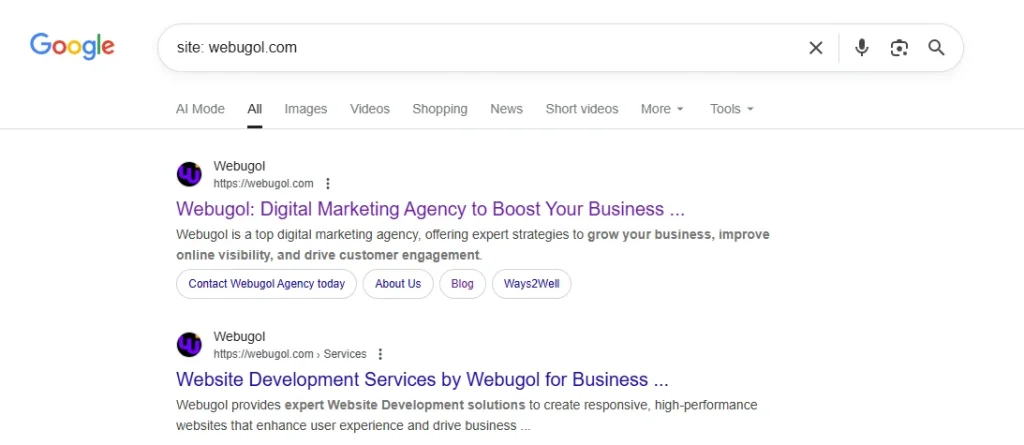
The “Site:” Search Method
Using a specific operator to do a manual search is the quickest approach to check your status.
- Open Google.
- Type site:yourdomain.com into the search bar (replace “yourdomain.com” with your actual URL).
- Hit enter.
If Google returns a list of your pages, congratulations! You are indexed. The problem is probably one of SEO or ranking, which means that although your site is technically visible, the site not showing up on Google’s first page and is buried deep in the search results. This often points to issues with ranking rather than indexing.
Using Google Search Console
For a more granular look, you need Google Search Console (GSC). This is a free service that Google offers that serves as a dashboard for the health of your website.
Go to the top of the GSC dashboard and click on the URL Inspection Tool. Paste your homepage URL there.
- Green Checkmark: “URL is on Google.” You are indexed.
- Grey Warning: “URL is not on Google.” This confirms you have an indexing problem.
Note: It is possible to have partial indexing. You may see your homepage, but not your new product pages or blog posts. Always check specific URLs if you suspect a WordPress site not showing up on Google only in certain sections.
Common Reasons Your Site Isn’t Showing Up
If you know for sure that you are invisible, what is causing it? The offenders typically fit according to a diagnostic checklist. We’ll go into more detail about how to fix these problems later, but here’s a quick look at why you might be asking, “Why isn’t my site showing up on Google?”
- The site is too new
- You told Google to stay away
- Lack of Content or Authority (Thin content that doesn’t offer enough value for Google to bother saving is frequently the cause of a Squarespace site not showing up on Google.)
- Technical blocks
- Google Penalty
Technical Issues Blocking Google
At Webugol, when a client asks us, “Why is my site not showing up on Google?”, technical errors are often the first place we look. These are the “red lights” that stop search engines dead in their tracks.
The Robots.txt File
A text file on your server called robots.txt provides web crawlers with instructions. It tells them which pages they can and cannot visit. On occasion, a developer may set this up to block everything while creating the website and forget to take it down.
You can check this by going to yourdomain.com/robots.txt. You’ve uncovered the problem if you see code that looks like this:
User-agent: *
Disallow: /
The forward slash / after Disallow tells every bot (User-agent: *) to stay off your entire site. To allow Google to return, you must either remove the entire line or that forward slash.

Why is My Site Not Showing Up on Google? Noindex Meta Tags
Robots.txt stops crawling, but noindex tags stop indexing. Although you may allow Google to view the page, this tag instructs them to “do not add this to search results.”
HTTPS and Security
Your website will be marked as dangerous by modern browsers if it lacks an SSL certificate. This doesn’t usually lead to complete de-indexing, but it does make your site not showing up on Google and can prevent it from ranking in search results.
JavaScript Rendering Issues
JavaScript is a big part of how modern websites work. But occasionally, Google finds it difficult to “read” content that is created dynamically by scripts. Google might only see a blank site if your content only shows up after a script loads.
Site Not Showing Up on Google: Content and SEO Problems
Sometimes the content itself is the challenge, even while the technological setup is flawless. Google doesn’t want to index low-quality pages because it has a limited crawl budget and storage space.
Duplicate Content
Google doesn’t know which page to choose if your website contains more than one page with the same text. It will frequently decide to index none of them. This happens a lot in online businesses where one item is listed in three separate categories, each with its own URL.
Thin or Low-Quality Content
Page types with minimal text or value are referred to as thin content. Google thinks a page with just one phrase and a generic picture is “low value.” If you’re wondering, “Why is my site not showing up on Google?” check your word counts. Try to provide users with full, useful responses to their questions.
No Internal Linking Structure
Google follows links to find new pages. Googlebot can’t get to a new site if you don’t link to it from your homepage or menu.
Missing XML Sitemap
An XML sitemap serves as a search engine roadmap. It shows all the URLs on your site that you want to get indexed. Google must infer your website’s structure without it.
Lack of Backlinks and Authority
If you are wondering, “why is my site is not showing up on Google search for high-volume keywords,” it is likely a lack of authority. Google doesn’t believe you’re a reliable source yet if no other respectable websites connect to you.
How to Get Your Site Indexed by Google
Step 1: Set Up Google Search Console
Check your site with Google Search Console if you haven’t done so yet. It is the exclusive method of immediately informing Google about the condition of your website.
Step 2: Submit Your Sitemap
Find the URL of your sitemap. This is normally yourdomain.com/sitemap.xml. In GSC, go to the Paste the URL into GSC’s “Sitemaps” section. This makes Google look at your list of pages again.
Step 3: Request Indexing for Important Pages
Use the URL Inspection feature in GSC to see results right away on certain pages, including your homepage. After entering the URL, select “Request Indexing.” You are then added to a crawling priority queue.

Step 4: Build Internal Links
If your site is not showing up on Google, linking to it from high-authority pages gives crawlers the necessary signals, making the concealed content easier to find.
Step 5: Get Your First Backlinks
Get your partners, local news sites, or suppliers to link to your website. Google can be informed that your website is authentic and deserving of indexing by even a small number of high-quality backlinks.
Step 6: Fix Technical Issues
The answer to the question “Why is my site not showing up on Google?” can be in the technical section above. Make sure your SSL certificate is active, edit your robots.txt file, and take off the noindex tags.
Action Checklist:
- GSC verified
- Sitemap submitted
- Noindex tags removed
- Homepage indexing requested
- Internal links added
Conclusion
Seeing an invisible website is frustrating, but it is rarely permanent. You may get Google to come back by regularly reviewing your indexing status, fixing technical problems, and making your content better.
Keep in mind that SEO is a journey rather than a race. Set up Google Search Console and run a diagnostic check today to get started. You’ll start wondering, “How do I handle all this new traffic?” instead of “Why is my site not showing up on Google?” after you get beyond the technical challenges.
Contact us today and take the next step toward driving more traffic to your website!