



Ecommerce replatforming: 7 signals your platform is holding you back
Ecommerce replatforming is the process of moving an online store from one platform to another, replacing the underlying technology while preserving product data, customer records, and order history. It differs from a redesign, which updates only the visual layer, and from an upgrade, which adds features within the same system. When a platform becomes the ceiling on revenue or performance, a full ecommerce replatforming project is often the only practical solution.
This guide covers both the decision and the execution. It lays out 7 operational signals indicating the platform is the constraint, real cost tiers by project size, a 10-point SEO protection checklist, and a decision framework for choosing between an agency, a consultant, and an in-house build.
What is ecommerce replatforming?
Ecommerce replatforming replaces the platform engine powering a store while keeping all business data intact. The platform handles commerce logic, checkout flow, catalog management, and the data layer connecting everything. Replacing it means rebuilding or reconfiguring every system that depends on it.
Four approaches often get confused with one another. A redesign changes the front-end design and user experience while the same platform runs underneath. A migration moves data or the store to a new hosting environment without replacing the platform itself. A refactoring improves code quality within the existing platform without changing its architecture. An upgrade adds features within the same system.
Ecommerce replatforming is the largest scope of the four. It replaces the foundation rather than adjusting what sits on top.
7 signals your platform is the constraint
Most ecommerce replatforming guides stop at telling you when to move. The harder question is when not to. Here are both sides.
Operational signals that your current platform is the constraint:
- Checkout performance is slow after exhausting all standard optimizations. Your team has tried CDN configuration, image compression, and database tuning. The platform architecture itself is the remaining bottleneck. Incremental fixes will not change that.
- Critical business integrations require constant maintenance. Inventory management, CRM, loyalty programs, and shipping carriers all need custom connectors that break on each platform update, consuming developer time that should go to new functionality.
- Developer capacity flows to workarounds, not features. If the majority of time goes to managing plugin updates, theme conflicts, and platform patches rather than building new functionality, the platform is working against the business.
- Mobile conversion trails desktop by an abnormal margin. The platform's templating layer cannot produce the mobile experience customers expect without a full rewrite.
- Licensing and maintenance costs rise each year without corresponding capability gains. The business pays more for a platform that continues to fall behind newer alternatives.
- Hard catalog limits block growth. Platform-imposed caps on SKU counts, variant combinations, or product attribute fields stop the catalog expansion the business needs.
- A competitor moved to a faster platform and gained organic rankings. Core Web Vitals scores feed directly into search visibility, and platform architecture determines how high those scores can realistically go.
When replatforming is the wrong call
Not every platform problem warrants a full ecommerce replatforming. Three scenarios where a targeted fix beats a full migration:
- Slow checkout caused by a third-party script or unoptimized asset. CDN implementation, script deferral, or a frontend performance audit can resolve checkout speed without touching the platform.
- Integration gaps a middleware layer can close. Lightweight API connectors bridge an existing platform to the tools a business needs at a fraction of the platform migration cost and timeline.
- Scaling problems rooted in hosting, not architecture. If the platform supports horizontal scaling but the current hosting plan does not, an infrastructure upgrade takes weeks rather than months.
If cheaper alternatives have been tried and the signals above persist, an ecommerce replatforming is the right next step. One isolated pain point is not enough to justify a full migration.

Should I replatform or redesign my ecommerce store?
Replatform when the problem is architectural: slow performance that no CDN fix can solve, integrations that break after every update, or catalog limits blocking growth. Redesign when the platform itself works well but the visual experience or user flow needs improvement.
Teams that confuse these four approaches often start the wrong project and absorb the wrong costs:
| Approach | What changes | Typical cost range | Timeline | SEO risk |
|---|---|---|---|---|
| Ecommerce replatforming | Entire platform engine, catalog, and data layer | $5k–$25k | 2–8 months | High without redirect plan |
| Migration (hosting) | Hosting environment or data transfer; same platform | $2k–$20k | 2–8 weeks | Low to medium |
| Redesign | Front-end design and UX; platform unchanged | $5k–$60k | 6–16 weeks | Low if URL structure unchanged |
| Refactoring | Codebase quality within the same platform | $5k–$30k | 4–12 weeks | Negligible |
The ecommerce platform switch is the most scope-intensive of the four approaches. That is why the decision requires more than a technical evaluation to justify.
Brands evaluating an API-first architecture often consider a headless CMS agency engagement alongside this decision. The two paths overlap but carry different scopes, budgets, and timelines.
Businesses running WooCommerce or other WordPress-based stores often reach this crossroads when weighing their next platform. WordPress alternatives for growing businesses in 2026 covers that wider platform decision in more depth.
How much does ecommerce replatforming cost?
For a small or mid-size store moving from WordPress or a comparable legacy platform, ecommerce replatforming typically costs between $5,000 and $20,000. Catalog size, integration complexity, custom functionality, and the state of existing product data all shape the final number significantly. Enterprise composable builds operate at a different budget tier, but that scope is rarely relevant to SMB stores.
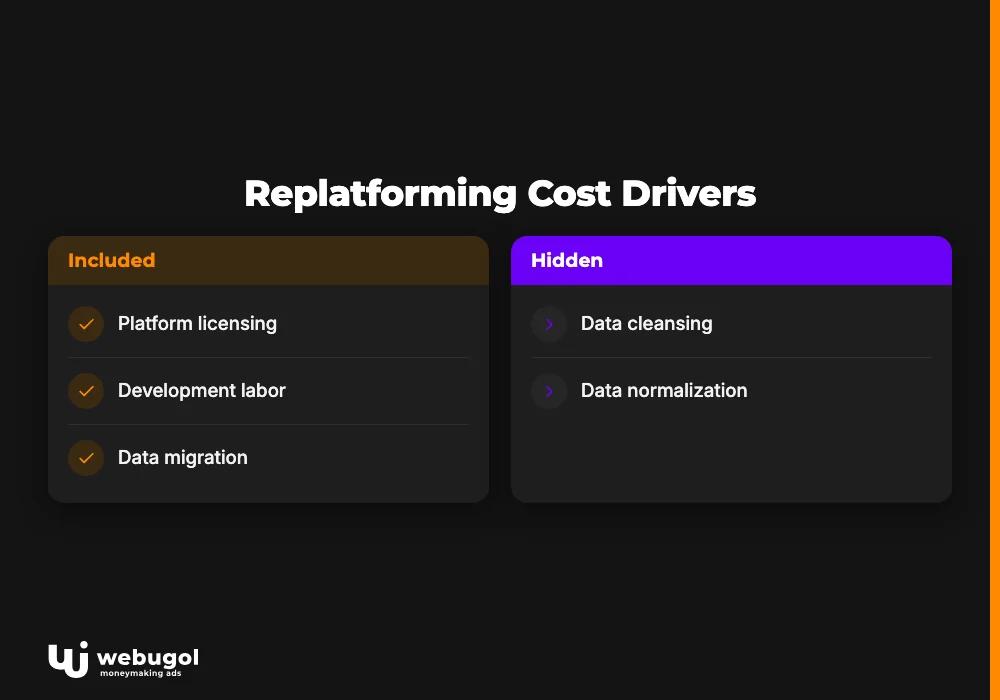
The three main platform migration cost drivers are platform licensing, development labor, and data migration. Platform licensing ranges from zero for open-source front-end frameworks to a monthly CMS subscription fee. Development labor is typically the largest single line item, regardless of whether the project is a WooCommerce migration, a custom-platform move, or a complete rebuild.
| Platform | License model | Typical development estimate | Migration complexity |
|---|---|---|---|
| Next.js + Headless CMS | Open-source + CMS subscription | $5k–$20k | Medium |
| Magento (Adobe Commerce) | Open-source or enterprise license | $50k–$200k+ | High |
| Commercetools | API-first, consumption-based | $100k–$400k+ | High (composable build) |
Headless commerce migration using a Next.js frontend is the most common route for SMB stores leaving WordPress. Building the storefront layer with a specialist Next.js development company keeps the architecture clean for future platform changes and the migration timeline predictable.
Hidden costs every platform migration budget must include
Replatforming budgets overrun because teams price the platform but not the work surrounding it. Eight line items consistently push projects past the initial estimate:
- Data cleansing and normalization. Product data accumulated over years rarely migrates cleanly. Duplicate records, inconsistent attribute naming, and missing fields require manual remediation before migration scripts run.
- 301 redirect mapping. Every URL that changes needs a redirect. For large catalogs, mapping and validating redirects is a project on its own, not an afternoon of work.
- QA and testing cycles. Full QA on a staging environment covers checkout flows, integrations, search functionality, and edge cases in filtering and sorting.
- SEO recovery buffer time. Even well-executed migrations see temporary ranking shifts. Budget two to three months of post-launch monitoring and response capacity.
- Staff retraining. A new platform means new admin interfaces, new reporting workflows, and new content management processes. This cost is routinely underestimated.
- Third-party integration rebuilds. Connections to payment processors, shipping providers, ERPs, and loyalty platforms each need to be rebuilt and tested on the new system.
- Content migration and reformatting. Rich product descriptions, category pages, and blog content often need reformatting to match the new platform's content model.
- Platform-specific licensing add-ons. Apps, extensions, and composable components carry their own cost outside the base platform fee.
How to protect SEO during ecommerce replatforming?
A replatforming without an SEO plan is the fastest path to a six-month traffic drop. Rankings fall when URLs change without redirects, when canonical tags are not transferred, when structured data fails to migrate, and when the new platform's default crawl settings are weaker than the old one's. The checklist below covers what needs to happen before a single URL moves.
Pre-migration SEO checklist
- Crawl audit. Export all indexable URLs, status codes, title tags, meta descriptions, and canonical tags from the current site. This becomes the migration baseline.
- Redirect map. Map every URL that will change to its new destination. Prioritize pages with inbound links and organic traffic. Redirects must go live on launch day, not after.
- Canonical tag transfer. Document all canonical assignments on the current site and rebuild the canonical structure on the new platform before launch.
- Structured data migration. Export existing schema markup (Product, BreadcrumbList, Review) and rebuild it on the new platform. Validate with Google's Rich Results Test before go-live.
- Core Web Vitals benchmarking. Measure current scores with PageSpeed Insights. Run identical benchmarks on the staging environment and resolve any regressions before launch.
- Internal link audit. Identify the most-linked internal pages and confirm that internal links update correctly to new URLs on the new platform.
- XML sitemap. Generate a clean sitemap on the new platform and submit it to Google Search Console on launch day.
- Search Console setup. Add and verify the new property before launch so crawl data is captured from day one.
- Robots.txt audit. Confirm the staging environment's robots.txt, which typically blocks crawlers, does not deploy to production.
- Post-launch monitoring plan. Schedule weekly ranking checks and crawl error reviews for the first 60 days after go-live.
Step-by-step ecommerce replatforming process
Below are realistic timeline estimates for an SMB project of moderate complexity. Ranges overlap deliberately, since architecture and data work run in parallel with early development.
- Discovery and requirements (weeks 1–4). Stakeholder interviews, technical audit of the current platform, integration mapping, catalog assessment, and platform selection. Deliverable: a scoping document with platform recommendation, integration plan, and cost estimate.
- Architecture design and environment setup (weeks 3–6). Staging environment configuration, data model design, and integration architecture decisions. Deliverable: approved technical architecture and signed-off data migration plan.
- Data migration and development (weeks 5–18). Product data cleansing, migration scripts, storefront development, integration builds, and content migration. This phase is the longest and most variable. Complex integrations or large catalogs push it well beyond the mid-range estimate.
- Staging QA (weeks 16–22). Full QA of checkout flows, integrations, search, filtering, responsive behavior, and edge cases. Redirect validation and structured data testing. Deliverable: signed-off test report.
- Soft launch and monitoring (weeks 22–24). DNS cutover, 301 redirect deployment, sitemap submission, and Search Console verification. Monitor rankings, crawl errors, and conversion rates daily for the first week.
- Post-launch optimization (weeks 24–36). Address issues emerging in production, monitor Core Web Vitals in real user data, and optimize based on actual behavior.
How long does ecommerce replatforming take?
A small to mid-size store completing an ecommerce replatforming from a legacy platform typically takes three to six months from kickoff to go-live. Catalog complexity, number of third-party integrations, and the quality of existing product data are the three variables that most often extend this timeline.
Small stores with clean data and few integrations can complete the process in two to three months. Enterprise builds on custom composable stacks often run nine to eighteen months. The single largest timeline risk is discovering data quality problems mid-migration, which pushes cleansing and migration phases out by weeks.

Agency, consultant, or in-house: how to choose
When businesses decide to migrate their online store, the resourcing decision is just as consequential as the platform choice. Searches for a Shopify migration agency and for an ecommerce replatforming consultant represent distinct buyers who need a concrete framework, not a general overview.
| Path | What they own | Typical cost | Internal capacity required | Best fit |
|---|---|---|---|---|
| Agency | Full build from architecture to launch | $8k–$25k | Low (light oversight) | Marketing directors and SMB owners without dev capacity; turn-key delivery needed |
| Consultant | Strategy and platform selection; not execution | $5k–$20k | High (internal team executes) | Companies with developers but no migration experience |
| In-house | Everything | Variable | Very high (senior engineers + PM) | Large enterprise teams with existing platform expertise |
An ecommerce replatforming agency owns the full build: architecture, data migration, development, QA, and launch. One point of accountability, start to finish. This suits marketing directors and SMB owners who lack internal technical capacity or want a single accountable partner from kickoff to go-live.
An ecommerce replatforming consultant advises on platform selection, structures the vendor evaluation, and defines the migration strategy. Execution stays with an internal team or a separate developer. This suits businesses that have engineers but need strategic direction on which platform to choose and how to sequence the work.
In-house builds suit large enterprise organizations with dedicated platform teams and existing composable architecture knowledge. The total budget looks lower on paper. The hidden cost is engineering time redirected from revenue-generating work.
As a digital marketing agency, Webugol pairs the technical migration with a post-launch growth system so the new platform generates revenue from day one. Ecommerce replatforming services that drive durable results treat launch as the start of a growth program, not the end of a technology project.
Common ecommerce replatforming mistakes and how to avoid them
Generic risk lists fill this space in most guides. These are specific, avoidable mistakes with one-line fixes.
- Scope creep mid-build. Adding features to the migration scope during development extends the timeline on the platform the business is paying to leave. Fix: freeze the feature scope at the end of discovery and maintain a separate post-launch enhancement backlog.
- Skipping a dedicated staging environment. Testing on production or using the old platform as QA reference misses platform-specific rendering bugs and integration failures. Fix: build an exact production replica on the new platform before touching any live data.
- Migrating dirty product data. Inconsistent product titles, missing descriptions, and duplicate SKUs create catalog quality problems that persist for months post-launch. Fix: run a data audit in discovery and dedicate sprint capacity to cleansing before migration scripts run.
- Launching without full 301 redirect coverage. Teams discover gaps after launch when rankings drop. Fix: validate 100% of high-traffic and high-authority URLs against the redirect map before go-live, not after.
- Cutting QA cycles to hit a deadline. Compressed QA sends broken checkout flows, failed payment integrations, and missing structured data into production. Fix: treat the go-live date as movable if QA sign-off is not complete.
- Treating ecommerce replatforming as a one-time event. The new platform performs exactly as well as the strategy behind it. Fix: build the post-launch SEO monitoring, performance benchmarking, and growth marketing plan before launch, not six months after.
Start your ecommerce replatforming on the right foot
Webugol builds ecommerce migrations from WordPress and legacy platforms that ship on time, protect organic traffic, and come paired with the marketing system to grow what was just built. If your store matches any of the 7 signals above, reach out to scope your migration project. Get a scoping call
FAQ
What is ecommerce replatforming?
Ecommerce replatforming is the process of moving an online store from one platform to another, replacing the underlying technology while preserving product data, customer records, and SEO equity. It differs from a redesign, which changes only the front-end visuals without replacing the platform itself.
How much does ecommerce replatforming cost?
Platform migration costs for a small or mid-size store moving from WordPress or a comparable legacy platform typically range from $5,000 to $20,000. Catalog size, integration complexity, and data quality all shape the final number. Enterprise composable builds on platforms like Commercetools can exceed $400,000.
How long does ecommerce replatforming take?
A small to mid-size store typically completes the process in three to six months from kickoff to go-live. Small stores with clean data and few integrations can finish in two to three months. Enterprise builds on custom composable stacks often run nine to eighteen months.
Will replatforming hurt my SEO?
A replatforming done without a redirect plan and pre-migration audit can cause significant organic traffic drops lasting several months. With 301 redirects mapped before launch, canonical tags transferred, and Core Web Vitals benchmarked on the new platform, most stores recover within two to three months and often rank higher after the migration.
How do I choose between a replatforming agency and a consultant?
An agency owns the full build from architecture to launch, which suits teams that lack internal technical capacity. A consultant advises on platform selection and strategy but leaves execution to an internal team or separate vendor, which suits companies that have developers but need strategic direction.

