



WordPress alternatives for growing businesses in 2026
The best WordPress alternatives for a growing business fall into three categories: SaaS builders like Webflow and Squarespace, self-hosted CMS platforms like Ghost and Payload, and headless platforms like Storyblok and Contentful. Choosing between them depends on how your team publishes, how much infrastructure ownership you want, and what the switch from WordPress actually needs to accomplish. If your current site has become a performance or conversion bottleneck, the platform you move to shapes business outcomes far more than any feature checklist. The real goal is a site that grows your business, not a cleaner admin interface.
Why businesses leave WordPress
The pattern repeats across marketing retrospectives. A business switches away from WordPress, runs cleanly for a year, then quietly asks whether switching back makes sense. The return rarely happens because the new platform failed. It happens because the migration was made without accounting for the full workflow ecosystem the team had built over years.
WordPress has real staying power. Two decades of plugins, themes, and community documentation mean almost any problem has a working solution, often several. The actual departure drivers are security fatigue from continuous patch management, plugin dependency bloat that slows every deployment, and performance debt that accumulates faster than caching layers can address.
These are legitimate reasons to switch from WordPress. But they are only legitimate if the alternative actually solves them, rather than replacing one set of constraints with another.
Businesses that successfully make the move share one trait: they found a WordPress alternative that matched their actual publishing and marketing workflow. That alignment separates teams that switch once from teams that cycle through platforms every two years. The landscape of wordpress alternatives has matured enough that a fit exists for most publishing workflows, the challenge is matching the right platform to the right team before committing.
The eighteen-month return pattern reveals a specific failure mode. Teams often come back not because they chose the wrong wordpress alternative, but because they underestimated how much of their marketing stack was WordPress-specific. Forms built on Gravity Forms, SEO data stored in Yoast meta tables, membership workflows tied to MemberPress logic. Migrating the content is straightforward. Migrating the operational layer is the part that requires planning. That gap derails migrations.
True cost of wordpress alternatives: what most teams don't budget for
WordPress looks inexpensive at first glance. Real cost builds in layers that rarely appear in an initial vendor comparison.
A typical premium plugin stack runs $200-800 per year before hosting, according to cost analyses of business WordPress installs. Most business sites run eight to fifteen active plugins, each with its own update cycle and potential conflict surface. Developer hours for routine core and plugin updates accumulate on a complex install, and emergency security patches arrive without notice or budget. The debt compounds silently.
The honest comparison is not WordPress license cost against a paid alternative. It is total annual ownership, including unbudgeted developer time and unplanned maintenance incidents, against a platform that bundles those responsibilities into a flat subscription or predictable infrastructure fee. For most small businesses, the total gap between platforms is smaller than sticker prices suggest once every actual cost category is included.
WordPress alternatives compared at a glance
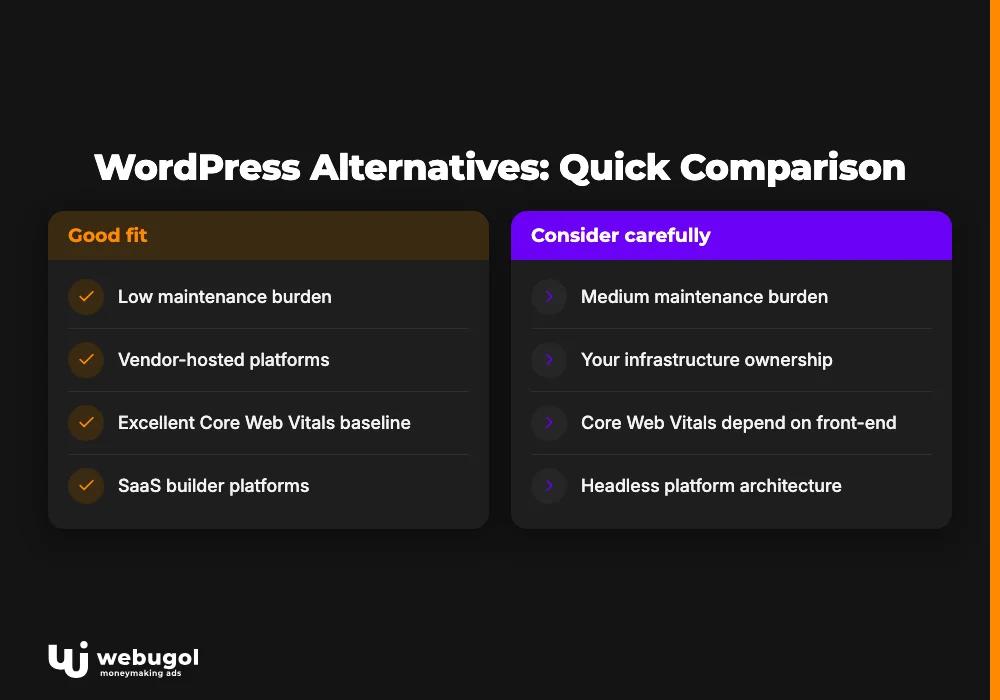
The table below organizes the strongest WordPress alternatives by ownership model, maintenance burden, and Core Web Vitals baseline. Most platform comparisons are built around feature lists. This one is organized by business profile, because the platform is the means and the goal is a site that generates leads. Six platforms are covered in depth rather than an exhaustive inventory that lists every option without matching any to a specific business need.
| Platform | Category | Ownership model | Maintenance burden | Core Web Vitals baseline |
|---|---|---|---|---|
| Webflow | SaaS builder | Vendor-hosted | Low | Good to excellent |
| Squarespace | SaaS builder | Vendor-hosted | Very low | Good |
| Ghost | Self-hosted CMS | Your infrastructure | Low | Excellent |
| Payload CMS | Self-hosted CMS | Your infrastructure | Medium | Depends on front-end |
| Storyblok | Headless platform | Vendor API | Medium | Depends on front-end |
| Contentful | Headless platform | Vendor API | Medium | Depends on front-end |
WordPress migration cost for a professional project ranges from $5,000 to $15,000, depending on site complexity, custom functionality scope, and the number of SEO redirects to map. That range applies whether you are moving to a SaaS builder, a self-hosted cms platform, or a headless architecture. The sections below match each category to the business profile that fits it.
What is the best WordPress alternative for small businesses?
For most small businesses, Webflow is the strongest WordPress alternative when design control and campaign publishing are the priority. Ghost is the better fit when content publishing and email newsletters drive the business model. Both platforms reduce ongoing developer dependency compared to a maintained WordPress install, which is the primary reason small teams find them easier to operate day to day.
The best cms for business is not a single answer. A five-person marketing team running paid acquisition campaigns needs something fundamentally different than a solo operator building a subscription newsletter. Webflow gives marketing teams full design autonomy without a developer approval queue for every update. Ghost gives content operators native subscriber management without a plugin layer between them and their audience.
Squarespace fills a third slot for small businesses whose primary need is a clean, low-effort web presence with predictable monthly costs. It tops both Webflow and Ghost on ease of setup and maintenance simplicity, trading that simplicity for less design flexibility and a more constrained publishing workflow. For businesses running active content operations or paid campaigns, that trade is usually the wrong one.
Understanding which problem you are actually solving, developer dependency, maintenance overhead, or publishing friction, determines the right platform. A cms for small business that addresses the wrong bottleneck adds costs rather than removing them. Match the platform to the specific constraint, not to the most impressive feature list. Most businesses that cycle through wordpress alternatives repeatedly are solving for the symptom rather than the underlying workflow constraint.
What is the easiest alternative to WordPress?
Squarespace is the easiest WordPress alternative for teams that want the lowest possible maintenance overhead. Everything runs on vendor infrastructure, updates are automatic, and the editor is designed for non-technical users from the start. You give up design flexibility and deep customization, but you eliminate the maintenance cycle entirely.
Webflow is the second-easiest option for teams that need more design control. The learning curve is steeper than Squarespace, but once the design system is in place, content editors publish without touching code. Teams feel that difference. That is the practical definition of marketing independence for most small business teams.
Ghost sits close behind Webflow for ease of operation once deployed. The admin interface is clean and direct. Native newsletter and membership tools come in the core product, which means no additional integrations to configure or maintain. Teams currently managing a WordPress install plus a separate email tool typically find Ghost meaningfully simpler to operate as a combined publishing and distribution system. Among the wordpress alternatives available in 2026, Ghost offers the clearest operational advantage for teams whose revenue depends on consistent content publishing.
Should I switch from WordPress to Webflow?
The webflow vs wordpress question comes down to who controls your publishing workflow and what that dependency costs you each month.
Webflow is the right move when your marketing team is regularly blocked waiting on developer availability to update pages or launch campaigns. The visual editor gives content teams full control over page structure, not just text fields inside a fixed template. For teams currently stretching page builders past their limits, Webflow offers a cleaner maintenance overhead and no annual plugin renewal stack.
The tradeoff is the plugin ecosystem. WordPress has thousands of integrations built over twenty years. Webflow's integration options are more limited, and teams with complex CRM hooks or specific marketing automation requirements should audit those integrations carefully before committing. For teams running a standard stack of analytics, forms, and a CRM connector, Webflow covers the workflow without meaningful gaps.
On performance: Webflow sites hosted on Webflow's own infrastructure consistently reach strong Core Web Vitals scores without optimization plugins. That is an architectural advantage, not a configuration result. Speed comes by default. Teams currently running multiple caching and performance plugins to compensate for a slow WordPress install remove that maintenance layer entirely when they move. The performance gain is structural, and it holds under traffic without ongoing tuning.
For agencies managing multiple client brands, Webflow's multi-site capability replaces WordPress Multisite with a more manageable architecture. WordPress Multisite plugin conflicts replicate across all sites in the network, and a security incident affecting one site can affect the entire installation. Webflow multi-site isolates each client environment while keeping design system components and billing under one dashboard, which is why it is the practical wordpress multisite replacement for most agency use cases.
The case for staying on WordPress is strongest when your site has deep WooCommerce integration, a large library of custom functionality built on WordPress-specific plugins, or a development team already fluent in the platform. Switching from WordPress to Webflow is not always the right call. The decision depends on which problem costs more: developer dependency or ecosystem depth. Teams that have reviewed the full range of wordpress alternatives typically find Webflow occupies a distinct position, strong design control, predictable maintenance costs, and no plugin renewal stack.

Self-hosted WordPress alternatives: Ghost and Payload
Ghost and Payload are the two strongest self-hosted WordPress alternatives. The case for a self-hosted cms platform in 2026 comes down to three factors: no per-seat licensing fees, no vendor price increases that force a mid-contract budget conversation, and Core Web Vitals performance that matches or beats managed SaaS on modern infrastructure.
Ghost on a standard VPS consistently outperforms a cached WordPress install on page load without optimization plugins. The performance advantage is architectural, not configured. It ships with built-in SEO, native RSS, and subscription tooling in the core product, which removes a significant plugin layer compared to a standard WordPress setup. Teams patching together WordPress plus a separate email platform typically find Ghost meaningfully simpler to operate as a combined publishing system.
Payload CMS is the right self-hosted pick when content requirements have outgrown what a standard CMS can model. It handles custom data relationships, role-based access control, and content schemas that evolve with business requirements. For developer teams building on Node.js, Payload replaces both the CMS layer and a significant portion of custom backend work.
Payload's strength is its schema flexibility. You define exactly what content types your application needs, down to field-level validation and relationship rules, and the platform generates both the API and the admin interface from that definition. This approach works well for teams that have tried to bend WordPress's post-based content model to fit complex structured data, found it frustrating, and want a platform built for that problem from the start.
For teams in regulated industries, data residency requirements add complexity to any platform decision. Self-hosted platforms win in these contexts because you control where data lives. Our regulated industry website work shows this pattern consistently: compliance requirements drive architecture toward self-hosted or private cloud deployments, where vendor-hosted platforms introduce data handling questions that compliance teams cannot accept.
Both Ghost and Payload support local development with the same toolchain your team already uses. If your workflow depends on a staging environment that mirrors production closely, both platforms fit without workarounds.
Headless CMS comparison: Storyblok vs Contentful
A headless cms comparison between Storyblok and Contentful comes down to editorial experience versus API maturity. Storyblok's visual editor gives content teams a preview-driven interface that reduces developer reliance for everyday publishing. Contentful's API is more mature and better suited to complex multi-locale content delivery at scale.
Both are viable WordPress alternatives for enterprise teams that manage content across multiple markets or large editorial operations. Both deliver structured content APIs, localization workflows, and built-in approval chains that replace the plugin scaffolding WordPress requires for the same functionality.
The engineering overhead is similar at initial build. Front-end delivery depends on the framework your team builds on top. Paired with a Next.js front-end, either platform delivers fast, SEO-ready pages with full editorial control at the content layer. Our headless CMS engagements consistently show this architecture outperforming standard WordPress installs on Core Web Vitals, particularly for sites with high page counts and complex content types.
The headless category of wordpress alternatives is not the right fit for every team. Headless requires a front-end developer to build and maintain the delivery layer. For teams without that resource in-house or on retainer, a SaaS builder like Webflow is a better fit. The productivity advantage of headless only materializes when the editorial team and the development team operate at roughly the same pace.
Storyblok requires less initial engineering investment for most teams. Contentful gives more architectural flexibility at scale for content teams managing hundreds of content types across many markets. Agencies building multiple client sites often land on Storyblok for standard client-facing work and Contentful for programmatic content delivery.
How much does it cost to migrate from WordPress?
A professional WordPress migration costs $5,000-15,000 and takes 4-8 weeks, depending on site complexity and custom functionality scope. Those figures reflect standard discovery scoping across comparable projects and hold regardless of which WordPress alternative you are migrating to. Across wordpress alternatives, migration effort scales with integration complexity rather than page count alone.
What commonly breaks and requires deliberate planning:
- Custom post type mapping: WordPress custom post types do not transfer automatically to the content schema of a modern CMS. Each requires manual mapping to the new data model.
- Plugin-dependent features: Contact forms, SEO metadata, membership logic, and any feature stored in plugin-specific database tables need rebuilt equivalents on the new platform.
- SEO redirect chains: Years of URL changes accumulate layered redirect chains. Migrating without resolving these first transfers technical SEO debt directly into the new site.
- Media library migration: Large media libraries require scripted bulk migration. Broken image paths are a predictable post-launch issue when this step is handled manually.
- Custom integrations: CRM connections, marketing automation hooks, and analytics instrumentation all require re-implementation on the new platform.
Understanding this checklist before the agency conversation separates businesses that budget realistically from those that encounter sticker shock during discovery.
DIY vs. agency migration: when to call in a team
DIY migration is appropriate for simple sites: under 200 pages, no custom post types, and no active integrations tied to revenue-generating workflows. The work is primarily scripted export and structured content cleanup.
The calculation shifts when you add active custom integrations, WooCommerce order data that needs to transfer cleanly, or more than 500 redirects to map accurately. At that complexity level, DIY risk outweighs cost savings. A missed redirect chain destroys organic ranking history quietly, with the impact becoming visible only weeks after launch. That damage is costly. A broken CRM integration cuts lead capture from the moment the new site goes live.
Ninety-day post-launch monitoring is the step most DIY migrations skip. Platform migrations shift ranking signals in ways not always visible in the first week. Structured monitoring catches regressions early, before they compound into ranking losses that take months to recover. Treating post-launch monitoring as a core deliverable, not an optional add-on, is what separates a migration project from a growth system.

Which WordPress alternative fits your business profile?
The right WordPress alternative depends on your business model, team structure, and growth objectives. The matrix below applies to the majority of business website scenarios. It does not cover specialized use cases like high-volume e-commerce, where other platform conversations typically come first, or enterprise intranet platforms, which operate under entirely different selection criteria. For the scenarios that represent most of the "which wordpress alternative" searches, these five profiles cover the decision space.
Blogger or independent content creator: Ghost, self-hosted or managed. Native newsletter, clean editor, built-in SEO. Top WordPress alternative for content operators who need subscriber management without a plugin dependency between them and their audience.
Small business marketing site with active campaigns: Webflow. Design autonomy without developer dependency for routine publishing updates. The practical choice for teams that need landing page flexibility without a separate subscription layered on top of their CMS.
Agency managing multiple client sites: Webflow multi-site or Storyblok. Webflow multi-site gives each client a separate editorial environment, shared design components, and full brand isolation under one billing dashboard. Per-site cost at scale is predictable in a way that a grid of individual WordPress installs is not. Storyblok adds programmatic content delivery with less engineering overhead for agencies working at scale.
Developer-built application with CMS requirements: Payload CMS. Teams that need their CMS to integrate with a broader application gain full schema control and API-first content delivery, with no vendor lock-in and no per-seat licensing. The right fit for Node.js teams building products where the CMS is one component among several, not the center of the stack.
Enterprise content team: Storyblok or Contentful. Teams managing content across multiple markets hit WordPress's content governance ceiling without significant plugin scaffolding. Both platforms deliver structured content APIs, localization at scale, and editorial approval workflows that replace what WordPress requires plugins to handle. Both are a credible WordPress alternative for teams on managed WordPress enterprise platforms who need those capabilities without the associated infrastructure overhead.
Most platform comparisons answer the question of the best WordPress alternatives with a ranked popularity list. This matrix answers by business profile, because the same platform is not the right fit for an independent blogger and an enterprise team running coordinated campaigns across eight markets. Filtering wordpress alternatives by business profile first, and by feature list second, is the approach that produces durable platform decisions.
What are the cheapest WordPress alternatives?
Ghost is the cheapest WordPress alternative for content-focused sites when you factor in total ownership cost. The open-source version carries no licensing fee, and server costs on a standard VPS are a fraction of a managed WordPress hosting plan. For teams with the technical capacity to run a self-hosted cms platform, Ghost's total cost at comparable performance tiers is difficult to match. Compare that against a WordPress install with a premium theme, eight to ten paid plugins, and a managed hosting plan, and Ghost is cheaper at every comparable performance tier.
Squarespace is the cheapest no-maintenance option for teams that want zero infrastructure overhead. Pricing is flat and predictable, with no plugin renewal stack and no unplanned maintenance costs. The total annual spend is knowable in advance in a way that a plugin-dependent WordPress install is not.
Webflow costs more than either option at the platform level. For teams currently paying developer rates for routine content updates, however, the platform investment is typically offset by reduced developer time within the first year of operation. The monthly subscription looks higher on paper. The annual bill, including developer hours, often looks significantly lower. The comparison surprises teams.
The cheapest WordPress alternative is not the one with the lowest subscription price. True cost includes developer time, plugin licensing, infrastructure management, and unplanned incident response. Totaling those categories against the flat subscription cost of a managed alternative usually narrows the gap, and sometimes reverses it entirely.
Ready to move off WordPress?
Choosing the right platform from the available WordPress alternatives is a platform decision and a business decision at the same time. The platform your team moves to shapes how fast you can run campaigns, how much maintenance overhead consumes your development budget, and whether your growth system scales as your business does.
Webugol is a digital marketing agency that manages the full transition: platform selection matched to your actual workflows, design and rebuild, complete SEO redirect mapping across every URL, and 90-day post-launch performance monitoring. Migrations are built under a Core Web Vitals budget, with PageSpeed verified before handoff on every build, because performance is an architectural constraint during the build, not a metric optimized after launch.
If you are ready to move, the WordPress migration service covers every step from the initial audit through launch. If you are still working through the platform decision, an audit of your current WordPress install maps the exact gaps between where you are and where a modern alternative would put you. The goal is a site that ranks, converts, and lets your team publish without a developer approval queue on every update.
FAQ
What is the best WordPress alternative for small businesses?
For most small businesses, Webflow is the best WordPress alternative when design control and marketing independence are the priority. Ghost is the better fit when content publishing and email newsletters are the core business model. Both platforms reduce ongoing developer dependency compared to a maintained WordPress install.
How much does it cost to migrate from WordPress?
A professional WordPress migration typically costs $5,000-15,000 and takes 4-8 weeks. DIY migrations save on agency fees upfront but often produce post-launch SEO debt from unresolved redirect chains and broken integrations that cost more to recover from than the initial savings.
What is the easiest alternative to WordPress?
Squarespace is the easiest alternative to WordPress for teams that want the lowest possible maintenance overhead, with automatic updates and an editor built for non-technical users. Webflow is the next-easiest option for teams that need more design control and want their marketing team to publish without developer involvement.
Should I switch from WordPress to Webflow?
Switch to Webflow when your marketing team is regularly blocked waiting on developer availability for page updates or campaign launches. Stay on WordPress when your site has deep WooCommerce integration or complex custom functionality that would require significant rebuild effort on another platform.
What are the cheapest WordPress alternatives?
Ghost is the cheapest WordPress alternative for content-focused sites when you account for total ownership cost, with no licensing fee and low server costs on a standard VPS. Squarespace is the cheapest no-maintenance option with flat, predictable pricing and no plugin renewal stack.

