



Zoom HIPAA compliance: what telehealth operators must verify before scaling
Zoom HIPAA compliance is achievable, but it is not automatic. Two conditions must both be in place: an eligible paid plan and a signed Business Associate Agreement with Zoom. Without both, patient sessions transmitted over Zoom carry no HIPAA protection, regardless of how the meeting is configured. The free tier cannot qualify at all, and upgrading to a paid plan without completing the BAA process still leaves your clinical sessions fully exposed.
Which Zoom plans support a Business Associate Agreement?
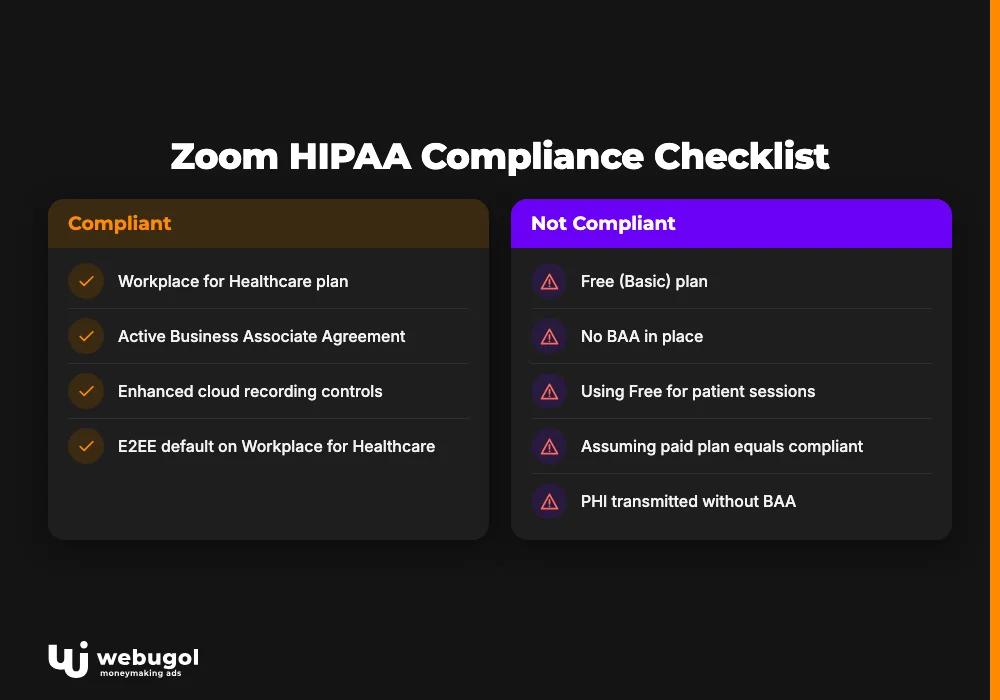
Plan-level eligibility is your compliance starting point. The question of Zoom HIPAA compliance has a different answer depending on which tier you are running. Zoom is widely used as a hipaa compliant video conferencing solution in healthcare, but only on specific paid tiers with an active BAA. Understanding where each plan stands prevents the most common mistake: assuming a paid plan equals a compliant plan.
| Plan | BAA Available | E2EE Default | Cloud Recording Controls | Compliance-Ready |
|---|---|---|---|---|
| Free (Basic) | No | No | No | No |
| Pro | Yes (on request) | Optional | Limited | Conditional |
| Workplace | Yes (on request) | Optional | Yes | Conditional |
| Workplace for Healthcare | Yes (included) | Yes | Enhanced | Yes (with config) |
For current per-seat pricing on each tier, see Zoom's healthcare pricing page.
Can you use Zoom Free for patient appointments?
No. The free tier does not support BAA agreements, which makes any clinical use non-compliant by definition. There is no configuration path, add-on, or workaround that changes this. PHI transmitted through a free Zoom account has no protection under the HIPAA Privacy Rule or the Security Rule, regardless of any other meeting setting.
If any member of your clinical team uses Zoom Free for patient sessions, that is an active violation. The platform lacks the legal framework required for covered entities. Move every seat that touches patient data to a paid tier before the next scheduled appointment.
Zoom Pro: BAA-eligible but not compliant by default
Zoom Pro is the entry-level paid tier, and many small practices assume upgrading from free resolves the compliance gap. It does not. Pro gives you access to the admin dashboard, where you can control encryption settings, recording defaults, and waiting room configurations. That access matters. But without a signed Zoom BAA agreement, those controls operate outside any HIPAA legal context.
The BAA is a separate document and a separate step. It is not executed automatically when you upgrade. You must navigate to the admin portal, locate the BAA request section, submit the form, and wait for Zoom to countersign before any HIPAA protections apply to your sessions.
Zoom Workplace: the practical compliance tier for most operators
Zoom Workplace is BAA-eligible and is the practical tier for most mid-size telehealth operations. The common error is treating plan eligibility as actual compliance. These are not the same thing. After upgrading to Workplace, you still need to submit the BAA request, confirm the agreement is active, and configure the mandatory admin settings. An active Workplace subscription with no signed BAA is legally equivalent to the free plan from a PHI-protection standpoint.
Zoom Workplace for Healthcare: the dedicated zoom healthcare plan
Zoom Workplace for Healthcare is a dedicated clinical tier with a fundamentally different default state. End-to-end encryption is on by default, the BAA is part of the onboarding process rather than a separate request, and audit logging is more granular. These defaults reduce the configuration burden in concrete ways.
Standard Workplace places the full configuration burden on your admin team. The Healthcare tier builds more of the Zoom HIPAA compliance baseline into its default state. For a telehealth operator running high session volume with limited IT support, that difference compounds quickly across hundreds of sessions per week. The per-seat cost is higher, but compliance-related setup time and ongoing audit overhead are substantially lower. For operations beyond 50 providers, the zoom healthcare plan often represents lower total compliance effort than manually configuring standard Workplace.
Does signing a BAA with Zoom make it HIPAA compliant?
Signing the Zoom BAA agreement is necessary but not sufficient on its own. The BAA is a legal contract that establishes Zoom's obligations for handling protected health information. Until it is signed and confirmed active, Zoom processes your session data as a general-purpose video platform. No HIPAA protections apply.
There is a layer that most guides skip entirely. A signed BAA only makes your account eligible for HIPAA-mode operation. You must then configure specific admin settings, or the agreement has no practical effect on your actual sessions. The BAA does not automatically enable encryption, disable cloud recording, or activate the waiting room. Each of those actions is a separate step in your admin portal.
This distinction matters during audits. "We have a BAA with Zoom" is not a complete compliance answer. The follow-up question is always: "Show me the configuration." Without verified settings, a signed BAA is an incomplete safeguard. Zoom HIPAA compliance is a configuration state you achieve and maintain continuously, not a status you receive by signing a document.
The BAA also has scope limits that operators frequently overlook. It covers Zoom's handling of session data under the specific terms of the agreement. It does not cover third-party apps connected to your Zoom account, data pulled from session metadata into external systems, or any downstream platform receiving session-related data. Every integration that touches PHI needs its own assessment. Many telehealth operators also miss the BAA's term structure: if you migrate to a new Zoom account or restructure your organization, the existing agreement does not carry over automatically. Review the BAA documentation with your compliance team any time a significant account or organizational change occurs.
How to sign a Zoom BAA agreement (step-by-step)
The BAA process takes longer than most operators budget for. Build this into your launch timeline, not your go-live week.
- Confirm plan eligibility. Log into Zoom Admin. You must be on Pro, Workplace, or Workplace for Healthcare. Free accounts cannot initiate a BAA request.
- Locate the BAA request. Navigate to Admin > Account Management > Account Profile. Scroll to the "HIPAA Business Associate Agreement" section. This option is not visible on free accounts.
- Submit the request. Click "Request BAA" and complete the form. Zoom reviews and countersigns. Zoom does not publish a guaranteed turnaround for countersigning, so plan for delays rather than assuming same-day approval.
- Enable required settings. After confirmation, go to Admin > Account Settings and activate: end-to-end encryption, Waiting Room for all meetings, disable cloud recording auto-start, disable auto-transcription, and restrict third-party app access for meeting participants.
- Verify BAA status. Return to Account Profile and confirm the agreement status shows "Active." A pending status means Zoom has not yet processed the request.
- Document the activation date. Record the BAA execution date in your compliance files. You will need this for any HIPAA audit or incident response.
- Re-verify after any plan change. If you upgrade or downgrade, the BAA may require reconfirmation. Treat every plan change as a trigger to check BAA status.
These seven steps establish the Zoom HIPAA compliance floor. They are the legal minimum for running a hipaa compliant telehealth platform, not a growth strategy.
Is Zoom HIPAA compliant for telehealth patient sessions?
Yes, under the conditions described above. But using Zoom in a clinical context creates PHI vectors that a standard meeting configuration does not automatically address.
A telehealth session generates PHI beyond the video stream. Chat messages, session metadata, cloud recordings, intake data, and post-visit summaries all qualify as PHI when they contain identifiable health information. Each data type requires its own control. The BAA covers the video session itself. The PHI generated around that session requires additional controls configured separately. That gap is where Zoom HIPAA compliance for telehealth most often breaks down.
Waiting room and access controls
The Waiting Room must be enabled for every patient session. This is not a default on most plans. Without it, patients can join before the provider is present, and a host can accidentally admit the wrong participant. Both scenarios expose PHI to unauthorized parties.
Required settings include a meeting password for every session, disabled participant join-before-host, and disabled browser-based join options that bypass the Waiting Room. Meeting links reused across patients create a separate risk. A prior patient could rejoin using a saved link, and the host may not notice until after a disclosure has occurred. Generating a unique link per appointment eliminates this exposure entirely.
Cloud recording and PHI storage
Cloud recordings of patient sessions are PHI under the HIPAA Privacy Rule. If cloud recording is enabled by default on your account, every session stores automatically in Zoom's cloud environment without any host action. Under a signed BAA, Zoom bears contractual responsibility for protecting those recordings. Your organization, as the covered entity, remains accountable for what is recorded, how long it is retained, and when it is deleted.
Disable cloud recording by default in Admin settings. If your clinical workflow requires recordings, enable it selectively at the host level and document your retention and deletion policy before the first session runs. Local recordings shift data custody to your own storage environment, which may simplify your audit trail but creates security obligations your IT team must manage independently.
Intake forms, scheduling, and patient consent
Collecting PHI through native Zoom features creates compliance exposure the BAA alone does not resolve. Zoom's in-session chat, pre-meeting registration forms, and polling tools are not built for clinical data. Data entered through those channels may not be governed by the same controls that apply to the session video itself.
Written patient consent is required before recording any session. That consent must be documented in your clinical records system, not captured only verbally during the call. The design of your telehealth intake and scheduling system matters as much as session-level configuration. A structured intake flow separates clinical data collection from general meeting logistics at the platform level, closing a gap that session configuration alone cannot address.

What admin settings are required for Zoom HIPAA compliance?
Five settings carry the most compliance risk at their platform defaults. Verify all five in Admin > Account Settings after your BAA is confirmed active. Checking them once during initial setup is not enough. Zoom HIPAA compliance is only as strong as its most recently verified configuration, so re-verify after every plan change, seat addition, and new app integration.
- End-to-end encryption (E2EE): Default is off on most plans. Without E2EE, Zoom's servers can technically decrypt session content in transit. Enable E2EE for all clinical meetings. Note that cloud recording and phone call-in are unavailable when E2EE is active, so adjust your clinical workflow accordingly before enabling it account-wide.
- Cloud recording auto-start: Default is on for many account types. Every session records automatically without any host action. Disable auto-start and restrict recording permissions to host-only. Any recording of a patient session requires documented patient consent under the HIPAA Privacy Rule before the session begins.
- Auto-transcription: Default is enabled on Workplace plans. Session transcripts are PHI and can be emailed automatically to participants through an unencrypted channel. That creates a PHI exposure path separate from the recording itself. Disable auto-transcription account-wide unless your workflow specifically requires it and a compliant retention and deletion policy is already documented.
- Third-party app integrations: Marketplace apps can access meeting data, including session content. Each app that handles PHI requires its own BAA. After your initial Zoom BAA agreement is active, audit every connected app. An app that reads participant data or session metadata is handling PHI, and the original BAA does not extend to cover it automatically.
- Meeting link reuse (Personal Meeting ID): Reused links allow prior session participants to rejoin future meetings without a new authorization step. Disable the Personal Meeting ID for all clinical sessions and generate a unique link per appointment.
Where Zoom HIPAA compliance intersects with paid media
Every competitor on this topic skips this angle. It is also where Zoom HIPAA compliance fails most quietly in practice, and it catches operators off guard well after the BAA is signed.
Zoom session attendance data is PHI in a telehealth context. A patient who attended a virtual consultation has disclosed a health-seeking behavior. Feeding that attendance data into a Meta custom audience or a Google Customer Match list to retarget that patient is a HIPAA violation. The fact that the patient provided an email for scheduling does not authorize using that data for advertising.
Before scaling paid acquisition alongside Zoom-based visits, verify that no clinical session data flows into your ad platforms. A compliant consent flow separates clinical data from marketing data at the point of collection. A consent management platform governs what can move where. Verifying whether your tracking pixel creates a separate HIPAA liability is a required step before connecting any session data to your reporting infrastructure.
The downstream risk compounds quietly. If your GA4 instance passes session identifiers to your CRM, and your CRM contains Zoom attendance data, the audience logic may inadvertently build PHI-linked segments. That is where phi protection telehealth compliance fails in practice. No single system in the chain looks obviously wrong. The violation is structural, and it only becomes visible during an audit.
The link between session attendance and paid acquisition runs through your CRM. Most telehealth CRMs receive data from multiple sources: your scheduling system, your session platform, and your ad platforms. Without deliberate data architecture, those streams mix in ways that create PHI-linked audience segments. The fix requires both technical controls and a documented data map at the integration layer. Getting your CRM data flows structured for HIPAA is the operational step that connects session compliance to a sustainable growth operation. Without that structure, paid media scaling and clinical compliance pull against each other. Telehealth operators who find this problem reactively, after a complaint or audit, face substantially higher remediation costs than those who map the data flows from the start.

Common mistakes that break Zoom HIPAA compliance
These errors surface most often in telehealth compliance audits. They share a common root: the initial setup is documented carefully, then incremental account changes erode the baseline without triggering re-verification.
Cloud recording left on by default. The admin setting controls the default for all hosts. If you configured it during initial setup and changed plans since, it may have reverted to on. One plan upgrade, one missed re-verification, and every session records automatically. Re-verify the recording default after every plan change. This is the single most common source of accidental PHI exposure on Zoom.
Auto-transcription enabled account-wide. Transcripts can be emailed automatically to participants through an unencrypted channel. Many operators do not discover this until an audit flag surfaces the issue. The fix is a single admin toggle. The exposure it closes may have been active since the account was first configured.
Free plan in use by any clinical staff member. Individual providers on a team account may be running on different plan tiers without the admin being aware. One provider on Zoom Free handling patient sessions is one active violation. Audit every seat that touches patient data, not just the primary account tier.
BAA not re-verified after a plan upgrade. Moving from Pro to Workplace, or adding seats, can interrupt BAA status on some accounts. The agreement does not carry over automatically. Treat every invoice change as a trigger to check the BAA status screen in Admin > Account Profile.
Third-party apps added without BAA review. Scheduling integrations, CRM connectors, and productivity tools in the Zoom Marketplace access meeting data. Each app added after the initial Zoom BAA agreement signing may not fall under the original agreement. This gap grows quietly every time a provider connects a new tool without a compliance team review.
Telehealth compliance requirements are an ongoing system, not a one-time checklist. Any configuration change, plan renewal, or tool addition is a trigger for re-verification.
Get a Zoom compliance audit before scaling paid acquisition
Zoom HIPAA compliance is the prerequisite for operating, not the growth engine. The gap between a compliant Zoom configuration and a scalable acquisition operation is where most telehealth practices stall.
The pattern across telehealth audits is consistent: a compliant session platform, a pixel sending uncontrolled signals, a CRM receiving data from three sources with no reconciliation, a reporting dashboard that cannot explain why CAC changed last month. Valhalla Vitality resolved this by building the acquisition system around the compliance layer from the start. The result was a 287% increase in monthly revenue and a 45% reduction in CAC (Webugol case file, 2025).
An end-to-end audit covers your Zoom configuration, pixel setup, CRM data flows, and paid media consent model as one connected system. Work with a digital marketing agency that treats Zoom HIPAA compliance and marketing infrastructure as a single design problem, not two separate workstreams. That is where the compliance floor becomes the foundation for growth rather than a ceiling on it.
FAQ
Does Zoom automatically sign a BAA with all paid accounts?
No. The BAA is a separate agreement you must actively request through the Zoom Admin portal. Upgrading to a paid plan makes you eligible to request one, but the agreement is not automatically executed. You must complete the request and confirm the status shows "Active" before any HIPAA protections apply to your sessions.
Is the free version of Zoom ever HIPAA compliant?
No. Zoom's free tier does not support BAA agreements, which means it cannot be used in any HIPAA-compliant configuration. There is no setting, add-on, or workaround that changes this. Using Zoom Free for patient sessions is an active HIPAA violation regardless of any other meeting settings.
Can Zoom recordings contain protected health information?
Yes. A cloud recording of a telehealth session is PHI under the HIPAA Privacy Rule because it captures identifiable health information. This applies to video, audio, and auto-generated transcripts. Under a signed BAA, Zoom bears contractual responsibility for securing those recordings, but your organization remains accountable for recording consent, retention periods, and deletion procedures.
What happens if you use Zoom for patient sessions without a signed BAA?
Using Zoom for patient sessions without a signed BAA means Zoom is processing PHI without the required business associate agreement. That is a direct HIPAA violation, and your organization bears the compliance liability. Penalties under HIPAA range from $100 to $50,000 per violation category, depending on the level of negligence and whether the violation was identified and corrected promptly.
Is Zoom HIPAA compliant for therapy sessions?
Yes, under the same two conditions that apply to all telehealth use: an eligible paid plan and a signed BAA. Therapy sessions carry heightened sensitivity because session content is highly specific PHI. Auto-transcription must be disabled, cloud recording requires documented patient consent before each session, and the Waiting Room must be enabled to prevent any unauthorized access to an active session.

