



Minimum viable product template: step-by-step guide for startup founders
A minimum viable product template is a structured document that aligns your problem statement, target user, feature scope, and go/no-go metrics before a single line of code is written. It forces the decisions most founding teams delay: what to build, for whom, and how you will know whether it worked. Webugol pairs this planning layer with full-cycle development and growth infrastructure, so founders move from a completed template to a live, growth-ready product without changing vendors mid-process. This guide covers MVP type selection, the eight core template sections with fill-in examples, AI-era adjustments, and what a finished template actually triggers next.
What is a minimum viable product template (and what it is not)?
A minimum viable product template is a thinking tool. It structures the decisions that determine whether a development sprint produces something testable: problem definition, user specificity, feature scope, and success thresholds, all aligned before work begins.
What it is not: a guarantee of product-market fit. Filling in the template does not replace user interviews, market validation, or the judgment of a capable development team. It creates alignment on paper. It does not create demand in the market. Founders who treat it as a deliverable rather than a thinking exercise end up with a polished document and an untested assumption.
The template also does not replace technical architecture decisions. Infrastructure choices, integration dependencies, and security requirements fall outside its scope. Think of it as the brief: specific enough that a developer can estimate the work, honest enough that the founding team can defend every line when scope pressure arrives mid-sprint.

Which MVP type should your template reflect?
The right template structure depends on which MVP model fits your constraints. A single-feature checklist applied to a service-delivery product leaves the validation approach entirely undefined. Identify your type before filling in a single field, because the sections that matter and the exclusions that belong there differ substantially between models.
Concierge MVP
A concierge MVP validates demand by delivering the service manually before building any automation layer. You are the product. This approach works when the core user journey can be completed by a person without software infrastructure, when the sample size needed for validation is small (typically 5 to 20 users), and when manual delivery costs less than building prematurely.
In a concierge template, the exclusions list looks different: "no automated matching logic," "no scheduling infrastructure," and "no admin dashboard" all belong there by default. The success metric is not adoption rate but service outcome. Did the user achieve the result the product promises? Would they pay for it again?
Wizard of Oz MVP
A Wizard of Oz MVP presents a working interface to the user while a person or a simple process simulates the backend operation. The user sees a product; behind it, logic runs manually. This works when the front-end UX is what you need to validate and the backend is the expensive part to build.
The critical addition to your minimum viable product template for this type is an explicit note in the exclusions section: "backend inference runs manually during test period." This prevents a future developer or investor from assuming the infrastructure already exists. Timeline assumptions also shift: someone needs to be available to operate the simulation for the full duration of the test window, which affects sprint staffing.
Single-feature MVP
A single-feature MVP locks to one user story and refuses all scope expansion until that story is validated. The discipline lives in the Won't column: everything that is not the core action goes there, without exception and without debate.
Go/no-go for a single-feature build is clean. If the one thing you shipped does not hit the threshold, you have a clear signal. Define that number before the build starts. "Users completed the core action" is not a threshold. "Sixty percent of test users completed the core action within their first session" is a threshold that produces a decision.
The 8 core sections of an MVP template (with fill-in examples)
Each section has a specific job. Skipping one does not simplify the document; it shifts the ambiguity into the build sprint, where resolving it costs real time at developer rates.
Problem statement
The problem statement gates everything that follows. A vague one invalidates your user definition, your feature list, and your success metrics, because each subsequent section builds on the assumption that the problem is real and specific.
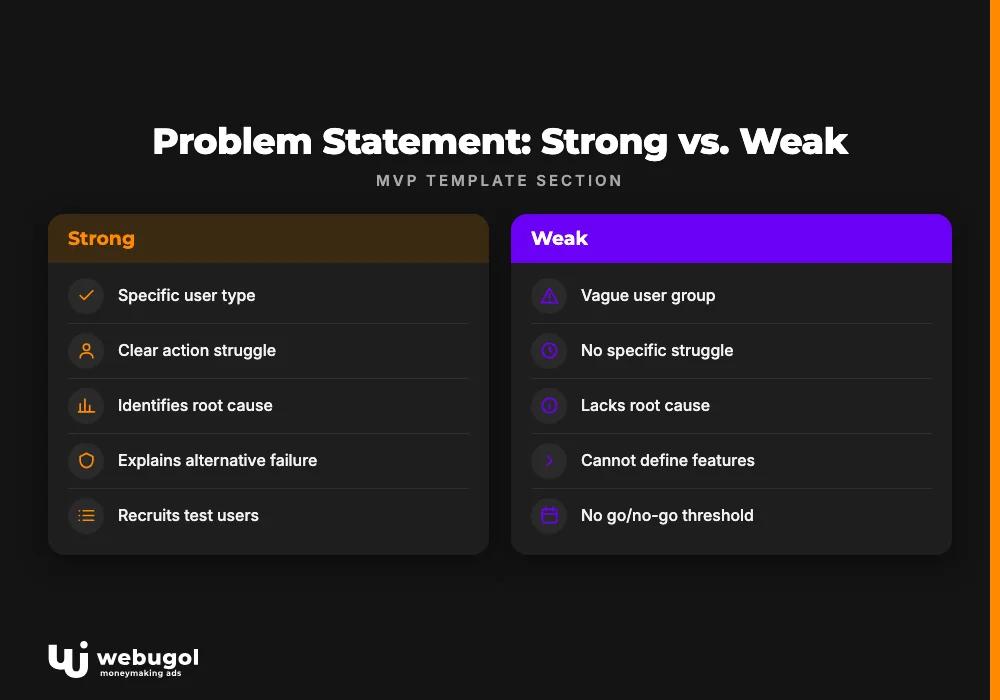
Write it using this fill-in pattern: "[User type] struggles to [action] because [root cause], and current alternatives fail because [gap]."
A strong example: "Independent physical therapists struggle to track patient home-exercise compliance because existing EMR tools do not support video check-ins, and spreadsheet workarounds create liability and workflow friction." A weak version: "People want better health apps." The weak version cannot recruit test users, cannot define a feature direction, and cannot produce a go/no-go threshold. Rewrite until you can find ten people matching the user type on LinkedIn in under an hour.
Target user definition
"Small business owners" is not a user definition. "Marketing managers at B2B SaaS companies with 10 to 50 employees who manage paid search in-house and have abandoned at least one reporting tool in the last 12 months" is a definition you can act on.
Include a behavioral qualifier alongside the demographic description. The behavioral qualifier, such as having tried and abandoned an existing tool, separates motivated test users who have experienced the pain from casual interest who have not. Motivated users give signal. Casual interest gives noise that looks like validation until you try to make a product decision with it.
User stories
Write user stories before touching the feature list. This prevents founders from prioritizing by technical complexity rather than user value, which is the single most common early scoping error. Cost-based prioritization builds a product optimized for ease of development, not ease of use.
Format: "As a [user], I want to [action] so that [outcome]."
For the physical therapy product:
- As a physical therapist, I want to send video exercise demos directly from the platform so that patients do not lose the instructions between sessions.
- As a physical therapist, I want to see which patients have viewed their assigned exercises so that I can follow up proactively with those who have not.
- As a patient, I want to log completion directly in the app so that my therapist sees my actual compliance, not my self-report.
- As a practice manager, I want to export compliance data per patient so that I can include outcome evidence in physician referral conversations.
Each story defines one unit of value. Features that do not serve a named story belong in the Won't column.
Feature prioritization matrix
Score each feature on two dimensions: Impact (to the user story it supports) and Effort (rough engineering days). Assign each to Must, Should, or Won't.
| Feature | Impact | Effort | Priority |
|---|---|---|---|
| Video exercise library | High | Medium | Must |
| Patient compliance log | High | Low | Must |
| Therapist notification on view | Medium | Low | Should |
| In-app messaging | Medium | High | Should |
| Progress charts | Low | Medium | Won't |
| Multi-practice admin dashboard | Low | High | Won't |
The Won't column is not a rejection list. It is the source material for your explicit exclusions section. Every item placed there becomes a named exclusion, which prevents it from re-entering scope during a sprint without a formal scope change decision.
Explicit exclusions list
Naming what you will not build is more reliable than listing what you will build when it comes to preventing scope creep. The list creates a shared reference the team can invoke when someone proposes an addition during development, removing the need to re-argue the same boundary in every sprint meeting.
Concrete exclusions for the physical therapy product:
- No admin dashboard in v1; therapist data access runs directly through the practitioner interface.
- No third-party payment processing; billing operates outside the product during the test period.
- No mobile app; the product runs in a mobile browser during initial validation.
- No automated compliance reminders; follow-up messages are sent manually by the therapist during the test window.
- No multi-practice account management; each instance supports one therapist or small clinic in v1.
Review this list at the opening of every sprint. Proposed additions that conflict with a named exclusion require a formal scope change decision, not a quick agreement in a Slack thread.
Success metrics and go/no-go thresholds
Set thresholds before the build. Post-launch revisions are rationalization, not measurement. The number that would have made you pivot must be the same number you wrote before writing any code.
Concrete examples with real thresholds:
- 7-day retention at least 20 percent: the user returns within seven days of their first session.
- Activation rate at least 40 percent: the user completes the core action (sending a first exercise assignment) within session one.
- Patient compliance log usage at least 30 percent: at least 30 percent of assigned patients log one completion within two weeks of assignment.
- Therapist re-engagement rate at least 50 percent: therapists who complete onboarding log in again within seven days.
Each metric maps to a user story. Retention tracks whether the product creates sustained behavior change. Activation tracks whether the core action is discoverable on first contact. Usage rate tracks patient adoption. Re-engagement tracks whether the tool fits the therapist's existing workflow.
Schedule the go/no-go meeting at kickoff. The date belongs in the template before development starts.
User recruitment plan
Recruit your first 5 to 10 test users before the build starts. Waiting until after demo day creates pressure to accept anyone, which means testing with convenient users instead of target users and generating feedback that cannot produce a product decision.
Three channels that work consistently:
- Community forums and Slack groups where your target user type is active. Physical therapists gather in professional Facebook groups and Reddit communities. Post the problem description, not the product, and recruit people who recognize the pain without prompting.
- LinkedIn boolean search. Combine job title, company size, and a behavioral indicator. Expect to message 25 to 30 qualified leads to recruit 5.
- Personal network with a behavioral filter. "I know a physical therapist" is insufficient. "I know a physical therapist who has complained about their EMR's documentation workflow in the last six months" is a qualified referral.
Document each contact and their recruitment status in the template. User recruitment is a launch-blocking dependency, not a post-sprint cleanup task.
Post-launch decision framework
Three outcomes are available after the validation sprint: pivot, persist, or kill. The criteria for each must be in the template before you launch.
Pivot applies when the go/no-go threshold is not met but user behavior points to a related adjacent problem. Maybe therapists did not use the compliance log, but they opened the messaging feature more than expected. The template data shows which user stories attracted disproportionate engagement relative to expectation and informs where to redirect.
Persist applies when the threshold is met and the pattern holds across test users. The minimum viable product template transitions from planning document to handoff brief. Validated scope becomes the foundation for the next sprint.
Kill applies when the threshold is not met and engagement with the core action is low across the board. This outcome costs significantly less than six months of building a product that does not address a real problem. The template surfaced that answer efficiently.
Schedule the decision meeting at kickoff. Scheduling it in advance removes the emotional pressure to rationalize a borderline result when the data is in front of you.
How AI tools change what you put in your MVP template
AI-assisted development tools like Lovable and Cursor have shifted the no-code and low-code boundary in ways that directly affect what belongs in a minimum viable product template. Three sections require different thinking in 2026 than they did two years ago.
Feature scope adjusts. A Lovable prototype that would have taken a developer two weeks to scaffold can now be ready in a few days. That changes what "minimum" means. Your feature matrix should reflect realistic timelines for your actual build approach: features that previously landed in "Should" because of development effort may now move to "Must" if the effort has genuinely dropped. But speed of generation does not equal validated scope. Add features to the Must column because a user story supports them, not because the tooling makes them easy.
Exclusions shift toward infrastructure. As the front-end UX layer becomes faster to produce, the category of work that AI tools cannot handle reliably comes into sharper focus. Security configurations, third-party API integrations with non-standard auth flows, and horizontal scaling logic all belong in your exclusions list earlier and more explicitly. In 2026, your exclusions section should name these by category: "no OAuth integration in v1," "no production-grade error handling," "no HIPAA-compliant data storage during test period."
Success metric expectations adjust upward. AI-built interfaces reach usable quality faster, which raises the baseline expectations of test users. A threshold designed for a rough prototype may underestimate what users consider acceptable for an AI-built interface that looks finished. Set thresholds that reflect the quality level users will actually encounter during validation.
One trap specific to this generation of founders: treating a Lovable prototype as a completed minimum viable product template section. The prototype answers whether one interface version communicates the intended action. The template answers whether you are building the right thing for the right user. These are different questions with different evidence requirements.
Founders weighing whether to build on a no-code platform or commission a custom production build will find the build-path trade-off analysis in WordPress alternatives for growing businesses useful alongside this template work.
Common mistakes founders make when filling out an MVP template
Building an MMP instead of an MVP. A minimum marketable product has been refined for user satisfaction; a minimum viable product has been designed for learning. Founders add features because they seem necessary or because their absence feels embarrassing, without tracing them to a user story. Every addition that lacks a story mapping belongs in the exclusions list, not the Must column.
Setting success metrics after launch. When you define thresholds after seeing the data, you are rationalizing, not measuring. This mistake does not just affect the current product; it trains the founding team to accept ambiguous signals as validation, which accumulates across every product decision that follows.
Testing with convenient users. Friends, colleagues, and acquaintances who fit the demographic but not the behavioral qualifier produce polite, useless feedback. They are not experiencing the pain you are solving. Their positive response is social dynamics, not product signal.
Omitting the exclusions list. Without named exclusions, every proposed feature addition during development is a reasonable conversation rather than a scope violation. The team re-argues the same boundary decisions in every sprint meeting. Writing the list costs 30 minutes and saves hours of repeated negotiation across a build.
Skipping the post-launch decision framework. When the go/no-go meeting is not scheduled, the data arrives and nothing happens. The team keeps building, refining, and waiting for clearer signal. The longer this continues without a decision trigger, the more expensive the eventual pivot or kill becomes. Schedule the meeting at kickoff. Treat it as a launch dependency.
Treating a Lovable prototype as a completed template. This is the mistake specific to AI-era founders. A prototype answers one question: does this interface communicate the intended action? The minimum viable product template answers a separate set: is this the right problem, the right user, the right scope? A prototype that precedes the template is a solution built before the problem has been precisely defined.
What happens after the template is done?
A completed template is the input for a development conversation, not a deliverable. The document does not build the product; it creates the shared understanding that makes a productive scoping session possible from the first meeting.
In practice, the handoff looks like this: problem statement, user definition, feature matrix, and go/no-go thresholds go into a scoping call. A development team that has run this process before can translate those four elements into a sprint structure, a technical architecture direction, and a preliminary timeline estimate within a single session. Founders who skip the template spend the first two weeks of their first sprint re-aligning on questions that should have been settled before the sprint started. That realignment is paid for at developer rates.
On day one of the build, the development team uses the template to make three immediate decisions: what to build in sprint one (the Must column), what to hold back (the exclusions list, which prevents scope expansion from the opening day), and what to measure (the go/no-go thresholds, which define what the entire effort is trying to answer).
The gap most founders hit is that development and growth strategy become two separate conversations with separate vendors. Growth infrastructure, including analytics, activation flows, and retention mechanics, needs to be considered during the build, not added as a retrofit six months after launch. An end-to-end MVP development team connects both by design, so the product launches with the measurement layer already in place rather than having it commissioned separately after the first users arrive.
Ready to build what your template describes?
If your minimum viable product template has a problem statement you can defend, a feature matrix with a populated Won't column, and thresholds written before you opened your laptop to start building, the next step is a scoping conversation.
Webugol builds MVPs alongside the growth systems they need from day one, not as separate projects with a gap between them. The entry point for AI-assisted and no-code production builds starts at $3,000 to $5,000. Custom production builds scale from there depending on integration complexity, data architecture, and launch scope. Every engagement includes the growth layer, analytics instrumentation, activation flows, and retention mechanics, built into the product from the first sprint, not commissioned separately after launch.
Bring your completed template to a scoping call via the MVP development page. The problem statement becomes the brief, the feature matrix becomes the sprint plan, and the go/no-go thresholds become the instrumentation the build team sets up before the first user arrives.
FAQ
What should an MVP template include?
A minimum viable product template should include a problem statement, a target user definition with a behavioral qualifier, user stories in "As a [user], I want to [action] so that [outcome]" format, a feature prioritization matrix (Must/Should/Won't), an explicit exclusions list, success metrics with pre-set go/no-go thresholds, a user recruitment plan, and a post-launch decision framework. These eight sections ensure the build begins with shared alignment on what to build, for whom, and how success is defined before a sprint starts.
Is there a free minimum viable product template PDF?
Several free minimum viable product template PDF versions are available publicly, search for "MVP template PDF" to find current options. The document format matters less than the rigor with which your team fills it in: a blank template provides no alignment regardless of how it looks, and the sections on exclusions and go/no-go thresholds are the ones most commonly left incomplete.
How long does it take to build an MVP after the template is ready?
Build time depends on MVP type, feature scope, and development approach. An AI-assisted single-feature product can reach a testable state in two to four weeks; a product with multiple integrations typically takes six to twelve weeks. The completed template compresses the timeline because the team does not spend the first sprint re-aligning on scope, user definition, or success criteria.
Can I use an MVP template for a no-code or AI-built product?
Yes, and the minimum viable product template is especially useful for no-code and AI-built products because the speed of generation creates scope pressure. When a Lovable prototype takes three days instead of three weeks, the temptation to skip the planning stage increases proportionally. The template disciplines that speed by anchoring the build to a validated problem statement and user definition rather than to whatever the tool makes easy.
What is the difference between an MVP template and an MVP framework?
A minimum viable product template is a fill-in document specific to one product: it captures your problem, your user, your feature decisions, and your success thresholds. An MVP framework is a broader methodology, such as lean startup or the experiment canvas, that describes how to approach product validation across many projects. The template is the artifact you produce for each build; the framework is the philosophy that informed how the template was structured.

