



Why is your WordPress site slow? 9 real causes and how to fix each one
Is your WordPress site slow to load? The cause is almost always one of nine specific failures: oversized images, bloated plugins, a missing caching layer, an uncleaned database, weak hosting, outdated code, runaway scheduled tasks, stacked-up external scripts, or the rendering architecture itself. Most of these respond to targeted fixes. One signals a structural ceiling no plugin can move.
How do I find what is slowing down my WordPress site?
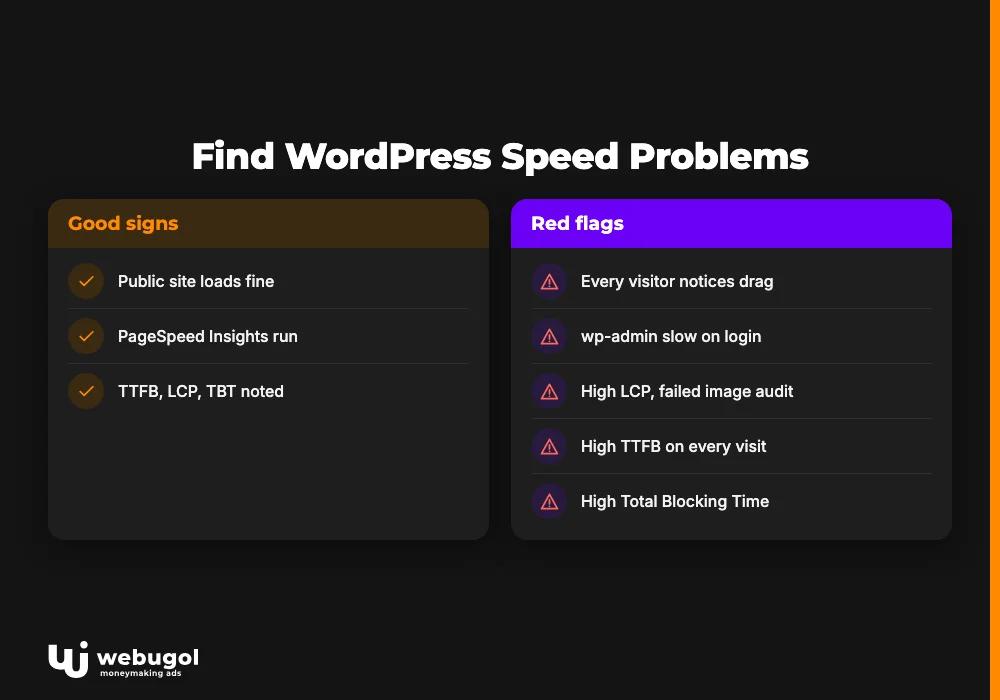
Start by dividing the problem in two. If every visitor notices the drag, the cause is frontend-side: images too heavy, caching absent, or hosting unable to keep pace with demand. If the public site loads fine but wp-admin greets every login with slow page builds, the culprit is deeper: database weight, plugin admin hooks, or background processes that only run for logged-in users.
Run PageSpeed Insights or GTmetrix on your homepage and on your two or three slowest pages. Write down Time to First Byte (TTFB), Largest Contentful Paint (LCP), and Total Blocking Time (TBT). Those three numbers tell you which of the nine causes is actually responsible before you change a single setting.
| Cause | Primary signal | Where it appears |
|---|---|---|
| Bloated images | High LCP, failed image audit | Frontend |
| Plugin overload or poor code | Site-wide drag, heavy admin | Both |
| Missing caching | High TTFB on every visit | Frontend |
| Database bloat | Slow saves, sluggish dashboard | Both |
| Underpowered hosting | TTFB spikes under any real traffic | Both |
| Outdated theme, plugins, or PHP | Gradual drift over months | Both |
| WP-Cron backlog | Dashboard lags right on login | Admin |
| External scripts | High Total Blocking Time | Frontend |
| Architecture limits | Consistent ceiling after other fixes | Both |
Why is WordPress so slow compared to other platforms?
WordPress renders each page dynamically through PHP and MySQL. Every visit triggers a live database query, a PHP execution cycle, and a full assembly of the HTML output before anything reaches the browser. Static-first platforms pre-build pages at deploy time. The server delivers a ready file rather than computing the response live on each request.
That default overhead is why a freshly installed WordPress site tends to be slower at the same traffic level than a headless or static alternative on equivalent infrastructure. It also explains why caching produces such dramatic results. A well-configured cache lets WordPress skip most of the live computation and serve pre-built pages instead. Without a caching layer, every request for the same unchanged page pays the full dynamic-generation cost again.
WordPress became the dominant publishing platform partly because this dynamic model was flexible enough for most content needs. It still works well at moderate scale with the right configuration. The gap with static-first and modern JavaScript alternatives grows when traffic climbs, when page templates generate complex database queries on each load, or when page speed is directly tied to revenue. That is when wordpress performance optimization starts returning diminishing results before the real constraint is even identified.
Nine things that make a WordPress site slow
Most wordpress site slow audits find more than one of the following causes at the same time. Work through them in order: the earlier ones are faster to fix and more common.
Bloated or unoptimized images
Uncompressed images are the most predictable cause of a WordPress site slow to pass its first speed audit. A photograph published at camera resolution forces the browser to download a large file and resize it locally, all before the page can finish rendering. Switching to WebP or AVIF, running uploads through a compressor, and enabling lazy loading are the three levers that address this directly.
Lazy loading prevents below-the-fold images from delaying the initial page paint. Format conversion and compression shrink the files themselves. These two changes together address both the byte count and the rendering order that determine Largest Contentful Paint.
Does adding more plugins make WordPress slower?
Yes, but code quality determines the impact more than plugin count. Each active plugin can register hooks, run database queries, and load scripts on every page request, regardless of whether the current page has any use for what that plugin does.
The more useful question is what each plugin actually does on each request. One poorly written plugin that fires excessive database queries per page load will hurt wordpress page load time more than several well-coded plugins combined. Use a query monitor tool to identify which plugins are responsible for the most database overhead per request. Deactivate the worst offenders and retest before drawing conclusions based on count alone.
Plugins are also the primary driver of a sluggish wp-admin dashboard. The same hooks that fire on the public site fire on every admin screen, often with additional admin-specific queries layered on top. A wp-admin dashboard slow enough to interrupt daily editorial work almost always points to plugins loading admin hooks on every screen, whether or not those hooks are needed for the task at hand.
Once you have identified the offending plugin through query monitoring, check whether a lighter alternative exists or whether the plugin's functionality can be replicated with a smaller, better-scoped tool. This is more reliable than disabling plugins at random and more precise than judging performance by active plugin count alone.
Missing WordPress caching setup
A missing wordpress caching setup is where the largest single-intervention improvement typically lives. Without it, WordPress executes the same PHP logic and the same database queries on every visit, even when the page content has not changed since the last request. Page caching solves this by storing the assembled HTML and serving it to subsequent visitors without triggering another database round-trip.
A complete wordpress caching setup combines at least two layers: a page cache plugin (WP Super Cache, W3 Total Cache, or the caching built into most managed hosting plans), plus a Redis or Memcached object cache for storing expensive query results in memory. A content delivery network adds a third layer that reduces latency for visitors far from the origin server.
Object caching matters specifically for wp-admin performance. It stores the results of repeated database lookups in memory and reduces the query load on every admin screen, which is why admin-side speed improves alongside frontend speed when object caching is added. Sites that add page caching without object caching often find the frontend improves while the dashboard remains slow.
Database bloat and WordPress database optimization
Post revisions, autosaves, spam comments, expired transients, and orphaned tables from removed plugins accumulate over time. WordPress does not remove any of this automatically. A site that launched with a lean database can develop substantial overhead after years of active publishing and plugin churn.
WordPress database optimization means scheduling routine cleanup: capping stored post revisions in wp-config.php, deleting spam and unapproved comments on a schedule, purging expired transients, and dropping tables from deactivated plugins. Tools like WP-Optimize handle most of this with a scheduled run. For sites where the database has already grown large, reviewing the slow-query log in the hosting control panel will typically surface one or two recurring queries responsible for a disproportionate share of the total overhead. Fixing those specific queries delivers more improvement than a general cleanup alone.
Database bloat is one of the most consistent causes of a wordpress site slow admin experience. The wp-admin dashboard queries the posts and options tables on nearly every screen it loads. A bloated database hits admin users harder than cached public-facing visitors, which explains why the admin can feel much slower than the frontend on the same server.
Underpowered WordPress hosting performance
WordPress hosting performance is a structural constraint before it becomes a configuration problem. Shared hosting splits one server's CPU and RAM across hundreds of unrelated accounts. A traffic surge on a neighboring account, or a runaway background process from someone else's site, can slow yours with no change on your end at all.
Sites generating meaningful revenue should not be on shared hosting. The upgrade path runs from shared plans to managed WordPress hosting built on cloud infrastructure, and from there to dedicated or VPS-based environments where server resources are not shared. Time to First Byte is the simplest confirming test: a consistently slow TTFB on a clean page with no external requests points to the server before it points to any code or content on the site.
When hosting is the bottleneck, no amount of image compression or plugin cleanup will close the gap. Confirming the diagnosis first with TTFB data prevents wasted optimization effort on the wrong layer.
Outdated themes, plugins, or PHP version
Newer PHP versions include performance improvements that directly affect how fast WordPress renders pages, executes queries, and handles object caching. Theme and plugin code written for older PHP releases also misses query optimizations shipped in newer WordPress core versions. The effect compounds quietly over time.
A site that launched fast and drifted into sluggishness over two or three years, with no single obvious change to point to, is often running an outdated PHP version alongside plugins that have not been updated since their original install. Checking and upgrading the PHP version in the hosting control panel, after testing on a staging environment first, is one of the lowest-effort ways to reduce WordPress load time without touching any content or settings.
WP-Cron tasks stacking up
WordPress's default scheduled task system, WP-Cron, does not run on a real server schedule. It checks on every page load whether any scheduled task is overdue. On a busy site, or on one where several plugins have each queued their own recurring jobs, simultaneous page loads all trigger that check at once, and the overhead stacks up.
This produces a consistent lag right after logging into wp-admin. The admin screen load triggers its own cron check, which works through all outstanding job evaluation before the admin page can finish loading. Disabling default WP-Cron behavior by setting DISABLE_WP_CRON to true in wp-config.php and replacing it with a real server-side cron job on a fixed interval eliminates the per-page-load overhead entirely and makes scheduled task execution predictable rather than coincidental.
External scripts and third-party embeds
Analytics tags, chat widgets, ad scripts, video players, and social embeds each add a network request the browser must complete before finishing the page. No single script is necessarily the problem. The issue is accumulation: several individually reasonable scripts from different vendors, each added for a different reason by a different person, can collectively push Total Blocking Time high enough for Google's Core Web Vitals to flag the page as failing.
To reduce WordPress load time from external script bloat, audit what is loading with a browser DevTools network waterfall or the render-blocking resources section of PageSpeed Insights. Defer or async-load any script that does not need to execute before the page is interactive. Self-hosting fonts and icon sets removes external DNS lookups that add latency before any font byte reaches the browser.
The architecture ceiling
Causes 1 through 8 can all be addressed, and addressing them genuinely helps. But there is a ceiling. WordPress was built in 2003 as a dynamic PHP and MySQL platform. At high traffic or with content-heavy templates that run complex queries on each request, the dynamic rendering model becomes the constraint itself. Further wordpress performance optimization stops returning meaningful gains regardless of which plugin or configuration change is applied next.
Past that point, a persistent wordpress site slow condition is not a misconfiguration. It is the platform generating every page from scratch through a full stack of PHP hooks and database calls on every request. Page caches reduce the frequency of those calls but cannot eliminate them under concurrent load. This ceiling is real, not theoretical, and it affects a meaningful share of sites that have already done everything else correctly.

Why is wp-admin slow but the frontend is fast?
This is one of the most common and misread wordpress site slow complaints, because the two symptoms suggest different causes, and they do require different solutions.
A cached frontend page loads fast because the server delivers a pre-built HTML file without executing PHP or running any database queries. The wp-admin dashboard bypasses that cache entirely. It loads live data, runs real-time queries, fires plugin hooks registered specifically for the admin context, and triggers a WP-Cron check on every screen load. The full dynamic cost of a WordPress page applies every time an editor opens any admin screen.
If your frontend is fast but the wp-admin dashboard slow experience persists, the most likely causes are plugin hooks loading on every admin screen whether or not they are needed, database growth from uncleaned post revisions and transients, and WP-Cron overhead running on every page load. These three tend to compound: a database grown large from years of uncleaned data slows every admin query, and a WP-Cron backlog on top of that makes login particularly painful.
The fix for a sluggish admin is targeted and carries no risk to the public-facing site. Audit active plugins and deactivate any not required in the admin context. Schedule database cleanup and configure a post-revision limit in wp-config.php. Replace default WP-Cron with a real server cron job. Frontend caching and image optimization, by contrast, do nothing for admin performance because admin pages bypass the page cache entirely.

When should I migrate away from WordPress for speed?
The criteria are specific. Migration becomes the right conversation when all of the following are already in place and the site is still slow on its key pages: caching correctly configured, plugins audited and reduced, hosting upgraded to managed or VPS infrastructure, database optimization running on a schedule. At that point, the bottleneck is architectural. No optimization plugin can fix an architecture that generates every page from scratch through PHP and MySQL.
The path off WordPress's dynamic rendering model leads to a static site generator or a modern JavaScript framework, where pages are built at compile time and served from a CDN with no live database computation on each visit. The headless CMS approach preserves the editorial workflow content teams depend on while removing the dynamic rendering overhead. Our Next.js development services cover this migration path for teams that have completed the optimization checklist and still have a wordpress site slow problem on their most important pages.
The benchmark our migration work targets is a 90+ mobile PageSpeed score. Before migration starts, we record baseline PageSpeed and Core Web Vitals numbers for the site's key page templates. After launch, we test those exact same pages under the same conditions and with the same tools. The goal is a documented improvement measured against each site's own starting point, not a comparison against a generic claim.
A WordPress to Next.js migration is not the first step for most sites. It is the step that comes after the checklist above is complete and the slowness remains.
Ready to stop patching and fix the root cause?
If caching, plugin cleanup, and hosting upgrades are already done and the site is still slow, the next move is a scoped technical assessment, not another optimization plugin. Webugol builds websites that grow, and for a site that has hit the platform ceiling, migration is where that growth starts. Our process begins with baseline PageSpeed measurements, identifies which templates are constrained by the architecture, and delivers a migration plan that keeps your accumulated SEO equity intact.
FAQ
Why does my WordPress site slow down over time without adding new content?
Database growth is the main driver. Post revisions, expired transients, and spam accumulate automatically, and WordPress does not remove them. Drift in plugin and PHP versions adds to the effect over months. A site fast at launch can degrade gradually with no single obvious cause to point to.
Why is wp-admin slow when the frontend loads quickly?
The admin dashboard bypasses the page cache that keeps frontend delivery fast. It runs live database queries, fires plugin hooks specific to the admin context, and checks WP-Cron on every screen load. Plugin bloat and database growth hit the admin harder than a cached public page.
Does adding more plugins make WordPress slower?
Yes, though code quality determines the impact more than count. Each plugin can run queries and load scripts on every request whether or not the page needs them. A query monitor identifies which plugins account for the most database overhead per request, start there before removing plugins by count alone.
How much does hosting affect WordPress page load time?
Significantly. Shared hosting splits server resources across hundreds of accounts, so a neighboring site's traffic can slow yours with no change on your end. A consistently slow Time to First Byte on a clean page with no external requests points to the server as the bottleneck. Managed WordPress hosting on cloud infrastructure is the right step up for any site generating real revenue.
Is WordPress always slower than other platforms?
No. A well-configured WordPress site with proper caching, compressed images, and managed hosting delivers fast page load times at moderate traffic. The gap with static-first or JavaScript-framework alternatives grows at higher scale or when the dynamic rendering model generates too many complex queries to cache effectively.

