



Email marketing for beginners: your complete step-by-step guide
Email marketing for beginners comes down to one idea: send the right message to people who chose to hear from you. You own your email list, and a well-run list consistently drives higher conversion rates than any paid social channel. This guide covers how to start email marketing from scratch, from picking a platform and building your list to writing campaigns that earn opens and clicks.
What is email marketing and how does it work?
Email marketing is the practice of sending targeted messages to subscribers who opted in to receive communications from your business. You use a dedicated email service provider, or ESP, to write, schedule, and deliver those messages, then track opens, clicks, and conversions inside the same platform.
The process starts with a signup. A visitor arrives on your website, sees an offer worth trading their email address for, and submits a form. Your ESP adds them to your list and can immediately trigger an automated welcome sequence. From there, you send campaigns on a schedule or based on subscriber behavior. Every email either builds trust with that subscriber or erodes it. That relationship determines whether your list eventually converts into revenue.
What tools do beginners need for email marketing?
Choosing the right email marketing tools is the first practical decision in any beginner's strategy. Three platforms consistently come up for those just starting out. When comparing options, the core criterion for email marketing for beginners is a platform that handles deliverability, automation, and list management without demanding technical expertise.
| Platform | Best suited for | Standout feature |
|---|---|---|
| Mailchimp | First-time senders, small lists | Free starting tier, drag-and-drop editor, send-time optimization drawn from millions of users |
| Klaviyo | E-commerce stores | Built-in customer data platform (CDP), deep purchase-history segmentation |
| HubSpot | B2B companies using a CRM | Email and CRM in one place, behavior-triggered automation |
Two factors matter most when evaluating any ESP. First, does the platform include a signup form builder so you do not need a separate tool? Second, does it handle spam compliance automatically?
A reputable ESP configures authenticated sending domains, unsubscribe links, and plain-text fallbacks by default. Without those in place, a new sender will land in spam folders before their list has any chance to engage. Before committing to one tool, the latest email marketing benchmarks and channel trends are worth reviewing for a broader picture of how the major platforms compare.

How do you build an email list from scratch?
Email list building starts with a constraint most guides understate: only subscribers who explicitly opted in are worth having. A purchased list damages your sender reputation with inbox providers and generates almost no buyers. Scraped contacts perform no better.
Given that constraint, the question becomes: why would a visitor give you their email address? A generic "subscribe to our newsletter" button rarely answers that question. You need a specific reason, one that delivers immediate value to the person signing up.
What is a lead magnet and why do you need one?
A lead magnet is a free resource you offer in exchange for an email address. It removes the friction of signing up by giving the visitor something useful before any purchase is required. Without a lead magnet, your form asks for something personal while offering nothing concrete in return.
The format matters less than the specificity. A narrow, highly relevant resource converts better than a broad one. A checklist titled "30 email subject line templates for online retailers" will generate more signups from that audience than a general "ultimate guide to digital marketing," because it solves a precise problem for a precise person.
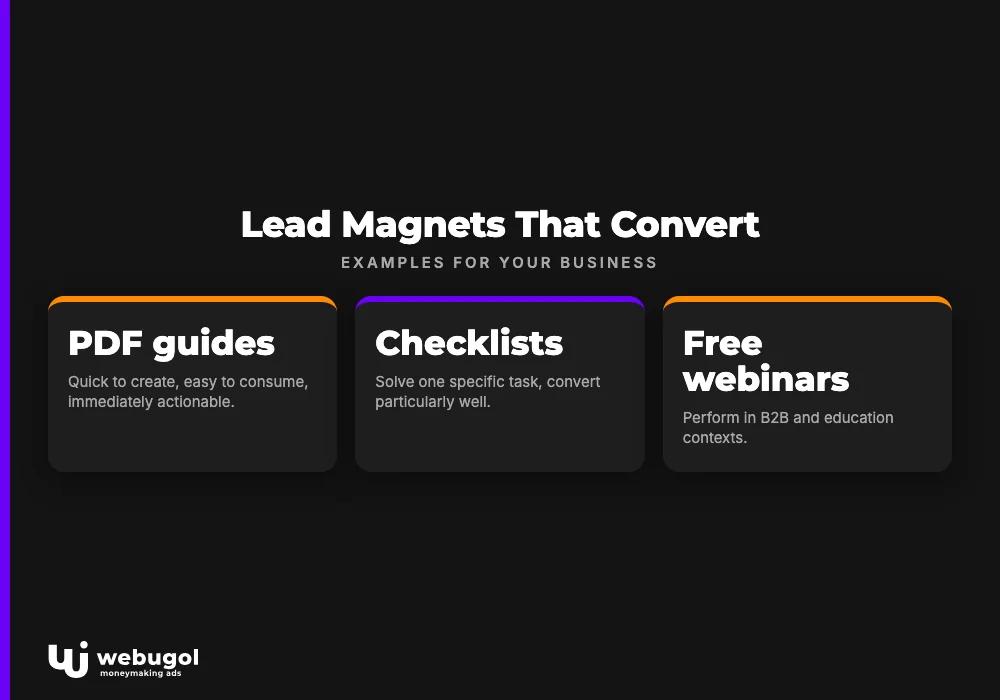
Lead magnet examples that work across business models
The following categories have consistent conversion track records. Each suits a different type of business and a different stage of the subscriber relationship.
- PDF guides and checklists work across industries because they are quick to create, easy to consume, and feel immediately actionable. A checklist that solves one specific task converts particularly well.
- Free webinars perform in B2B and education contexts where audiences value direct access to expertise more than a document they could read on their own.
- Free trials or product samples suit software companies and physical goods businesses because they let the subscriber experience the product before any financial commitment.
- Discount coupons convert well in e-commerce but attract bargain-seekers more than long-term customers, so use them with that trade-off in mind.
- Free consultations or estimates make sense for service businesses, where the lead magnet functions as the first step of the sales conversation.
- Quizzes work when the result is genuinely useful to the person taking it. A quiz that recommends which email platform fits your business generates leads who are already actively researching the topic.
- White papers and case studies target buyers who are later in the decision process and need proof before committing.
One rule applies across all of these: your lead magnet should solve one specific problem for one specific type of person. Broad resources feel like homework. Specific ones feel like shortcuts.
How to design a signup form that converts
Your signup form is where the visitor decides whether your lead magnet is worth their email address. Getting the design right is about making the value obvious and the process frictionless, not about aesthetics.
Write a headline that names the benefit. The headline should complete this sentence from the visitor's perspective: "After I submit this form, I will get..." A headline like "Download the 30-day email planning calendar" outperforms "Join our community" every time because it names a specific outcome.
Use bullets in the description. Three or four short bullet points listing what the subscriber receives reduce the time required to evaluate the offer. People make this decision in seconds, so scannable formatting matters.
Show a visual of the resource. Display the ebook cover, a screenshot of the checklist, or the photo of the person who will provide the consultation. Making a digital resource feel tangible increases conversions.
Ask for first name and email only. Every additional field you add reduces your signup rate. The goal of the form is to capture the email address. You can gather more information over time through behavior and follow-up messages.
Write CTA button text that describes the action. "Download the guide" converts better than "Submit" because it tells the visitor exactly what happens when they click. Use a high-contrast button color so it stands out from the surrounding form.
Do not skip the thank-you page. After someone signs up, redirect them to a page that tells them exactly what to do next: how to receive the resource, how to whitelist your sending address, and what kind of emails they can expect from you going forward. A well-designed thank-you page also invites new subscribers to share the lead magnet on social media, which can generate additional signups without additional spend.
Where to place your signup forms
Placement determines how many visitors ever see your form. A single form buried in the site footer will underperform. Multiple placements across strategic locations increase the number of signups you collect from the same traffic.
- Exit-intent popups trigger when the visitor's cursor moves toward the browser bar, signaling departure. Because they fire after someone has already spent time reading your content, they convert without interrupting the experience. Exit-intent popups consistently outperform static form placements by a wide margin, according to the original research informing this article.
- Homepage placement above the fold reaches visitors who arrive with existing intent to engage.
- Inside blog posts catches readers mid-content, when their interest in the topic is at its peak.
- Floating bars stay visible as the user scrolls, which is especially practical on mobile where screen real estate is limited.
- Dedicated landing pages work well for paid or social traffic sent to a focused, distraction-free offer.
If you can add only one placement today, choose the exit-intent popup. It does not interrupt reading, it reaches visitors who already demonstrated interest by spending time on your content, and it reliably outperforms static alternatives.
How to segment your list for more targeted campaigns
Segmentation means dividing your subscriber list into smaller groups based on shared characteristics, then sending each group content specifically relevant to them. Broadcasting the same message to every subscriber treats a first-time visitor identically to a repeat buyer. That approach rarely serves either person well.
Common segmentation criteria include signup source (which lead magnet or page brought them in), engagement level (who opens regularly versus who never clicks), purchase history (buyers versus non-buyers, repeat versus one-time), and preferences stated during onboarding.
The practical benefit for email marketing for beginners is that segmentation makes writing easier. When you know exactly who you are writing to, you can use their language, reference their situation, and make an offer that matches where they are in the buying journey. A message written for someone considering your product for the first time is a different email than one written for a long-time customer. Both can be excellent. Neither works if sent to the wrong person.
Once subscribers are tagged into segments, you can also trigger automated sequences when someone enters or exits a segment. That is how email campaign strategy scales without proportionally scaling your workload. For the retention side of this equation, the approach to building long-term subscriber loyalty covers how to keep different segments engaged across multiple sends.
Email campaign strategy for beginners: planning before you write
A campaign strategy answers three questions before you open your email editor. Who is receiving this message and what do they already know? What is the single action you want them to take? Why is now the right time to send?
"Send a newsletter every Thursday" is a schedule, not a strategy. A strategy looks more like: "Send a three-part onboarding sequence to every new subscriber within their first two weeks, each email introducing one use case and ending with one specific next step." The schedule falls out of the strategy naturally. The reverse does not work.
On timing, Mailchimp's analysis of data from millions of users shows that weekday sends outperform weekend sends on average, and that a mid-morning window around 10 AM tends to see stronger open rates. Those are aggregate numbers. Your specific audience may behave differently based on their industry, location, and daily routine.
Use your platform's defaults to start. Run your own timing tests once you have enough send history to identify patterns. The right answer for your list comes from your own data, not from a generic benchmark.
How can you improve your email open rate?
Your email open rate is determined before the subscriber reads a single word of your content. Three factors control whether an email gets opened: whether it arrived in the inbox rather than spam, what the subject line says, and whether the sender name is recognizable. Email open rate improvement means working on all three, consistently.
Avoid the spam folder from the start
Most deliverability protection comes from your ESP automatically, provided you chose a reputable one. What you control is the permission and content side.
Send only to people who explicitly opted in. This is the leading cause of deliverability problems for beginners. When subscribers who did not choose to hear from you mark your emails as spam, those reports signal to inbox providers that your messages are unwanted. That eventually affects deliverability even for subscribers who do want your emails.
Beyond permission: avoid subject-line language that spam filters flag, such as "free," "buy now," and "limited offer." Use a consistent sender name and email address across all campaigns. Include a physical mailing address in your footer, which is legally required in most jurisdictions and expected by spam-scoring systems. Ask new subscribers to whitelist your sending address as part of your welcome sequence.
Write subject lines that earn the open
The subject line is your email's headline. It is the only element the subscriber sees before deciding whether to open or ignore. These email marketing tips consistently improve subject line performance.
Use specific numbers. "5 email templates you can copy today" signals a concrete, finite piece of value. Generic phrasing does not.
Build curiosity without misleading. A subject line like "the mistake most first-time senders make" creates curiosity and sets up a useful email. Subject lines that overpromise what is inside train subscribers to stop trusting you, and eventually to stop opening altogether.
Ask a real question. "Are your emails landing in the spam folder?" draws in anyone actively researching that problem because the brain automatically starts forming an answer. Questions work especially well when your audience is mid-search on a topic you can help with.
Match the tone of your brand. Subscribers signed up because of something they already saw from you. Deliver the same voice in the inbox that attracted them in the first place.
Remove inactive subscribers regularly
Over time, some subscribers stop engaging because their interests shifted, their job changed, or they simply forgot they signed up. Continuing to send to unengaged contacts lowers your measured open rate and signals to inbox providers that your messages are unwanted. That creates a compounding deliverability problem over time.
Define an inactivity window that fits your sending frequency. For most senders, someone who has not opened an email in six months is a reasonable reactivation candidate. Before removing them, send one targeted email. The original article behind this piece includes a practical example of a reactivation message that is direct and slightly self-aware:
"Are you still interested? Let me know if you want to keep receiving emails, if you would like me to check back in a few months, or if you would prefer to unsubscribe."
Some subscribers will re-engage. Those who do not can be removed without regret. A smaller, active list produces better deliverability signals and more accurate open rate data than a large, disengaged one.
Optimize for mobile from day one
A significant share of email opens happen on mobile devices. Designing primarily for desktop means a large portion of your audience receives a layout that is hard to read and frustrating to navigate.
Practical checklist for mobile-friendly email design:
- Use a single-column layout at 600px wide for reliable rendering across email clients.
- Keep subject lines under 40 characters for full visibility on small screens.
- Set body text to at least 16px for comfortable reading without zooming.
- Make CTA buttons large enough to tap comfortably with a thumb without hitting adjacent links by mistake.
- Include alt text on every image. Many mobile clients block images by default, and your message must be understandable without them.
- Compress images to reduce load time on mobile data connections.
Test every email in both desktop and mobile preview modes before sending. Most ESPs include this natively. Two minutes of preview testing prevents a broken experience for a substantial share of your audience.

Email marketing for beginners: writing emails subscribers actually read
Getting into the inbox is half the work. Once your email is open, the content determines whether this subscriber trusts you more or starts ignoring you. Email marketing for beginners often focuses on list building and open rates, but the email body is where the relationship either deepens or stalls.
Write to one person, not to a list
The most common beginner mistake is writing with the awareness of having thousands of subscribers. That awareness produces generic, broadcast-style copy that reads like an announcement. The fix is to write as if you are addressing one specific person who represents your ideal subscriber.
Segmentation and persona development both serve this goal. When you know exactly who you are writing to, you can use their vocabulary, reference their situation, and frame your offer in their terms. A subscriber who feels addressed directly is more likely to click and far less likely to unsubscribe.
If you find it difficult to write for a specific person even after doing persona work, select a handful of actual subscribers and invite them to a short five-minute call. Ask what they need, what they are struggling with, and what they hoped to get from joining your list. That kind of direct research pays off across every future email you write.
Sound like a person, not a company
Formal corporate language creates distance. "We are pleased to inform our valued subscribers of an exciting new opportunity" signals that a template is speaking, not a person. Compare that to "this deal is worth a look" as a subject line sent from a recognizable name. One sounds like a person sharing something useful. The other sounds like a press release.
Email is a personal medium. Your subscribers share their inbox with friends, family, and colleagues. If your emails feel like interruptions from a faceless organization, they will be treated accordingly over time. Being direct and human does not mean being casual to the point of inconsistency with your brand. It means respecting that email is a conversation, not a broadcast channel.
Use humor when it fits your audience
Humor builds connection in a way that polished corporate language cannot. The most effective humor in email is specific rather than generic. A reference to a frustration your subscribers recognize proves you understand their world. It lands because it is true.
You do not need to be naturally funny to use this approach. The original article behind this piece includes a reactivation email example that ends with: "You have been bitten by a tsetse fly, and I must call SOS Medicine urgently." It works because it is absurd, and the absurdity is proportionate to the awkwardness of reaching out to someone who has gone quiet. Knowing your audience well enough to find the right level of irreverence is the whole skill.
If humor does not fit your brand or audience, a warm and direct tone that avoids corporate distance achieves most of the same result.
Ready to put email marketing for beginners into practice?
Email marketing for beginners does not require a massive list, a large budget, or technical expertise. It requires a clear starting point: permission-based list building, a lead magnet worth signing up for, an ESP that handles deliverability, and the discipline to send content that earns its place in someone's inbox.
The businesses that generate real revenue from email are not the ones with the largest lists. They are the ones who built deliberately, segmented thoughtfully, and treated every email as a conversation rather than an announcement. That discipline compounds over time into an audience that opens, clicks, and buys with consistency.
If you are ready to build that kind of email program and want help with strategy, copywriting, or technical setup, the professional email marketing services at Webugol are designed for exactly this starting point. You can also reach the team directly through the Webugol homepage to discuss where your email strategy stands today.
Frequently asked questions
What is the first step in email marketing for beginners?
Choose an email service provider and set up a permission-based signup form with a clear lead magnet offer. Without a platform that handles deliverability and a concrete reason for visitors to subscribe, no other part of your email marketing strategy can function effectively.
How long does it take to build an email list from scratch?
It depends on your existing traffic and the relevance of your lead magnet. A business with steady site visitors and a specific, well-matched offer can collect hundreds of subscribers within the first month. Growth accelerates as your content earns organic visibility and your lead magnet spreads through referrals.
How often should beginners send marketing emails?
Start at a frequency you can sustain with genuinely useful content, typically once or twice per month. Sending inconsistently damages subscriber trust more than sending less often. Adjust your cadence based on engagement data once you have enough send history to see what your audience responds to.
What makes a healthy email open rate for beginners?
Open rate benchmarks vary by industry, but most ESPs report healthy averages between 20 and 30 percent. As a beginner, prioritize list quality and subject line testing over comparing your numbers to broad industry figures. A smaller, highly engaged list consistently outperforms a larger, disengaged one.
Do I need a large email list to see results from email marketing?
No. Even a list of 100 engaged subscribers can generate meaningful revenue for a focused business. Start small and build intentionally, because list quality compounds in ways that raw size does not.

