



Google Keyword Planner: how to find and choose the right keywords for Google Ads
Google Keyword Planner is a free tool inside Google Ads that shows you which search terms people use, how often they search for them, and what advertisers typically pay per click. It is the core instrument for adwords keyword research: enter a seed term or a website URL, and it returns hundreds of keyword ideas with monthly volume, competition level, and cost estimates attached to each one. Building a Google Ads campaign without this data means choosing terms by gut feel rather than evidence.
What is Google Keyword Planner used for?
Google Keyword Planner has two core functions. The first is keyword discovery: enter a product, service, or URL and receive a list of related search terms, each with its average monthly search volume, competition level, and a suggested bid range. The second is forecasting: once you have a working keyword list, the tool projects impressions, clicks, and estimated spend for a given budget and time frame.
Businesses — including law firms running PPC campaigns — use the tool at the start of every campaign cycle and return to it when expanding into new products or markets. Thorough research at the outset reduces the risk of the most common budget drain: spending on terms with high volume but low purchase intent.
For ppc keyword research, both outputs are directly useful. The discovery view tells you which terms exist and how competitive they are. The forecast shows what traffic and cost to expect before you commit to a campaign structure.
Is Google Keyword Planner free to use?
Yes. Google Keyword Planner is free for any Google Ads account holder. You can access keyword ideas and basic performance data without running an active campaign, which makes it a practical starting point even for businesses that have not yet launched ads. The tool connects to the same underlying data Google uses for its own auction, so the volume and CPC estimates reflect real search behavior rather than third-party projections.

How to find keywords for a Google Ads campaign
Finding google ads campaign keywords follows a repeatable process. Skipping any step tends to produce a list that is either too broad to be useful or too narrow to generate meaningful traffic.
- Open Keyword Planner. In Google Ads, click the tools icon and select Keyword Planner under "Planning."
- Choose a starting point. Select "Discover new keywords" and enter a seed keyword (such as "running shoes") or your website URL to let the tool scan your pages.
- Filter and sort results. Sort by average monthly searches, competition level, or top-of-page bid. Apply filters to remove terms below a useful volume floor or above a CPC ceiling your budget cannot support.
The tool groups related results by theme, which speeds up the process of organizing terms before building out your campaign structure.
Organizing keywords into ad groups
Tight, thematically consistent ad groups — a core Google Ads best practice — outperform groups that mix loosely related terms. Group keywords by intent: "buy running shoes online" and "running shoes free shipping" share purchase intent and belong together, while "how to break in running shoes" signals an informational query and should go into a separate group or be excluded with a negative keyword. This structure raises ad relevance, which improves Quality Score and lowers your effective cost per click over time.
What is the difference between broad match and exact match in Google Ads?
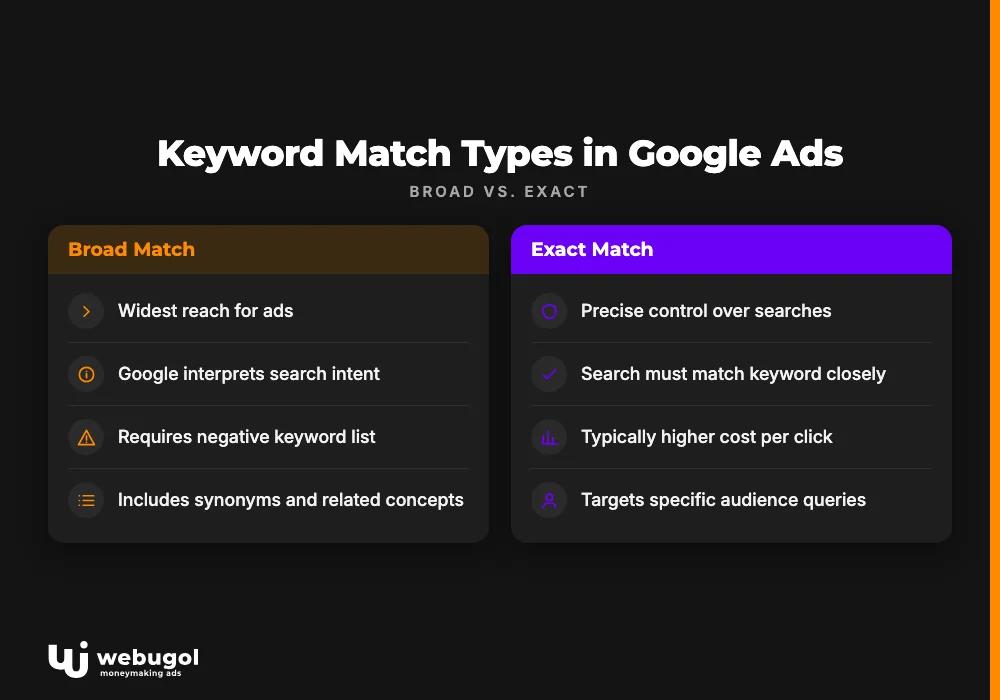
Keyword match types control which user searches can trigger your ads. Misunderstanding search term match types is one of the most common ways advertisers overspend early in a campaign.
| Match type | How it works | Keyword example | Sample triggering searches |
|---|---|---|---|
| Broad match | Google interprets the intent behind the search, including synonyms and related concepts | running shoes | sneakers, athletic footwear, jogging trainers |
| Phrase match | The search must contain the keyword's meaning in the correct word order | "running shoes" | best running shoes, buy running shoes online |
| Exact match | The search must match the keyword or a close variant only | [running shoes] | running shoes, running shoe |
Broad match delivers the widest reach but requires a well-maintained negative keyword list to prevent your ads from appearing on irrelevant queries. Exact match gives precise control, typically at a higher cost per click. Phrase match sits between the two and is often a reasonable default when starting a new campaign.
The Search Terms report in Google Ads shows the actual queries that triggered your ads. Reviewing it consistently reveals whether your match type settings are pulling in the right audience or generating wasted impressions that need to be filtered out.
How to choose the right keywords for your ads
Google Keyword Planner gives you data, but the selection decision still requires judgment. Choosing the right google ads campaign keywords comes down to four factors: relevance, search volume, competition, and commercial intent.
Relevance means the keyword describes what you actually sell. A high-volume term that only loosely fits your offer generates clicks that do not convert, which drains budget and gradually pulls down Quality Score.
Search volume indicates potential reach. Low-volume terms may not generate enough impressions to matter individually, though many specific terms grouped together can add up to significant aggregate traffic.
Competition shows how many advertisers are bidding on the same term. High competition pushes CPCs up. Longer, more specific phrases tend to attract fewer competitors and lower cost per click, while reaching people who are closer to a purchase decision.
Commercial intent separates keywords that drive direct hotel bookings from keywords that drive traffic. "Nike air max running shoes" signals a buyer far more directly than "what running shoes should I buy," even though both relate to the same product.
Long-tail keywords and negative keywords
Long-tail keywords are multi-word phrases aimed at specific audiences. "Stylish black high-heel sandals" converts better than "sandals" for a fashion retailer because the longer phrase filters out casual browsers. Mixing long-tail keywords with higher-volume head terms balances reach against conversion quality.
Negative keywords remove irrelevant traffic before you pay for it. A company selling computers should add terms like "free," "cheap," and "repair" as negatives so its ads do not show to people looking for free repair services rather than a machine to buy. Building a thorough negative list is a core part of ongoing adwords keyword research, not a one-time setup step.
Keyword bid strategy: connecting research to performance
The tool shows a top-of-page bid range (low and high) for each keyword, drawn from historical auction data. These figures set realistic expectations for what you will need to spend to appear prominently on a given search term.
A keyword bid strategy should account for both the bid price and Quality Score. Quality Score is Google's rating of how relevant your keyword, ad copy, and landing page are to the person searching. A higher score lowers your effective CPC: an ad with strong relevance can outrank a competitor who bids more but whose keyword, ad, and page are poorly aligned. As the original campaign research makes clear, the quality score of an ad and its cost per click are determined in large part by keyword relevance. This is why keyword selection extends beyond the tool itself. The terms you choose shape the ad copy you write, which shapes the landing page that makes sense, which determines your Quality Score and the real cost of each click.
Targeting long-tail keywords as part of your keyword bid strategy also reduces average CPC, since fewer advertisers compete for specific phrases. The tradeoff is lower individual volume, but the aggregate traffic from many precise terms can match a single head term at a fraction of the cost.
Once your campaign has real performance data, improving ad group structure and bid logic based on what the account has learned is typically where the largest efficiency gains appear. And understanding how your keyword choices connect to the larger business objectives you are pursuing through Google Ads helps you decide which campaigns deserve more budget as the account matures.

Start building your keyword strategy today
Google Keyword Planner gives you the data to make informed decisions about which terms to target, how to structure your campaigns, and what to expect from your budget. Markets change, competitors enter and exit auctions, and what people search for shifts over time. Revisiting your keyword list and acting on the Search Terms report regularly keeps your campaigns aligned with real demand rather than assumptions made at launch.
Webugol builds and manages Google Ads keyword strategies for businesses that want to reduce wasted spend and improve campaign returns. Contact us for a review of your current campaign.
FAQ
What is Google Keyword Planner used for?
It is used to discover relevant keyword ideas, review monthly search volume and competition data, and forecast expected impressions and spend for Google Ads campaigns. It helps advertisers choose which search terms to target before committing budget to a campaign.
Is Google Keyword Planner free to use?
Yes, Google Keyword Planner is free for any Google Ads account holder. You can access keyword discovery and forecasting features without an active campaign or billing information on file.
What is the difference between broad match and exact match in Google Ads?
Broad match shows your ad for searches Google interprets as related to your keyword, including synonyms and variations you did not specify. Exact match shows your ad only when a search matches your keyword or a close variant, giving you tight control over which queries trigger your ads.
How do I choose the right keywords for my ads?
Evaluate each keyword on four criteria: relevance to your offer, monthly search volume, competition level, and commercial intent. Prioritize terms where all four factors align well, and use long-tail keywords to reach specific buyers at lower cost per click.
What are negative keywords and why do they matter?
Negative keywords prevent your ads from showing for searches unlikely to convert to sales. Adding terms that describe what you do not sell keeps your budget focused on the audience most likely to become a customer.

