



HubSpot in healthcare: the BAA, the tracking setup, and the revenue gaps most teams miss
HubSpot is HIPAA-eligible for healthcare organizations when you sign the Business Associate Agreement on an Enterprise plan and enable sensitive data handling, but compliance is the floor. Tracking, website, CRM, and ops run as one revenue system or break at the handoffs between them, and one team must own the full path from ad click to recognized revenue. The configurations that actually drive revenue go further than compliance: end-to-end attribution from ad click to showed appointment, automation that reduces no-shows, and pipeline data the ad platforms can optimize against. Most teams configure HubSpot for healthcare to satisfy a compliance checkbox and stop there, leaving tracking broken and show rate unowned. This guide covers what the full setup requires and where revenue leaks when steps are skipped.
Why most HubSpot healthcare setups pass the compliance check and miss revenue
Healthcare teams configure HubSpot to meet a compliance requirement, then stop. The tracking pixel still fires on PHI-adjacent pages. Attribution from ad spend to showed appointment is absent. Show rate belongs to intake, not marketing, so no department owns fixing it.
The result is a CRM that logs contacts accurately and explains revenue almost not at all. Compliance is necessary. It is not the same as a setup that returns measurable return on ad spend.
Is HubSpot HIPAA-compliant for healthcare organizations?
HubSpot is HIPAA-eligible, not HIPAA-certified by default. The platform reaches eligibility when you enable the sensitive data feature, sign the BAA, and audit forms and tracking scripts for unsanctioned PHI transmission. Eligibility is a configuration state the team must actively create and maintain, not a product guarantee.

Does HubSpot sign a BAA, and what does that actually cover?
Yes, HubSpot signs a Business Associate Agreement with Enterprise plan customers, covering specific hubs designated to handle protected health information. The BAA is not automatic; customers must request it through HubSpot's privacy settings and confirm which hubs and features are in scope before any patient data enters the portal.
Hubs in scope at Enterprise tier include Marketing Hub, Sales Hub, Service Hub, and CMS Hub. Standard analytics cookies and third-party integrations configured outside the sensitive data boundary fall outside BAA coverage. Understanding the boundary before you build prevents a compliance gap that is hard to close retroactively.
How to enable HIPAA-protected sensitive data in HubSpot
The sensitive data toggle lives in HubSpot account settings under Privacy and Consent. Enabling it restricts certain contact properties, limits data flow paths, and activates audit logging for patient-facing automations. Completing this step without first auditing form fields and tracking scripts creates a false sense of compliance.
Use this launch readiness checklist before allowing any PHI into your portal:
- BAA requested and countersigned with HubSpot
- Sensitive data feature enabled in account settings
- Tracking pixel audit completed with PHI-adjacent pages excluded
- All form fields reviewed for PHI exposure
- Consent banner configured per applicable state law
- Role-based access controls applied to sensitive contact properties
- Deal pipeline includes a "showed" stage separate from "booked"
- Workflow audit logging active for all patient-facing automations
If your team also needs to confirm whether your analytics setup is HIPAA-compatible, Is Google Analytics HIPAA compliant? The 2026 Answer for Healthcare covers consent mode, data retention, and the configurations that change the compliance picture.
What HubSpot for healthcare must actually track
The tracking layer is where most HubSpot CRM for healthcare installations lose revenue visibility. Forms capture leads and ad platforms report clicks, but the gap between them, where a lead becomes a booked appointment and a booked appointment either shows or does not, goes unrecorded in most setups.
Closing that gap requires three connected elements: offline conversion imports that pass "showed" events back to Google Ads and Meta, clean deal stages that record appointment outcome, and call tracking integrated without exposing PHI upstream to the ad platforms.
From ad click to showed appointment: building the attribution chain
Attribution requires an offline conversion import tied to the deal stage your team marks when an appointment completes. Without it, ad platforms optimize for form fills. That creates a direct conflict: the platform maximizes volume while the practice needs patients who actually show.
Deal stage structure matters as much as the import itself. Most practices track "booked" but not "showed." The two numbers diverge hardest during high ad spend periods, exactly when accurate data is most valuable. Mapping the patient lifecycle to HubSpot pipeline stages covers how to structure those stages before the offline import connects them to ad platform reporting.

HubSpot vs. GoHighLevel vs. ActiveCampaign for healthcare
Three platforms dominate the evaluation conversations healthcare marketing teams have before committing to a CRM. Each fits a different operational profile, and the wrong choice at implementation creates a migration problem later.
| Criterion | HubSpot | GoHighLevel | ActiveCampaign |
|---|---|---|---|
| HIPAA / BAA | Enterprise BAA available | No formal BAA | No formal BAA |
| EHR integration | API + certified partners | Limited native | Limited native |
| Patient automation | Full workflow builder | Strong intake flows | Strong email sequences |
| Price tier | Mid to high | Low to mid | Low to mid |
| Migration effort | High (data model depth) | Low to mid | Mid |
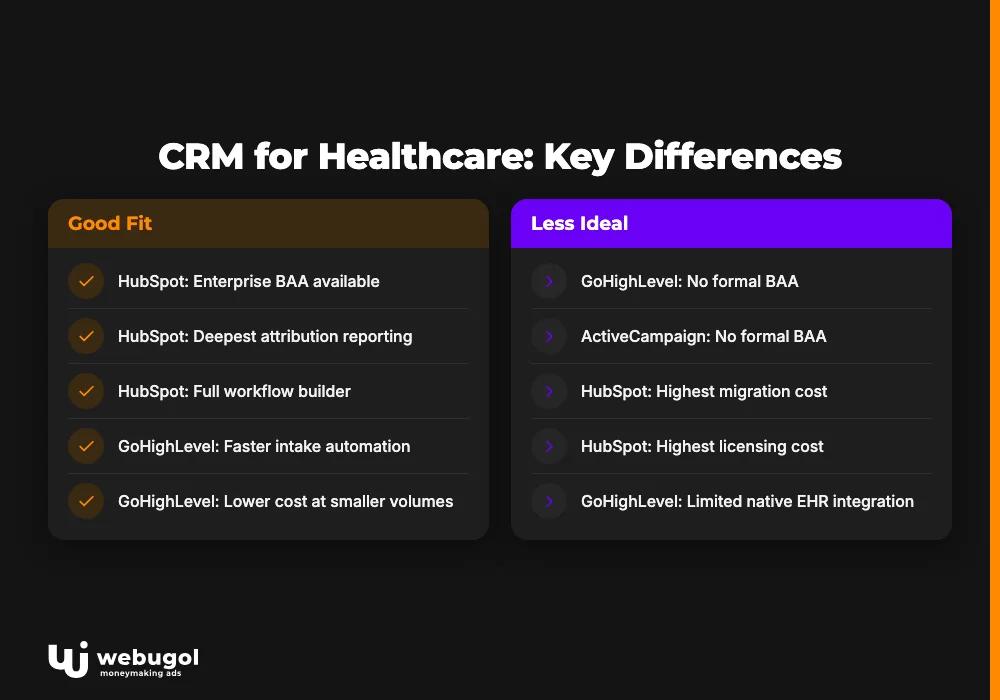
HubSpot carries the highest migration and licensing cost but delivers the deepest attribution reporting and the only formal BAA in this group. GoHighLevel configures faster for intake automation and costs less at smaller patient volumes. The deciding factor is whether full attribution from ad click to revenue or low-cost funnel speed is the higher operational priority.
How HubSpot automation reduces no-shows and lifts show rate
Two automation workflows move show rate most in any HubSpot for healthcare setup: speed-to-lead response and post-booking reminder sequences. Speed-to-lead fires within five minutes of form submission, assigns record ownership, and triggers first outreach. Post-booking reminders run at 48 hours, 24 hours, and 2 hours before the appointment.
Both workflows run inside the sensitive data boundary to remain HIPAA-compliant. Neither is complicated to build. Both are consistently skipped in basic implementations.
Configuring the speed-to-lead and post-booking sequence
Speed-to-lead triggers on form submission, enrolls the contact, and routes it to the first available intake team member based on service line or geography. Under five minutes is the threshold where show rates hold; past 30 minutes, lead quality typically degrades faster than intake can recover.
The post-booking sequence starts from a deal stage trigger. Each touchpoint uses a compliant channel, email or SMS depending on consent captured at intake, and references the appointment without exposing clinical detail in the message body. Building HIPAA-compliant email sequences for post-booking patient nurture into deal stage triggers keeps compliance and operational requirements aligned simultaneously.
For a closer look at how scheduling software affects no-show rates independently of CRM configuration, how patient scheduling software cuts no-shows covers the ops layer that integrates with HubSpot's deal pipeline.
Migrating your CRM to HubSpot for healthcare: what to protect
HubSpot CRM migration for healthcare carries higher stakes than a standard data move. Pipeline history, lifecycle stage logic, and consent records must survive the import intact or attribution baselines reset to zero on day one. That zero resets months of decision-making context.
Three data objects most teams lose in transit: consent timestamps tied to specific form versions, deal stage history that established the lifecycle baseline, and call recording links attached to contact records. Audit these before migration starts. A partner without healthcare-specific migration experience will learn the compliance requirements on your portal.
How to choose a HubSpot partner for healthcare
A revenue-system owner, the team accountable from ad click to recognized revenue, looks different from an implementation vendor. Most HubSpot partners understand marketing automation inside their own scope. What distinguishes a system owner is accountability for the handoffs: tracking into CRM, CRM into ad platform, offline conversion into intake ops.
Use these six criteria to identify whether a partner owns the revenue system or just one layer of it:
- BAA and sensitive data configuration experience, with examples from real healthcare portals
- Attribution chain track record: ask to see a "showed" deal stage in a live portal
- EHR integration references with named systems such as Epic, Athenahealth, or Cerbo
- No-show reduction workflow examples with before-and-after show rate context
- Compliance review process for ad copy and landing page claims
- Reporting output beyond lead count: revenue, CPA, and show rate visible in one dashboard

Real results: healthcare providers on HubSpot in 90 days
Three healthcare organizations illustrate what a properly built hubspot for healthcare stack delivers when tracking, website, CRM, and ops are built and managed as one system, with a single team accountable for the full revenue path. Valhalla Vitality, a telehealth practice, reached +287% monthly revenue and -45% CAC after the tracking foundation and deal stage structure were rebuilt from scratch. UberDoc, a virtual clinic, hit 4.2x ROAS and +120% lead volume after offline conversions were connected. Ways2Well generated $2.1M in revenue across six months with -38% CPA after funnel and ops gaps were closed.
None of these results came from campaign optimization alone. Each started with a diagnostic, fixed the attribution chain, and scaled spend against accurate data. The 90-day sprint that structured each of these implementations follows a defined sequence: tracking foundation in month one, conversion assets and campaign launch in month two, scale and automation in month three.
If your HubSpot portal is live but attribution is incomplete or show rate is unmeasured, a system audit identifies exactly where revenue is leaking and what to fix first. Request a system audit to find the gaps before they compound.
Find the gaps in your HubSpot healthcare setup
Most teams running HubSpot for healthcare discover broken attribution and misconfigured tracking months after go-live. By then, wrong data has already shaped wrong decisions on budget, offer, and channel mix. Tracking, website, CRM, and ops run as one revenue system or break at the handoffs, and fixing the gaps requires one team accountable for the full path.
A system audit maps every step from ad click to recognized revenue, surfaces the configuration failures, and produces a prioritized remediation plan for your specific portal. Start the audit to see exactly where your setup is losing revenue.
FAQ: HubSpot for healthcare
Does HubSpot sign a Business Associate Agreement (BAA) for healthcare providers?
Yes, HubSpot offers a BAA to Enterprise customers covering specific hubs designated to handle protected health information. The BAA is not automatic; customers must request it through HubSpot's privacy settings and confirm which hubs and features are in scope before enabling sensitive data handling.
Can HubSpot replace an EHR system for a healthcare practice?
No. HubSpot manages patient acquisition, marketing automation, and appointment pipeline, while the EHR manages clinical records, scheduling, and billing. The two systems integrate via API or middleware and are not designed to substitute for each other.
What is the difference between HubSpot and GoHighLevel for healthcare?
HubSpot offers deeper attribution reporting, a formal HIPAA BAA, and stronger offline conversion integration with ad platforms, while GoHighLevel configures faster for intake automation and costs less at smaller patient volumes. The deciding factor is whether full attribution or low-cost funnel speed is the higher operational priority for the practice.
How long does HubSpot implementation take for a healthcare practice?
A HIPAA-compliant baseline covering the BAA, sensitive data configuration, forms, pipeline stages, and basic automation typically takes four to six weeks. Full attribution architecture with offline conversion imports and no-show workflows adds two to four weeks depending on the existing tech stack.
What tracking breaks most often in a HubSpot healthcare setup?
The default tracking code frequently fires on pages where PHI appears in URLs or form fields before the sensitive data feature is enabled, sending that data into HubSpot's standard analytics infrastructure. The second common failure is missing offline conversion imports to Google Ads, which causes the ad platform to optimize for form fills instead of showed appointments.

