



Illustrator vs Photoshop: the right tool for your project
Illustrator vs Photoshop is one of the most common decisions creative professionals face. The core distinction is vector vs raster graphics: Photoshop handles raster images and pixel-level photo editing; Illustrator handles vector graphics that scale without quality loss. Choosing between them depends on what you're building. Most professionals use both, but knowing which one fits your project saves time. That saves real budget.
What is the difference between vector and raster graphics?
Vector graphics use mathematical paths. Scale them from a business card to a billboard and every edge stays crisp. Raster graphics are pixel grids. Enlarge a raster image beyond its original resolution and it blurs. That single difference drives nearly every practical choice when comparing these two programs.
| Illustrator | Photoshop | |
|---|---|---|
| Image type | Vector | Raster |
| Scales without quality loss | Yes | No |
| Primary strength | Logos, icons, print | Photos, digital art, UI mockups |
| Native file formats | AI, SVG, EPS | PSD, JPG, PNG, TIFF |
| Beginner learning curve | Steeper | Gentler |
When to use Photoshop: photo editing and pixel precision
Photoshop is the industry-standard photo editing software. It gives you control at the pixel level: color-correct, remove objects, blend layers, and build composites that look photorealistic. Photographers rely on it for color grading. Concept artists use it for digital painting. Web designers build high-fidelity UI mockups with it before handing work off to a development team.
The layering system is where Photoshop earns its reputation. Layer masks, blending modes, and adjustable opacity give you granular control over multilayered compositions. The catch: Photoshop works at a fixed resolution. A 2000px image looks sharp at 2000px. Enlarge it to 4000px and it degrades. Always work at or above your final output resolution. Resolution is non-negotiable.
Photoshop is the right choice when you need to:
- Retouch photos, correct colors, or remove unwanted objects at the pixel level.
- Paint digital artwork using a sophisticated brush engine and custom textures.
- Build layered compositions like collages, website mockups, and multi-element posters.
- Output graphics at a specific, fixed display size where scaling is not required.
When to use Illustrator: logo design and scalable graphics
Illustrator is the standard logo design software because logos appear at many different sizes. A brand mark has to look sharp on a phone screen, a tote bag, and a building sign. Vector paths keep every curve and corner precise at any scale. Scale never fails here. That is why brand designers default to Illustrator for marks, wordmarks, and icon sets.
The Pen Tool and Shape Builder Tool let you draw exact geometric forms. Type handling is stronger here too: fonts convert to outlines cleanly, kerning is granular, and layouts stay resolution-independent for print. For brochures, business cards, infographics, and web illustrations, Illustrator produces files that hold quality across both print and screen.
Many web design projects start in Illustrator for brand assets before moving to a development stack.
Illustrator is the right choice when you need to:
- Design logos, icons, or brand marks that scale to any size without quality loss.
- Produce print materials where crisp vector edges matter: brochures, cards, and posters.
- Create infographics, technical diagrams, or maps with precise line work.
- Build typography-heavy layouts where text needs to convert to outlined paths.
Quick use case reference
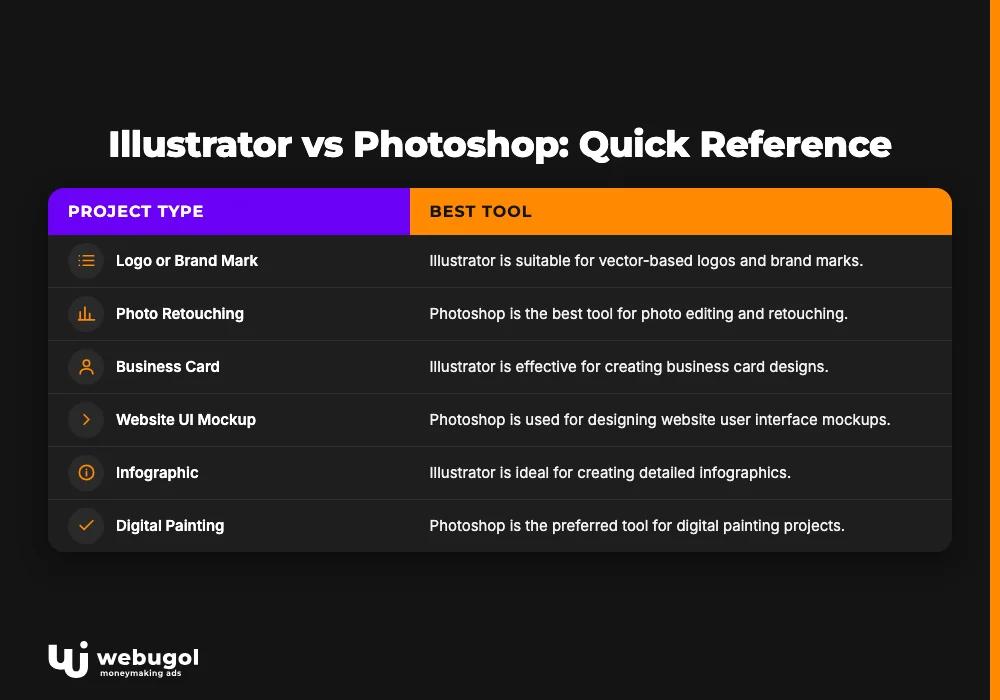
| Project type | Best tool |
|---|---|
| Logo or brand mark | Illustrator |
| Photo retouching | Photoshop |
| Business card | Illustrator |
| Website UI mockup | Photoshop |
| Infographic | Illustrator |
| Digital painting | Photoshop |
| Print brochure | Illustrator |
| Social media image with text | Photoshop |
Illustrator vs Photoshop: comparing core features
Both tools have deep feature sets built around different core assumptions.
Illustrator gives you paths, anchor points, and curves. The Pen Tool is its backbone. You construct shapes mathematically, making them infinitely adjustable. File formats like SVG and EPS travel well between systems and scale cleanly for print. Large vector files with hundreds of complex paths can slow performance, so keeping files organized matters.
Photoshop gives you pixels, layers, and blending modes. Its brush engine convincingly simulates oil, watercolor, and charcoal. Layer masks let you composite images without permanently altering the source. High-resolution PSD files carry all that detail but grow heavy with complex projects. Adobe recommends at least 8 GB of RAM for both tools, with 16 GB or more for complex work (Adobe system requirements).
Both programs run on Windows and macOS and integrate with the broader Adobe Creative Cloud tools ecosystem. Illustrator files import into Photoshop and vice versa, so hybrid workflows are standard in agencies.
Which is better for beginners: Illustrator or Photoshop?
Photoshop is the easier entry point for most beginners. Adjusting brightness, cropping, and doing basic retouching provide quick, visible feedback. Illustrator's vector model requires understanding paths and anchor points before the basics feel natural, which makes the initial curve steeper. If you already know your goal is logo design or scalable graphics, however, start with Illustrator directly rather than routing through Photoshop first. Most beginners miss this.
Is Photoshop good for logo design?
Photoshop is not the right tool for logos. Raster designs lose quality when scaled up. A logo built at 500px blurs when printed large or displayed on a high-resolution screen. Vectors hold every edge. Illustrator is the correct choice because vector graphics stay sharp at any size. Start every branding project in Illustrator.
Can Illustrator replace Photoshop?
No. Illustrator has no meaningful photo editing or digital painting capabilities. Photoshop has no true vector drawing system. For a project that combines brand identity work with campaign photography, you need both tools, or at minimum you need to export assets between them. The illustrator vs photoshop question is not about ranking one above the other; it is about recognizing they solve completely different problems.

Do I need both Illustrator and Photoshop?
It depends on what you make. A photographer rarely needs Illustrator. A brand designer rarely needs Photoshop for core deliverables. A full-service creative team or web agency needs both. Adobe bundles them in the Creative Cloud all-apps plan; individual app subscriptions are also available. Check Adobe's current pricing page for the latest figures. If budget is a constraint, identify your primary output first: photos and composites point to Photoshop, logos and print work point to Illustrator.
A practical decision framework
Three questions cut through the noise when the illustrator vs photoshop choice is unclear:
- Will the design appear at multiple sizes? If yes, use Illustrator. Logos, icons, and print materials all need to scale without degrading.
- Does the project start with a photograph? If yes, use Photoshop. Retouching, compositing, and digital painting are pixel-based tasks.
- Is it a web or UI project? Most UI workflows start in Photoshop or a design tool like Figma and pull vector assets from Illustrator for brand elements. Handling both brand identity and production assets together almost always means using both adobe creative cloud tools.
Our design team often starts brand identity work in Illustrator and hands off raster assets to Photoshop for campaign production. This workflow just works. Finalized designs then move to our Next.js development team for web build-out. The two programs complement each other; experienced studios use them in tandem.
Ready to build with the right tools?
Choosing the wrong software wastes time and budget. If your project needs professional design and development work from day one, Webugol can help. We build and optimize digital products with the right tools for each job.
FAQ
Which is better for beginners: Illustrator or Photoshop?
Photoshop is generally the easier starting point because its photo editing interface provides quick, intuitive results. Illustrator's vector drawing model requires more upfront learning before the basics click. If your goal is logo design or scalable graphics from the start, learn Illustrator directly.
Can Illustrator replace Photoshop?
No. Illustrator handles vector graphics and is built for logos, icons, and scalable design. Photoshop handles raster images and is built for photo editing, compositing, and digital painting. They cover distinct jobs and cannot substitute for each other in a professional workflow.
What is the difference between vector and raster graphics?
Vector graphics use mathematical paths that scale to any size without quality loss. Raster graphics are pixel grids that degrade when enlarged past their original resolution. That difference is the core reason the illustrator vs photoshop choice exists at all.
Is Photoshop good for logo design?
Photoshop is not suited for logo design. Raster-based designs degrade when scaled up, making them unsuitable for branding that appears across many sizes. Use Illustrator for every logo or brand mark project.
Do I need both Illustrator and Photoshop?
Many professionals use both, but your primary output determines where to start. Photographers and digital artists work mainly in Photoshop; brand designers and illustrators work mainly in Illustrator. Full-service creative teams typically use both as complementary adobe creative cloud tools.

