



Is Google Meet HIPAA compliant? What telehealth providers must verify in 2026
Is Google Meet HIPAA compliant? Yes, but only on a paid Google Workspace plan with a signed Business Associate Agreement in place. The free consumer version is not eligible for a BAA and cannot be used for any patient-facing workflow under HIPAA. Compliance also requires specific post-BAA configuration steps, including disabling Gemini AI features and enforcing domain-level 2FA, which this guide covers in full.
Is Google Meet HIPAA compliant when using a free account?
No. Free Google accounts cannot obtain a Business Associate Agreement, which HIPAA requires for any vendor that stores or transmits protected health information. Using Meet on a free account for patient consultations is a HIPAA violation regardless of any other security measures the practice has in place.
The structural issue runs deeper than a missing document. Free accounts share infrastructure with consumer Google services that have no enterprise-grade data controls, no domain-level admin console, and no enforceable audit log policy.
A practice relying on a personal Gmail account for telehealth video calls has no mechanism to restrict data access, enforce authentication requirements, or demonstrate compliance to an OCR auditor. This is not a configuration gap, it is a plan-tier eligibility issue.
Wait, removing em dash, let me rephrase: This is not a configuration gap. It is a plan-tier eligibility issue.
Why free accounts don't qualify
Three specific HIPAA safeguard requirements make free Google accounts incompatible with any patient-facing workflow. First, Google does not offer a BAA to free account holders, so the covered entity cannot establish the legally required vendor relationship.
Second, free accounts lack domain-level admin controls, meaning there is no organizational way to enforce authentication policies, restrict external participants, or manage session recordings. Third, there is no enforceable audit log policy: a covered entity cannot demonstrate to HHS/OCR that it tracked access to PHI.
Signs your current Google Meet setup is not HIPAA compliant:
- A free @gmail.com or personal Google account handles patient video calls
- No signed BAA with Google is on file in your compliance documentation
- Gemini AI features, including meeting summaries and AI transcripts, are enabled and have not been disabled in the admin console
- Two-factor authentication is not enforced at the domain level for all users who access patient sessions
- Meet recordings route to a personal Google Drive folder rather than a shared, admin-controlled Workspace drive
- Third-party Marketplace add-ons are active in Meet sessions without their own BAAs reviewed and on file
Which Google Workspace plans include a BAA
BAA eligibility begins at Business Starter and applies to all paid Google Workspace tiers above it, including Business Standard, Business Plus, and all Enterprise plans. According to Google's HIPAA implementation guide, a covered entity must accept the HIPAA Business Associate Amendment through the admin console before any PHI may be stored or transmitted using covered services.
One persistent source of confusion: Google Workspace Individual does not qualify for a BAA even though it is a paid subscription. It lacks the organizational admin controls that HIPAA requires for covered entities.
How to sign a BAA with Google for Google Meet
Signing the BAA is a prerequisite, not a finish line. The configuration work in the following section is what converts the signed agreement into a compliant operating environment.
Step-by-step BAA enrollment
- Log in to the Google Workspace admin console at admin.google.com using a super-administrator account.
- Navigate to Account > Account settings > Legal and compliance > HIPAA Business Associate Amendment.
- Review the amendment terms and click "Accept" to countersign on behalf of your organization.
- Record the acceptance date in your compliance documentation. Google does not send a confirmation email, so the enrollment timestamp in the console is your evidence of the signed agreement.
If you are comparing platforms before committing to a Google Workspace subscription, the guide to HIPAA-compliant video conferencing options covers purpose-built telehealth platforms alongside Google Meet so you can evaluate requirements before signing.
What the BAA covers, and what it doesn't
The Google HIPAA BAA covers a defined set of core Workspace services. Outside that boundary, a signed BAA provides no protection.
Services covered by Google's BAA:
- Gmail (with S/MIME encryption and admin controls enabled)
- Google Drive and Shared Drives
- Google Meet (paid Workspace plans only)
- Google Calendar
- Google Chat
- Google Vault
Services not covered:
- Gemini AI features in any Workspace product, including Meet summaries and transcripts
- Google Workspace Individual
- Google Workspace free tier
- Third-party Marketplace add-ons
- Consumer Google services (YouTube, Google Photos, standard Maps API)
This boundary matters for practice administrators. Many assume a signed BAA covers everything inside their Google account. It does not. A Marketplace add-on used during a patient call falls outside the BAA envelope and requires its own vendor review.
What to configure in Google Meet after signing the BAA
A signed BAA is a legal agreement, not a technical control. The controls that protect PHI live in the admin console, and none are active by default. Practices that stop at the signature and proceed with patient calls are still running a non-compliant environment.
Recording and storage settings
By default, Meet recordings route to the session host's personal Drive, not a shared organizational folder. To meet HIPAA's minimum necessary access and audit requirements, recordings must go to a shared drive controlled by an organizational admin, with access restricted to staff who have a clinical or administrative need.
In the admin console, navigate to Apps > Google Workspace > Google Meet > Meet video settings. Set the recording destination to a specific shared drive folder and disable the option for individual users to override that destination. Set a retention policy inside Google Vault that aligns with your state's medical record retention requirement, typically six years minimum under HIPAA. Disable personal Drive storage for Meet recordings organization-wide.
Access controls and 2FA
Domain-level two-factor authentication is required, not optional. Navigate to Security > Authentication > 2-step verification in the admin console, set enrollment to "mandatory" for all users, and choose an authenticator app or hardware key over SMS. SMS-based 2FA is vulnerable to SIM-swap attacks and should not be used for accounts that access patient session data.
For patient-facing sessions, restrict external participant access so only invited attendees can join without admin approval. Enable host management so the session host must admit participants from a waiting room. Set these controls under Meet video settings at the organizational unit level, not left to individual host preferences.
Post-BAA configuration checklist:
- Redirect all Meet recordings to an admin-controlled shared drive; disable personal Drive routing
- Set a Google Vault retention policy matching your state's medical record retention requirement
- Enable mandatory 2FA for all users at the domain level; use authenticator app over SMS
- Restrict external participant join: require host approval for all non-domain attendees
- Enable waiting room and host management for all patient-facing call types
- Disable all Gemini AI features: meeting summaries, AI transcripts, smart nudges, and auto-notes
- Audit and block Marketplace add-ons that process session data without a current BAA on file
- Implement role-based access control: restrict who can view, export, or delete Meet recordings
Third-party add-ons and integrations
Any Google Workspace Marketplace add-on that processes data during a Meet session falls outside Google's BAA. A scheduling tool, transcription service, or note-taking extension connected to Meet must either carry its own HIPAA BAA or be blocked from patient-facing sessions.
To audit installed add-ons, go to Apps > Google Workspace Marketplace apps in the admin console. Review each app for a current BAA and block those that cannot produce one. Your compliance officer should approve any new Marketplace installation that touches video session data before it goes live.
HIPAA compliance does not stop at the video call. Telehealth providers scaling Google Ads or Meta campaigns face the same PHI exposure in tracking scripts, landing pages, and CRM intake flows as they do in the video layer. Healthcare Growth System by Webugol builds the full acquisition path, from ad click to confirmed booking, with HIPAA-compatible tracking and infrastructure built into the foundation rather than patched on later. Book a Strategy Call to see what that looks like for your practice.
Is Google Meet HIPAA compliant for telehealth?
Yes, under specific conditions: a paid Workspace plan, a signed BAA, and completed post-BAA configuration. But HIPAA compliance for telehealth extends beyond a compliant video tool. The regulatory framework adds requirements around informed consent documentation, session logging, and state telehealth regulations that Google Meet only partially addresses natively.
Telehealth requirements beyond a BAA
A compliant video call does not automatically produce a compliant telehealth encounter. Practices are responsible for capturing and retaining informed consent for telehealth visits, a process Google Meet does not support without an external integration. Most telehealth workflows pair Meet with an EHR or scheduling system that handles consent capture, visit documentation, and audit trail generation. Relying on Meet alone leaves identifiable gaps in the encounter record.
Session logging is a related gap. Google Vault retains recordings when configured correctly, but it does not produce structured visit logs that match clinical documentation standards. If your jurisdiction requires documentation proving that a telehealth visit met specific standards, that documentation typically comes from the EHR integration, not from Meet itself.
State telehealth regulations add another layer. Some states require specific informed consent language, in-state provider licensure, or prescribing limitations that affect how appointments can be structured. Google Meet handles the video transmission; the regulatory overlay is the practice's responsibility regardless of which platform is used.
For practices evaluating Zoom as an alternative, Is Zoom HIPAA compliant covers the BAA terms and required configuration steps specific to Zoom for Healthcare, letting you compare both platforms on identical criteria.
When dedicated telehealth platforms make more sense
Google Meet on a paid Workspace plan works well for lower-volume telehealth operations or practices already running clinical workflows inside Google Workspace. Practices with high session volumes, regulated specialty verticals such as behavioral health or psychiatry, or tightly integrated EHR workflows may find that purpose-built telehealth platforms reduce the operational burden of maintaining compliance across multiple integrated systems.
Patient experience is a factor too. A purpose-built telehealth platform typically reduces friction for patients: they join through a branded waiting room without needing a Google account, and the practice has a documented encounter flow rather than a configured general-purpose video tool. For practices focused on reducing no-show rates, that friction reduction is a measurable variable worth weighing.
The decision is a business operations question as much as a compliance one. If your scheduling, consent, and documentation workflows already live outside Google Workspace, you are managing integration overhead regardless. A dedicated telehealth platform may consolidate more of that workflow under a single BAA and reduce the administrative surface area.
Is Gemini AI in Google Meet HIPAA compliant?
No. Gemini features are explicitly excluded from Google's HIPAA BAA. This includes meeting summaries, AI-generated transcripts, auto-notes, and every other Gemini-powered output from a Meet session. Using these features during a patient call creates a HIPAA violation even when every other configuration step is complete.
This is the most common misconfiguration among practices that believe they are fully compliant after signing the BAA. Gemini features in Google Meet are enabled by default in most Workspace plans and produce AI-processed outputs that route outside the BAA-covered service boundary.
The admin console controls are specific: navigate to Apps > Google Workspace > Google Meet, locate the Gemini features section, and disable every toggle before allowing any patient-facing use of Meet. Toggles to disable include meeting summaries, transcript generation, smart recap, and all AI-powered note-taking or suggestion features.
Check the admin console after each Google Workspace platform update, as Google periodically adds new Gemini capabilities that default to enabled. Your compliance documentation should record the date each toggle was disabled and the name of the admin who performed the change.
Google Meet vs. telehealth video platforms
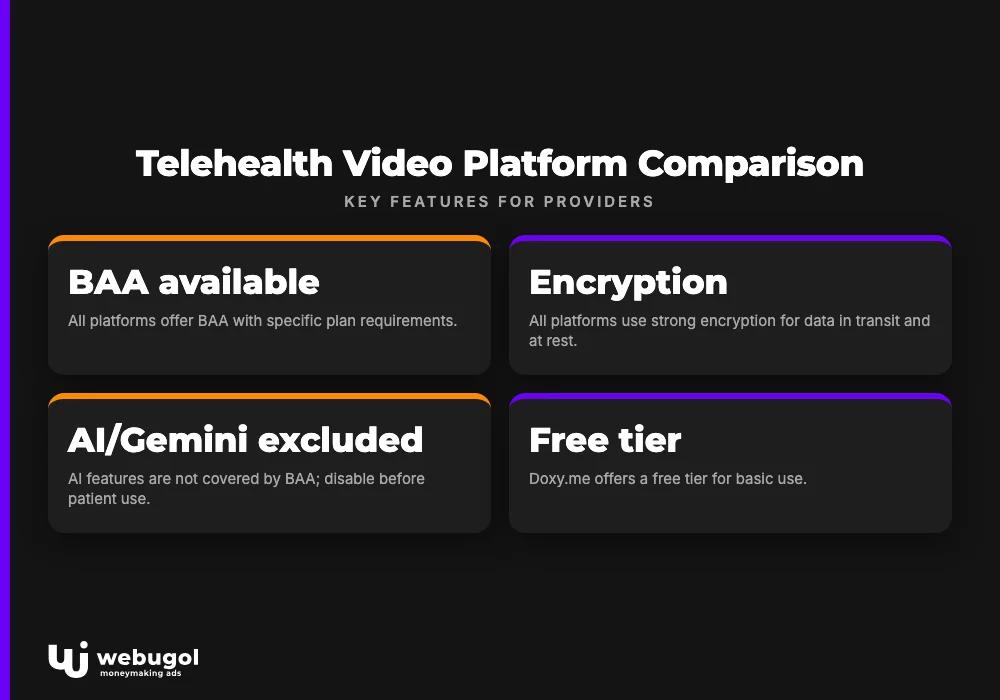
Is Google Meet HIPAA compliant enough for your telehealth practice compared to platforms built specifically for clinical settings? The comparison below puts the key decision factors side by side. No top-10 search result for this query currently provides this view.
| Feature | Google Meet (Workspace paid) | Zoom for Healthcare | Doxy.me | EHR-embedded video |
|---|---|---|---|---|
| BAA available | Yes (paid plans; admin acceptance required) | Yes (Healthcare plan required) | Yes | Varies by EHR vendor |
| Encryption | TLS in transit, AES-256 at rest | AES-256 GCM, optional end-to-end | TLS/AES-256 | Varies |
| Waiting room | Yes (host management required in admin console) | Yes (enabled by default) | Yes (built-in) | Varies |
| Consent capture | No (requires EHR or scheduling integration) | No (requires integration) | No | Often yes |
| Session documentation | No native capability | No native capability | No native capability | Often yes |
| AI/Gemini HIPAA status | Excluded from BAA; must disable before patient use | AI Companion excluded from BAA | No AI notetaking | N/A |
| Entry pricing | Business Starter (~$7/user/mo) | Healthcare plan priced separately from base Zoom | Free tier; paid from ~$35/mo | Bundled with EHR subscription |
Table reflects publicly available feature descriptions and pricing as of 2026. Zoom for Healthcare and EHR-embedded pricing varies by contract.
What happens if you use Google Meet without these steps?
Using Google Meet for patient visits without a signed BAA is a HIPAA violation. No end-to-end encryption configuration, no additional security measure, and no good-faith intent changes that outcome. OCR treats the absence of a BAA as a structural violation, not a procedural one.
The HHS OCR civil monetary penalty tiers are organized by level of culpability:
- Did not know: $100 to $50,000 per violation, annual cap up to $25,000 per violation category
- Reasonable cause: $1,000 to $50,000 per violation, annual cap up to $100,000 per violation category
- Willful neglect, corrected: $10,000 to $50,000 per violation, annual cap up to $250,000 per violation category
- Willful neglect, not corrected: $50,000 per violation, annual cap up to $1.9 million per violation category
Each patient call conducted without a BAA is a separate potential violation. A practice running consultations on a non-compliant platform for several months is not facing a single violation. OCR audit triggers tied to video conferencing include patient complaints, breach reports submitted by the practice itself, and reports from former employees with knowledge of non-compliant operations.
The compliance exposure extends to the intake layer. If landing pages collect patient information and route it through tracking scripts not covered by a BAA or a consent mechanism, the risk does not end at the video call. The HIPAA-compliant scheduling software buyer's guide covers what to evaluate in a scheduling system that works alongside your video platform and keeps intake flows within compliance boundaries. Practices running web analytics alongside their telehealth stack should also review is Google Analytics HIPAA compliant, a closely related question that affects how conversion tracking and patient acquisition data are handled.
Scale telehealth patient acquisition on a compliance-ready foundation
For telehealth providers running or planning to scale Google Ads and Meta campaigns, HIPAA compliance must extend from the video call to the tracking layer, landing pages, and CRM intake workflow. Most practices address the video platform and leave the acquisition infrastructure unexamined. That creates PHI exposure at every point a potential patient submits information before a call is booked.
Webugol builds end-to-end acquisition infrastructure for US telehealth providers with compliance requirements built into the tracking setup, landing page architecture, and CRM intake flows from day one. The Healthcare Growth System program covers the full 90-day path: strategy and funnel architecture in month one, compliant tracking and campaign launch in month two, and scaling after the numbers prove the model in month three. Book a Strategy Call to discuss what that infrastructure looks like for your practice size and specialty.
FAQ
Is Google Meet HIPAA compliant for free?
No. Free Google accounts are not eligible for a Business Associate Agreement, which HIPAA requires for any vendor handling protected health information. Both a paid Google Workspace plan and a signed BAA are required before using Meet for patient communications.
Does Google Meet require a BAA to be HIPAA compliant?
Yes, a signed BAA with Google is a prerequisite, not an optional safeguard. Without it, transmitting protected health information over Google Meet constitutes a HIPAA violation regardless of any other security settings the practice has in place.
Can I use Google Meet for telehealth appointments?
Yes, provided the practice uses a paid Google Workspace plan, has a signed BAA, and completes the post-BAA configuration covering recordings, access controls, 2FA enforcement, and Gemini AI feature disablement.
Is Gemini AI in Google Meet HIPAA compliant?
No. Gemini features such as meeting summaries, AI transcripts, and auto-notes are excluded from Google's BAA and must be disabled in the Workspace admin console for any session that involves patient data.
What happens if I conduct patient visits on Google Meet without a BAA?
Using Google Meet for patient visits without a signed BAA is a HIPAA violation. OCR civil monetary penalties range from $100 to $50,000 per violation, with an annual cap up to $1.9 million per violation category depending on the level of culpability.

