



Lovable + Shopify: What It Does, Where It Breaks, and What Comes Next
The lovable shopify integration connects Lovable's AI builder to your Shopify backend through the Storefront API, generating a custom headless frontend instead of a native Shopify theme. Both platforms run simultaneously: Shopify handles payments, inventory, and checkout while Lovable controls the storefront your customers browse. This headless architecture is what separates lovable shopify from a standard page-builder or theme tool. It is also the reason certain Shopify apps stop working and the primary factor that determines whether the setup still fits where your store is heading.
What is the Lovable Shopify integration?
Lovable uses Shopify's Storefront API to build a custom headless frontend for your store. Your Shopify account stays active and manages all commerce operations: orders, payments, taxes, and inventory. Lovable generates the pages, layouts, and product displays that customers browse. This is not a plugin or an app inside Shopify's admin; it is a fully separate frontend application connected to your store's live data.
In practice, the lovable shopify integration makes Lovable the face of your store while Shopify runs the engine underneath. Neither platform replaces the other, and both require active subscriptions to keep the store live.

How to connect Lovable to Shopify
The connection takes roughly ten minutes with an existing Shopify account. You authorize Lovable through an OAuth screen, choose between a new store or an existing one, build the storefront, and publish. Both paths end at the same place: a Lovable-hosted headless frontend pulling live data from your Shopify catalog.
Creating a new store vs. connecting an existing one
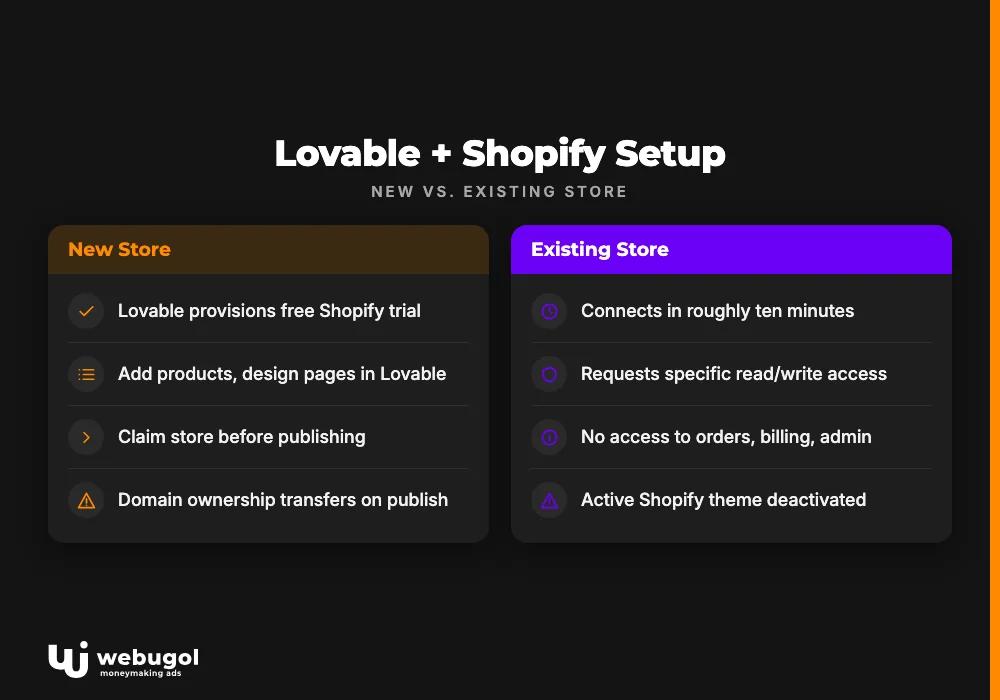
For a new store, Lovable provisions a free Shopify trial account and handles initial setup. You add products, design pages inside Lovable, then claim the store before publishing. For an existing store, Lovable requests specific read and write access scopes, primarily product catalog data and storefront display settings, without touching your orders, billing, or admin configuration.
Full setup flow for lovable and shopify:
- Open a new project in Lovable and select the Shopify integration option.
- Authenticate with your Shopify account through Lovable's OAuth screen.
- Choose "new store" or "connect existing store" based on your situation.
- For a new store: add products and design your storefront pages inside Lovable.
- Claim the Shopify store to transfer domain ownership before going live.
- Publish the Lovable frontend as your active storefront.
3 gotchas nobody mentions in the docs
Three friction points that catch merchants by surprise:
- Domain ownership transfers on publish. When a new store goes live, the domain moves from Lovable's account to yours through Shopify admin. Missing this step leaves your store on a Lovable subdomain after launch.
- Your active Shopify theme is deactivated. Publishing through Lovable replaces the active Shopify theme with the headless frontend. Reverting to a theme-based setup later requires manual reactivation inside Shopify.
- Some API scopes require a paid Shopify plan. Checkout customization and certain Storefront API features are unavailable on the free trial and require Shopify Basic or higher.
What can Lovable actually build for Shopify?
The lovable shopify output is a custom storefront, not a theme template. Lovable's AI constructs the visual layer through conversational prompts, and you can adjust layouts, colors, typography, and page structure without writing code. The result is a hosted frontend that reads product data live from your Shopify catalog.
Specific capabilities available through lovable ai shopify:
- Lovable generates a storefront homepage with AI-designed layout and brand styling.
- Product listing and detail pages pull live catalog data from Shopify via the Storefront API.
- Cart functionality routes customers to Shopify's native checkout, keeping Shopify Payments active.
- Collection pages organize products by your existing Shopify categories.
- Custom landing and promotional pages build directly from conversational prompts.
- Basic on-page SEO structure, meta titles, meta descriptions, and heading hierarchy, gets generated per page.
- Visual customization of typography, color palettes, and section layouts happens through conversational editing inside Lovable.
Where the integration breaks
Every benefit of the lovable shopify headless approach carries a compatibility cost. Because Lovable's frontend lives outside Shopify's native rendering layer, any app built to inject code into a Shopify theme stops working as expected. This is not a bug in the integration; it is a structural consequence of going headless.
Which Shopify apps stop working with headless storefronts?
Apps built for Shopify's Liquid theme engine break in a Lovable headless setup. Theme-injecting review widgets work by inserting code into Liquid templates that no longer exist in the Lovable frontend. The same mechanism takes down script-tag loyalty programs, checkout upsell tools that manipulate the DOM before checkout, and live-chat apps built for Shopify's native JavaScript layer.
Affected app categories:
- Review and rating apps insert widget code via Liquid snippets; most configurations default to this approach and will not render in a headless context.
- Loyalty and rewards programs using client-side script tags fail because the Liquid DOM they target no longer exists.
- Checkout upsell tools relying on Shopify UI extensions or DOM access outside a headless API context stop loading entirely.
- Live-chat widgets built for Shopify's native storefront JavaScript layer do not initialize.
- Email capture popups packaged as Shopify theme app extensions rather than standalone scripts will not appear.
Some vendors offer headless-compatible alternatives through API integrations or standalone JavaScript embeds. Verify compatibility directly with each app vendor before committing to the setup.
When does performance become a real problem?
Core Web Vitals for a lovable shopify store depend on how Lovable hosts and bundles its frontend, not on Shopify's infrastructure. Shopify's servers are fast. The variables are JavaScript bundle size, image optimization, and rendering strategy on Lovable's side.
Performance becomes a conversion issue when Largest Contentful Paint on mobile climbs above Google's 2.5-second threshold for a "good" LCP score. Below that point, slow load times affect quality scores but not necessarily sales. Above it, customers leave before the page finishes loading. Track Core Web Vitals in Google Search Console after launch, and address image compression and unused JavaScript in Lovable's build settings first.
What does Lovable + Shopify actually cost?
Two active platforms mean two monthly bills. The free trial framing from both companies makes the total look manageable early on. The full picture at month six or twelve looks different for most stores.
Monthly cost breakdown: Lovable plan + Shopify fees
Lovable offers a free tier suitable for prototyping, with paid plans that unlock more AI messages and build credits for ongoing iteration. Running a live store with any regular customization effectively requires a paid Lovable plan. Shopify fees add a separate line item on top.
- Lovable free tier: limited AI messages; functional for early prototyping but not for active store management.
- Lovable Starter plan: entry-level paid tier, sufficient for occasional storefront changes.
- Lovable Launch plan: mid-tier, suited for active iteration, new page builds, and layout experiments.
- Shopify Basic ($39/month, per [Shopify's pricing page](https://www.shopify.com/pricing)): minimum paid plan with all core commerce features and Shopify Payments.
- Shopify plan ($105/month): lower transaction fees and better reporting for stores processing consistent volume.
A minimum shopify lovable setup, entry-level paid Lovable plan plus Shopify Basic, starts at roughly $59/month before apps, transaction fees, or credit overages.
12-month total vs. custom development
Cumulative fees change the math for founders thinking past the prototype stage. At the minimum viable configuration, platform fees alone reach approximately $700 over twelve months. A growth-tier setup runs $1,800 or more, before paid apps or credit overages are counted.
Custom development costs more upfront. A production-grade custom headless storefront built by a team that treats development and growth strategy as one engagement rather than two separate contracts starts at $3,000–$5,000 for an AI-accelerated build. Over twelve months, that one-time investment looks different against recurring fees, particularly once app workarounds and iterative patches are factored in.
The comparison:
- 12-month Lovable + Shopify (minimum tier): costs approximately $700 in platform fees, plus app subscriptions, transaction fees, and ongoing credit dependency for any store changes.
- 12-month Lovable + Shopify (growth tier): runs $1,800 or more in platform fees, with the same headless compatibility limits throughout.
- Custom headless build (one-time): starts at $3,000–$5,000 upfront, brings full Shopify app compatibility, no recurring frontend platform fee, and complete codebase ownership.
If the 12-month math points toward a custom build, see what a custom production build for your store actually covers at Webugol, including how development and your organic growth strategy get scoped together from day one.

Who is Lovable Shopify for, and who has already outgrown it?
The right fit for a lovable shopify store is a pre-revenue founder validating a product concept without a development team. At that stage the tool delivers real value: a working, branded storefront connected to Shopify's full commerce infrastructure in hours rather than weeks, with no developer hire and no full-build commitment required.
Three signals that you have outgrown lovable shopify:
- Apps your store depends on, including review tools, loyalty programs, and post-purchase flows, fail to render in the headless frontend or require expensive custom workarounds.
- You are rebuilding the same pages repeatedly because AI prompts produce inconsistent layouts as your product catalog grows.
- Your store needs checkout customizations, subscription billing logic, or third-party integrations that require direct API access and code Lovable's prompts cannot generate.
None of these signals mean the tool was a wrong choice. Hitting the ceiling is a natural part of the growth path. The question is what comes next. Webugol works with founders at exactly this inflection point, not to deliver a website as a standalone output, but to build the next growth stage as a system where the custom storefront and the organic acquisition layer get designed together.
What's the next step when Lovable isn't enough?
Moving from a lovable shopify prototype to a custom headless build requires three things to carry over cleanly: product data, URL structure, and a plan for how the new frontend will earn traffic rather than just display products.
Product data is the straightforward part. Shopify holds it in your account regardless of which frontend renders it. A custom build connects to the same backend via the Storefront API, so no product migration is needed.
URL structure takes deliberate attention. If your Lovable store has been live long enough to earn backlinks or indexed pages, those URLs carry SEO equity. A custom build should match the existing URL architecture or implement clean 301 redirects rather than defaulting to a fresh schema.
The migration approach Webugol uses covers all three layers: a production frontend matched to your existing URL structure, connected to your current Shopify backend, with organic growth strategy built into the architecture from the start rather than scoped as a separate project after launch.

Ready to move beyond your Lovable prototype?
Lovable shopify gave you a real foundation: a live storefront, real products, and a working commerce backend. The ceiling is now visible in the form of app gaps, scaling constraints, or logic the platform cannot deliver through prompts.
The next step is a focused scoping conversation about what a production build actually requires for your specific store. Book a scoping call to define what carries over from your current Lovable setup, what a custom build needs to deliver, and how development and organic growth get structured as a single engagement.
FAQ
How do I connect Lovable to an existing Shopify store?
Open a project in Lovable, select the Shopify integration, and authenticate through the OAuth screen. Lovable requests specific read and write access to your store, primarily product catalog data and storefront settings. Your existing orders, billing history, and Shopify admin configuration are not affected by the connection.
Does Lovable replace Shopify, or do you need both?
Lovable does not replace Shopify. The two platforms operate as separate layers: Lovable generates and hosts the custom frontend while Shopify handles all commerce operations including payments, inventory, and checkout. An active Shopify account is required for the integration to function.
Which Shopify apps don't work with Lovable's headless storefront?
Apps built for Shopify's Liquid theme engine will not work correctly in a Lovable headless setup. The affected categories include theme-injecting review widgets, script-tag loyalty programs, checkout upsell tools, and live-chat apps that insert code into native Shopify templates. Some vendors offer headless-compatible alternatives, but compatibility must be confirmed directly with each app.
What happens when my Lovable store is ready to scale?
When a lovable shopify store outgrows its platform limits due to app incompatibilities, performance constraints, or custom logic requirements, the path forward is a custom headless build on the same Shopify backend. Product data and your Shopify account stay in place; only the frontend layer needs rebuilding.
How do I migrate a Lovable store to a custom build?
Product data remains in Shopify and does not require migration. The work involves rebuilding the frontend layer with a custom codebase connected to your existing Shopify backend via the Storefront API. Preserving or properly redirecting existing URLs protects the SEO equity your store has accumulated over its live period.

