



HIPAA compliant video conferencing: BAA checklist, platform picks, and compliance gaps
HIPAA compliant video conferencing requires four elements working together: a signed Business Associate Agreement, end-to-end encryption with AES-256 at rest and TLS 1.2 or higher in transit, access controls that restrict session entry to authenticated participants, and a session audit log recording who accessed the call and when. No platform qualifies on a single criterion. This guide compares nine platforms by BAA status, pricing, and use case, covers whether Zoom, Google Meet, and Microsoft Teams qualify, and addresses the ad-tracking gap that no video BAA extends to.
What makes a video platform HIPAA-compliant?
A platform qualifies only when all four criteria are active simultaneously. A signed BAA with unchanged vendor defaults still exposes protected health information. If the platform records sessions to a server outside the BAA scope by default, or if AI-generated transcripts run automatically, the data flowing through those features is not covered, regardless of the BAA language.
Think of the four criteria as a system. Remove any one, and the others stop protecting you.
Most video conferencing software is HIPAA compliant only after manual configuration changes and a signed BAA are both in place. The subscription alone does not create compliance. Configuration without the BAA, or a BAA without the required settings changes, leaves PHI exposed.
What encryption standards are required for HIPAA video calls?
The HIPAA Security Rule does not name a specific algorithm, but the accepted standard for healthcare video encryption is AES-256 at rest and TLS 1.2 or higher in transit. Any BAA using vague language such as "industry-standard encryption" without naming these specifications does not confirm compliance. Request written confirmation of both standards before signing.
One area the four criteria do not cover: the acquisition path that brought the patient to your booking page. Tracking from ad click to confirmed appointment runs through your ad stack, not your video platform, and no video BAA reaches that far.
What does a BAA need to cover for video conferencing?
Most practices sign a BAA and assume compliance is complete. That assumption is where audits find exposure. This telehealth BAA checklist takes about 15 minutes to complete before signing and eliminates the most common post-audit finding: a BAA that technically exists but does not cover the features in active use. These telehealth BAA requirements apply to every platform in this guide.
- Named parties. The covered entity (your organization) and the business associate (the vendor) are identified by legal name. References to "customer" or "subscriber" are not sufficient.
- PHI scope. Session metadata and recordings are explicitly included, not only file attachments. Many BAA templates default to a narrow PHI definition that excludes session logs and the HIPAA video audit log the Security Rule requires.
- Breach notification timeline. The vendor commits to notifying you within 60 days of a discovered breach, the minimum required under the HIPAA Breach Notification Rule. Some agreements extend that window to 90 days or longer.
- Encryption standards. AES-256 at rest and TLS 1.2 or higher in transit are named explicitly. Vague language does not confirm the specific standards required.
- Auto-logout configuration. Session timeout must be configurable by your organization, not locked to vendor defaults. A 60-minute default on shared clinical devices is a Security Rule gap.
- Tier coverage. The BAA applies to the product tier you are actually purchasing. Some agreements cover only an enterprise tier one level above the one being contracted.
No current top-10 competitor for this keyword provides this checklist in full. It is the practical difference between a BAA that exists and one that holds up under audit.

Comparing 9 HIPAA compliant video conferencing platforms
Prices shown are approximate list rates as of 2026. Verify current tiers directly with each vendor before contracting, since healthcare-tier pricing changes frequently.
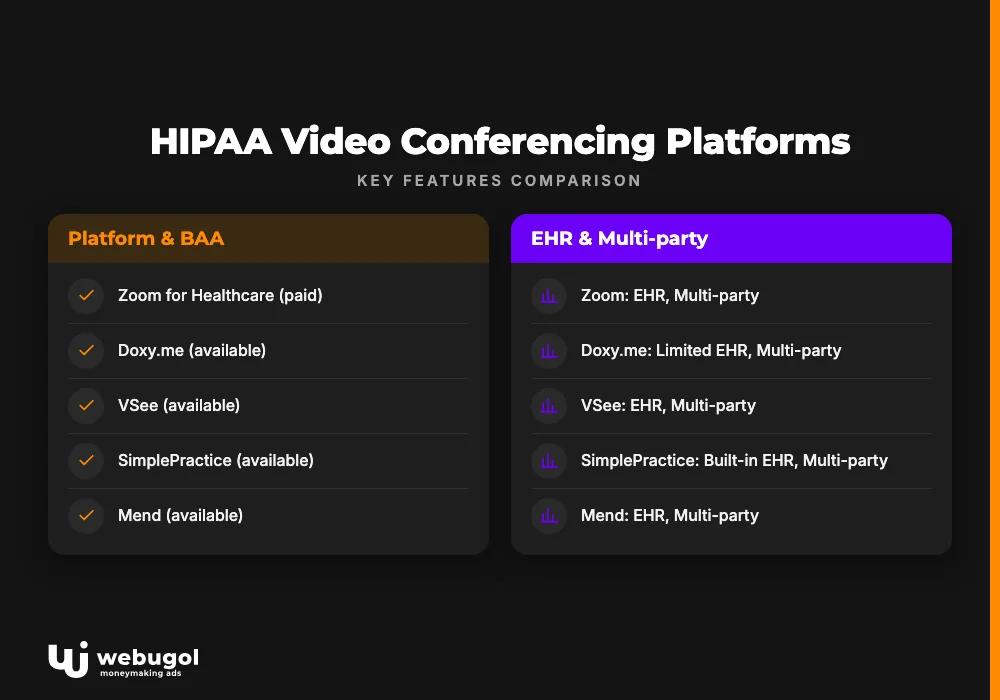
| Platform | BAA available | Starting price | Free tier | EHR integration | Multi-party |
|---|---|---|---|---|---|
| Zoom for Healthcare | Yes (paid plans) | ~$200/mo | No | Yes | Yes |
| Doxy.me | Yes | Free | Yes | Limited | Yes |
| VSee | Yes | ~$49/user/mo | No | Yes | Yes |
| SimplePractice | Yes | ~$69/mo | No | Built-in | Yes |
| Mend | Yes | ~$99/mo | No | Yes | Yes |
| SecureVideo | Yes | ~$50/mo | No | Yes | Yes |
| Microsoft Teams | Yes (Business+) | ~$6/user/mo | No | Via add-ons | Yes |
| Google Workspace | Yes (Enterprise) | ~$22/user/mo | No | Limited | Yes |
| Webex for Healthcare | Yes | ~$25/user/mo | No | Yes | Yes |
Not all HIPAA compliant video conferencing solutions suit every practice type. Use case determines the right fit. The sections below add platform-specific guidance by practice size and provider type.
Does Zoom qualify as HIPAA compliant for telehealth?
Yes, but only under specific conditions. Zoom HIPAA compliance requires a Business or higher plan with a signed BAA obtained from Zoom's healthcare compliance team. Three default features must then be disabled at the admin level: AI-generated meeting transcripts, meeting summaries, and any third-party recording integrations that route session data outside the BAA boundary.
Free Zoom accounts do not qualify under any circumstances. Using a free account for patient video visits is a HIPAA violation regardless of what other security settings are enabled. For a full breakdown of account-type requirements, see the detailed analysis of Zoom's configuration requirements and healthcare BAA process.
The shared failure point is assuming a paid subscription alone creates compliance. The BAA must be requested, signed, and stored. Then the features it covers must match what the organization actually uses.
Is Google Meet safe for therapy sessions?
No, not on a standard plan. Google Meet qualifies only under a Google Workspace for Healthcare and Life Sciences enterprise agreement with a signed BAA. A standard Google Workspace account, even a paid one, does not include the healthcare BAA by default. Sessions on a standard workspace plan expose PHI to Google's infrastructure outside any BAA boundary.
Microsoft Teams follows the same logic. It qualifies under Business and Enterprise Microsoft 365 plans that include the healthcare BAA. Teams AI features, Copilot transcripts, and Loop components must each be evaluated against the BAA scope before use. Enabling Copilot on an account with an active healthcare BAA does not automatically mean Copilot session data falls within that BAA.
Consumer accounts on all three platforms fail the BAA requirement regardless of any other settings. No BAA means no HIPAA compliant video conferencing, regardless of the encryption or authentication controls in place.
HIPAA video compliance and your ad tracking stack
Choosing a compliant video platform covers the call. It does not cover the rest of the patient acquisition path. This is the angle absent from every current top-10 result for this keyword, and it directly affects practices running paid acquisition.
Meta Pixel and Google Ads conversion tags capture URL-level data by default. On telehealth sites, URLs frequently encode session type, condition category, or appointment type in query parameters. A URL like /schedule?condition=weight-loss&type=consultation transmits PHI to ad platforms not covered by any video BAA. The video session is compliant. The attribution event that fired when the patient clicked "Book appointment" is not. These are two separate compliance layers with no shared vendor oversight.
Two compliant approaches exist. Google's Consent Mode v2 prevents tag firing for users who decline consent, but it does not eliminate URL-parameter PHI exposure unless the implementation strips query parameters before tag firing. Meta's Conversions API with server-side filtering allows event transmission without browser-side pixel code, giving the practice control over what data leaves the server before it reaches Meta's infrastructure.
Retargeting on medical conditions is prohibited on both platforms regardless of consent mode. Running condition-specific retargeting segments under a video BAA addresses one compliance layer while creating exposure in another. Video compliance and ad tracking are handled by different vendors with no shared view of overall risk.
If your practice has the video platform in place and needs to audit whether the measurement setup creates a separate risk, your GA4 tracking configuration and its HIPAA exposure covers the analytics-layer risk most practices discover only after scaling ad spend. For practices using a CRM alongside their telehealth workflow, verify that your CRM falls within the same BAA scope as your video platform, since cross-platform patient data flows are a recurring audit finding.

How do you configure a video platform for HIPAA compliance?
Selecting the platform is the prerequisite. These five steps target the post-BAA configuration gaps that cause real audit failures.
- Request the BAA in writing before the first patient visit. Most platforms generate it in-app under account or compliance settings. Some require a direct email to a healthcare compliance team. Do not assume the BAA was issued at account creation.
- Disable AI-generated transcripts, meeting summaries, and third-party recording integrations. These features are active by default in Zoom, Teams, and Google Meet. Disabling them at the admin level, not just for individual sessions, keeps session data inside the BAA boundary.
- Set session auto-logout to 15 minutes on inactive sessions. On shared clinical devices, require re-authentication for sessions running longer than 30 minutes. This setting is frequently left at vendor defaults of 60 minutes or longer.
- Configure a HIPAA-specific waiting room. A standard waiting room prevents early joiners from entering an active session. A HIPAA-configured waiting room also prevents PHI from appearing in the lobby interface before the provider admits the patient. Most platforms require both configurations separately, and most security documentation does not make that distinction clear.
- Run a dry call with a staff member before going live. Verify that BAA-covered settings are active, recording is off, and session metadata is not stored outside the BAA scope. Fifteen minutes of testing eliminates the most common post-launch compliance gap.
HIPAA compliant video conferencing for therapists and mental health providers
For mental health providers, three criteria are non-negotiable: no patient app download required, a branded or neutral waiting room, and in-flow consent capture as part of the join process rather than a separate pre-visit email step. These are the baseline for any therapist video platform used in a clinical context.
The mental health-specific risk is less visible than the call itself. Session notes and companion features syncing to third-party apps outside the BAA scope are a recurring compliance failure point. A notes app connected via API is covered by the video BAA only if it is explicitly named in that BAA. Most third-party note and homework apps are not named in video BAAs. Verify BAA scope for each connected application before using it with patient data.
Platform verdicts for therapists: SimplePractice for practices that need documentation integrated with scheduling and billing; Doxy.me for zero-friction patient access with no app install; TheraNest for session workflow management without a full EHR migration. All three provide a signed BAA and meet the core criteria for HIPAA compliant video conferencing in mental health contexts.
When evaluating platforms, verify whether vendor API integrations route data outside the BAA scope. Calendar sync, patient reminders, and third-party homework tools are consistent oversight areas in practices running therapy alongside their video platform.
Best free option for solo providers
Doxy.me's basic tier is the only platform in this guide with verified no-cost access that includes a BAA. That is the complete list. Every other HIPAA compliant video conferencing option in this guide requires a paid subscription before a BAA is available.
One verification step applies before the first patient call: confirm the BAA explicitly covers the free tier, not only paid plans. Some vendors provide a BAA document that applies only to a professional or enterprise subscription. Request written confirmation that your specific plan tier is covered. A generic BAA referencing an enterprise account does not protect a practice on the free tier.
Best for mid-size telehealth companies
Mid-size practices with multiple providers and an existing EHR need multi-party group visits, patient intake automation, enterprise access controls, and per-user BAA coverage that stays cost-effective at scale.
Mend handles intake automation, appointment reminders, and video within one compliance boundary. That single-BAA scope reduces the number of separate vendor agreements needed. Webex for Healthcare and RingCentral for Healthcare are built for HIPAA compliant video conferencing at enterprise scale, with access controls and EHR integration that support concurrent provider sessions without per-user costs becoming unmanageable.
Zoom for Healthcare is viable for organizations that already use Zoom broadly and can enforce configuration policy across all provider accounts. Relying on individual providers to configure their own sessions correctly is a compliance risk at any size.
Ready to audit your full telehealth compliance stack?
Most practices that have a compliant video platform still carry PHI exposure in their ad tracking stack. Video compliance and measurement architecture are handled by separate vendors with no shared view of overall risk. That gap is where practices get caught in audits, and no video BAA covers it.
The Webugol 90-day direct-to-patient growth program is built as a compliance-first acquisition system. Video platform selection, tracking setup, and paid acquisition are designed together rather than patched after launch. Month 1 is a tracking and compliance audit covering the full acquisition path from ad click to booked appointment, not just the video call.
Valhalla Vitality, a telehealth client, built their acquisition system on this compliance-first foundation and reached +287% monthly revenue with a 45% reduction in CAC.
If your practice has the video compliance layer in place and needs the rest of the system to match, start your compliance-first acquisition review through the 90-day healthcare growth program and see what a fully integrated stack looks like.
FAQ
What video conferencing platforms are HIPAA compliant?
Verified platforms include Zoom for Healthcare (paid plans with BAA), Microsoft Teams (Business and Enterprise Microsoft 365 plans with the healthcare BAA), Google Meet under a Google Workspace for Healthcare and Life Sciences enterprise agreement, and purpose-built solutions such as Doxy.me, VSee, SimplePractice Telehealth, and SecureVideo. Consumer accounts on any of these platforms do not meet the BAA requirement regardless of other security settings.
Does Zoom qualify as HIPAA compliant for telehealth?
Zoom is HIPAA-compliant only on paid Business or Healthcare plans that include a signed Business Associate Agreement. Free Zoom accounts do not qualify, and using them for patient video visits is a HIPAA violation regardless of any other security settings enabled on the account.
What is the cheapest HIPAA-compliant video conferencing option?
Doxy.me offers a free tier that includes a BAA, making it the lowest-cost verified option for individual providers. Practices that need EHR integration or multi-party group visits can expect to pay $35 to $99 per month depending on platform and feature requirements.
Is Google Meet safe for therapy sessions?
Google Meet qualifies for patient visits only under a Google Workspace for Healthcare and Life Sciences enterprise agreement with a signed BAA. Standard Google Workspace accounts and consumer Gmail accounts do not meet this requirement and expose PHI to Google's infrastructure outside any BAA boundary.
What happens if I use a non-compliant video platform for patient visits?
Using a non-compliant video platform for telehealth is a HIPAA Privacy and Security Rule violation. OCR fines range from $100 to $50,000 per violation based on culpability, and a breach notification to affected patients and to HHS is required within 60 days if PHI was exposed.

