



HIPAA-compliant scheduling software: 2026 buyer's guide for telehealth and clinics
Not every piece of appointment scheduling software is HIPAA compliant by default, two non-negotiables determine whether a tool qualifies: a signed Business Associate Agreement from your vendor and the technical safeguards that protect patient health information at every step in the booking flow. Covered entities, including telehealth platforms, medical clinics, solo practices, and allied health providers, must meet both conditions or face federal penalties.
Most buyer guides stop at "look for encryption." This one covers what they skip: what a BAA must actually contain, whether any free tier qualifies, and why staff calendars follow different rules than patient booking systems.
If your clinic or telehealth platform already runs a scheduling tool, use this guide as an audit checklist rather than a selection guide. The compliance gaps that drive no-show rate leaks and show-rate variance are almost always in the existing stack, not the choice of tool.
What makes scheduling software truly HIPAA-compliant?
HIPAA-compliant scheduling software requires a signed BAA, end-to-end encryption, role-based access controls, and a retained audit log. No single feature alone satisfies the requirement. The Office for Civil Rights (OCR) at HHS treats any scheduling tool that stores, transmits, or processes PHI on behalf of a covered entity as a business associate. This category includes automated booking confirmations and appointment reminder messages.
The BAA, what to demand before you sign
A Business Associate Agreement is a legal contract governed by 45 CFR §164.308. It defines exactly how a vendor may use and protect PHI on your behalf. Most vendors offer one. The default template, however, typically protects the vendor. Before signing any scheduling contract, confirm the BAA includes all of the following:
- The agreement explicitly lists all permitted PHI uses, including booking confirmations, automated reminders, and reporting exports.
- The BAA prohibits any PHI use not specifically named in the agreement.
- The vendor documents specific safeguards by name, referencing HIPAA Security Rule standards rather than generic "industry best practice" language.
- The agreement commits to breach notification within 60 days of discovery, consistent with HITECH requirements.
- Any subcontractors that touch PHI (SMS providers, email platforms, calendar sync services) must sign their own BAAs.
- The contract specifies a PHI return-or-destroy requirement on termination.
- The BAA grants HHS access to records for oversight and audit purposes.
- The agreement references specific encryption standards by name rather than deferring to "appropriate measures."
- The vendor discloses all third-party services that receive or process PHI under the agreement.
The subcontractor clause is the most commonly omitted item. Your appointment reminder service, calendar sync, and video platform all touch PHI. Each one needs its own agreement in place.
Technical safeguards that actually matter
Encryption is necessary but not sufficient. The safeguards that separate a HIPAA-ready tool from a consumer calendar are specific and verifiable:
- All data in transit uses TLS 1.2 or higher, covering booking forms, confirmation emails, and calendar sync connections.
- PHI stored at rest is encrypted with AES-256 or equivalent.
- The platform automatically terminates sessions after a configurable period of inactivity.
- Role-based access controls restrict which staff members can view, edit, or export appointment records.
- Audit logs capture all PHI access events and remain tamper-evident for at least six years.
- The tool offers multi-factor authentication for all user accounts, not just administrators.
- The vendor provides a written breach notification SLA in the contract, not just a verbal commitment during the sales process.

Can free scheduling tools be HIPAA-compliant?
Practices seeking hipaa compliant scheduling software free of charge will find limited options: a small number of free tiers can qualify, but only if the vendor provides a BAA on that specific tier, and most consumer-grade free tools explicitly prohibit PHI storage in their terms of service. Verify BAA availability on the free plan before booking a single patient.
What "free" includes, and what it doesn't
Free tiers fail HIPAA compliance in four predictable places:
- BAA availability: Most vendors gate the BAA behind a paid plan. The free tier is non-compliant for PHI by default.
- Infrastructure isolation: Free plans run on shared multi-tenant infrastructure with no tenant separation. Paid tiers often provide segregated or dedicated environments.
- Audit logs: Free tiers frequently provide limited or no access logs, which are required under the HIPAA Security Rule.
- Reminder content controls: Consumer tools send reminders with whatever content the scheduler enters, with no validation preventing PHI from appearing in an unencrypted SMS or email.
- Subcontractor agreements: Free tiers rarely manage downstream services, SMS gateways, email providers, calendar integrations, with their own BAAs in place.
The result is a tool that looks functional but creates a compliance gap the moment a provider name, appointment type, or patient name appears in any outbound communication.
Top HIPAA-compliant scheduling tools compared (2026)
Whether you need hipaa compliant online scheduling software for telehealth or an in-office system, use case determines the right fit. The best HIPAA compliant scheduling software for a solo mental health practice differs from what a multi-provider telehealth platform needs. The table below compares five established tools on the criteria that determine compliance readiness.
| Tool | BAA available | Free HIPAA tier | Patient self-scheduling | Telehealth support | Staff scheduling |
|---|---|---|---|---|---|
| SimplePractice | Yes | No | Yes | Yes | Limited |
| Acuity Scheduling | Paid tier only | No | Yes | Via integration | Yes |
| Jane App | Yes | No | Yes | Yes | Yes |
| Zanda | Yes | Trial only | Yes | Yes | Yes |
| TherapyNotes | Yes | No | Yes | Yes | No |
Feature details verified [TEAM: дата перевірки]; confirm directly with vendor before signing.
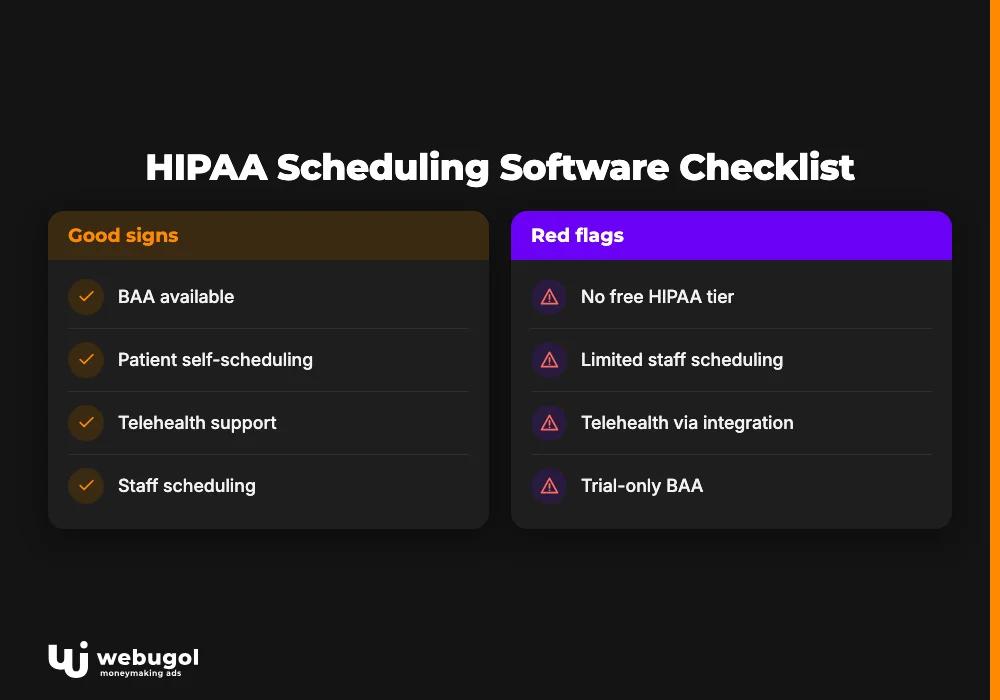
No tool in this table combines a free HIPAA-compliant tier with full telehealth support and staff scheduling. Before onboarding any hipaa compliant appointment scheduling software, ask for the BAA, confirm subcontractor agreements are in place, and verify audit log format and retention period. If free hipaa compliant scheduling software is a hard requirement, confirm BAA availability in writing with the vendor before onboarding, then read the subcontractor clause specifically.
Patient self-scheduling with HIPAA: key requirements
Patient self-scheduling is compliant when the booking form collects only minimum-necessary PHI, uses an encrypted connection, and routes confirmation through an approved channel. "Minimum necessary" is the operative phrase. Collecting a diagnosis, insurance ID, or medication list at the booking stage almost always exceeds what a scheduling tool needs to confirm the appointment.
When selecting hipaa compliant self-scheduling software, the booking form itself is the primary PHI risk surface. Name plus appointment time is not PHI in isolation, but name plus appointment time plus provider specialty becomes a regulated data set. Consent collection, meaning a written acknowledgment that the patient understands how their booking data will be used, is a required step before any self-scheduling workflow goes live.
Automated reminder timing also intersects with opt-in obligations. An SMS reminder sent to a number the patient did not provide for that specific purpose may violate both HIPAA and the Telephone Consumer Protection Act. The safer design collects communication preferences at booking and stores them alongside the appointment record.
For a broader view of how patient-facing booking fits into the telehealth stack, see how HIPAA-compliant patient booking connects to overall telehealth site architecture.
Staff scheduling vs. patient scheduling: different HIPAA rules
Staff schedules are not inherently PHI, but the moment a staff calendar references a patient record, care type, or appointment, it becomes regulated data. That distinction determines whether your workforce scheduling tool needs a BAA.
When HIPAA applies to staff scheduling:
- The schedule references a specific patient's appointment, name, or medical record number.
- Shift descriptions include a care type, service line, or clinical notes about patient conditions.
- Staff calendars live in the same database or system as patient health records.
- Automated staffing notifications contain patient-identifiable information.
When staff scheduling does not require HIPAA compliance:
- Shifts cover generic open/close staffing with no reference to patient appointments.
- HR scheduling manages non-clinical staff who have no PHI access.
- Resource allocation tracks rooms or equipment without linking to patient identities.
Hipaa compliant staff scheduling software is its own product category. Most EHR-native scheduling tools are built around patient appointments, not operational workforce management. A clinic running two separate tools, one for patients, one for staff, may only need a BAA for one of them. Knowing which one is the compliance work.
PHI fields to audit in your current patient scheduling tool:
- Full name combined with appointment date and time creates a regulated data set.
- Reason for visit or service type in the booking record reveals clinical context.
- Provider name combined with visit type can imply a patient's condition by specialty context.
- Insurance information collected at booking links a patient identity to a health claim.
- Contact data stored alongside a health record qualifies as PHI under the minimum-necessary standard.
The compliance decisions made at the scheduling layer connect directly to the patient experience overall. The scheduling design decisions that affect patient retention and long-term site performance covers the next layer of that system.

How HIPAA-compliant scheduling reduces no-shows and protects revenue
A compliant reminder workflow creates something clinics consistently underestimate: a reliable, repeatable communication cadence. Non-compliant tools cannot safely run this cadence without exposing PHI.
HIPAA restricts reminder content to minimum-necessary information. Here is what compliant and non-compliant reminders look like in practice.
HIPAA-safe reminder copy, do:
- Include the appointment date and time.
- Name the provider's first name or the clinic name.
- Provide the location address or a secure telehealth access link.
- State the cancellation and rescheduling procedure.
HIPAA-safe reminder copy, do not:
- Mention a diagnosis, condition, or treatment type.
- Reference the specific service category, such as "your therapy session" or "your weight loss consultation."
- Include prescription, medication, or lab result information.
- Add any detail that reveals the clinical nature of the visit.
Practices that send non-compliant reminders, for example, "Your GLP-1 follow-up is Thursday at 2pm", expose PHI in unencrypted channels. They also run the risk of platform policy flags when reminder content triggers a health-category audit on Meta or Google.
HIPAA-compliant appointment scheduling software that runs on an automated sequence produces consistent reminder delivery. Show rates respond to consistency, not to channel volume. Practices that migrate from manual reminders to a compliant automated sequence typically see measurable improvement within weeks, though the timeline depends on appointment type, patient volume, and prior baseline.
If your current booking workflow has not been audited for PHI handling and reminder compliance, the show-rate leak may be in the stack itself, not the ad spend. A patient acquisition and compliance audit can isolate exactly where the gap is.
You can also see how scheduling gaps compound no-show costs in how patient scheduling software cuts no-shows and lowers cost per acquisition.
What happens if your scheduling tool isn't HIPAA-compliant?
OCR fines for HIPAA violations range from $100 to $50,000 per violation per year, capped at $1.9 million per violation category annually, according to HHS HIPAA enforcement guidelines. Scheduling-related PHI exposure is one of the most common complaint triggers because it leaves a clear paper trail: the reminder, the booking confirmation, and the server log are all discoverable.
HIPAA penalty tiers for scheduling violations:
| Tier | Violation type | Fine range | Scheduling scenario |
|---|---|---|---|
| 1 | Unknown violation | $100-$50,000/year | Vendor lacks BAA; data inadvertently exposed |
| 2 | Reasonable cause | $1,000-$50,000/year | Non-compliant free tool used for patient bookings |
| 3 | Willful neglect, corrected | $10,000-$50,000/year | Known PHI exposure in scheduling system ignored |
| 4 | Willful neglect, uncorrected | $50,000/year minimum | Continued use after OCR notification |
Fines are only part of the cost. A confirmed breach triggers mandatory patient notification, which generates review damage and patient attrition that no ad spend recovers. Platform policy violations on Meta and Google can restrict ad account access during a period when new patient acquisition cannot pause.
For a related compliance exposure, see whether your analytics setup creates a separate HIPAA liability.
A compliant scheduling stack is a foundation decision, not a checkbox. Fixing it before a complaint forces the timeline is the only leverage a provider has.

Ready to build a booking workflow that converts and stays compliant?
Most clinics and telehealth providers have a scheduling tool in place. Very few have audited its PHI handling, BAA clauses, subcontractor agreements, and reminder content as a single system. The gap between "we have scheduling software" and "our scheduling stack is HIPAA-compliant" is where compliance risk accumulates and where show-rate leaks hide.
Scheduling compliance is not a standalone checklist, it is load-bearing infrastructure in your patient acquisition system: a PHI gap in a booking or reminder workflow can freeze ad accounts on Meta and Google, suppress tracking accuracy, and invalidate the attribution data your acquisition decisions depend on.
The Healthcare Growth System starts with exactly that diagnostic: tracking, funnel, and compliance infrastructure reviewed together before any ad spend scales. Schedule a booking workflow review to see where your stack stands.
FAQ
Does scheduling software need a BAA to be HIPAA compliant?
Yes. Any vendor that handles PHI on behalf of a covered entity is a business associate under HIPAA and must sign a BAA before receiving any patient data. Operating without one exposes the covered entity to Tier 1 or higher fines even if the vendor's platform is otherwise technically secure.
Is your appointment scheduling software HIPAA compliant?
Ask two questions: has the vendor signed a BAA, and does the vendor provide a written list of the specific technical safeguards in place? If either answer is unavailable, the tool is not compliant for PHI regardless of how its marketing describes it. Confirming both before go-live is the minimum due-diligence step for any covered entity.
Is Google Calendar HIPAA compliant?
Google Calendar is not HIPAA-compliant by default. Google offers a BAA under Google Workspace, but standard Calendar lacks the access controls and audit logging that clinical scheduling requires. The Workspace BAA also excludes several Google services by name, so review the exclusion list carefully before using it for patient appointments.
What appointment reminder content is considered PHI under HIPAA?
Any reminder that combines a patient's name with a service type, provider specialty, diagnosis, or appointment details qualifies as PHI under the minimum-necessary standard. A message reading "Your appointment is Tuesday at 3pm at Main Street Clinic" carries lower risk than one that names the specific service or provider specialty, which reveals clinical context.
What is the penalty for using non-HIPAA-compliant scheduling software?
Tier 1 through Tier 4 fines range from $100 to $50,000 per violation per year, with willful neglect starting at $10,000 per incident. OCR investigates scheduling-related complaints by auditing BAA status, data transmission records, and reminder logs, all of which a non-compliant tool fails to produce in the required format.
Can a solo practice use a free scheduling tool and stay HIPAA compliant?
Yes, but only if the vendor provides a BAA on the free tier, which very few do. Before using any free tool for patient bookings, confirm in writing that a BAA is available on the specific plan in use and that the infrastructure meets minimum HIPAA Security Rule requirements for PHI storage and transmission.

