



Site not showing up on Google? Diagnose and fix every cause
If your site is not showing up on Google, the root cause is one of three things: a crawling block, an indexing block, or a ranking problem. Run site:yourdomain.com in Google to find out which one applies. Zero results confirms a google indexing problem. Results with no traffic points to a ranking issue, not an indexing one. Each has a different fix, and this guide walks through both.
How do I check if my site is indexed by Google?
Two methods confirm your indexing status: a manual site: search and Google Search Console.
The `site:` search method
Open Google and type site:yourdomain.com (replacing "yourdomain.com" with your actual domain). Press enter.
- If Google returns a list of your pages, the site is indexed. Your issue is ranking, not indexing.
- If Google returns zero results, you have a confirmed website not indexed problem and need to work through the technical checks below.
Using Google Search Console
Google Search Console (GSC) provides more detail than the site: operator alone. Open the URL Inspection Tool and paste the URL you want to check.
- A green checkmark ("URL is on Google") confirms indexing.
- A grey warning ("URL is not on Google") confirms a google indexing problem.
Partial indexing is common. Your homepage may be indexed while newer blog posts or product pages are not. Always inspect specific URLs when you suspect the problem is limited to one section of the site.
Why is your site not showing up on Google? Common causes at a glance
Before working through each fix, here is a diagnostic checklist. Most google indexing problems come from one of these six causes.
| Cause | What to check | Likely fix |
|---|---|---|
| Site is new | site:yourdomain.com returns zero results | Submit sitemap, request indexing via GSC |
| Robots.txt blocking crawlers | yourdomain.com/robots.txt shows Disallow: / | Edit robots.txt to allow all crawlers |
| Noindex tag active | GSC shows "Excluded by 'noindex' tag" | Remove the noindex meta tag |
| Thin or duplicate content | Pages with very few words or identical text across URLs | Consolidate pages or expand content |
| Crawl budget issues | Large site with low-value or parameter URLs | Block or remove low-value URLs |
| No authority or backlinks | No external sites link to yours | Build first backlinks and improve content depth |
Work through this table top to bottom. The first confirmed issue is the one to fix first.
Technical issues that block Google indexing
At Webugol, when a client's site is not showing up on Google, technical errors are the first place we check. These problems stop Google's crawler before it reads a single word of your content. Fixing them often resolves the issue within days.
The robots.txt file
A robots.txt file lives at yourdomain.com/robots.txt and tells web crawlers which parts of your site they may visit. During development, blocking everything is standard practice. Forgetting to re-open access after launch is equally common.
Paste your domain plus /robots.txt into a browser. If you see the code below, you have found the problem:
``
User-agent: *
Disallow: /
The forward slash after Disallow tells every bot to stay off your entire site. Remove that forward slash, or delete the Disallow line entirely, to let Google back in.
What is a noindex tag and how do I remove it?
A noindex tag is a line of HTML in a page's <head> section that instructs Google not to include the page in search results. It looks like this:
``html``
<meta name="robots" content="noindex">
Unlike robots.txt, a noindex tag does not block crawling. Google reads the page. It simply refuses to show it. This is why GSC sometimes reports a page as "crawled but not indexed." The crawler got in, but the tag stopped the page from appearing in results.
To confirm whether a noindex tag is causing your site not showing up on Google, open the URL Inspection Tool in GSC and check the coverage reason. If it reads "Excluded by 'noindex' tag," that is your culprit.
Noindex tag removal is one of the fastest fixes you can make. Edit the HTML <head> section directly, or use your CMS's SEO plugin. In WordPress, both Yoast SEO and Rank Math include a noindex toggle in the page settings panel. Disable it. Then request re-indexing through GSC. The change typically becomes visible in GSC within a few days.
HTTPS and security
An expired or missing SSL certificate does not usually cause complete de-indexing. What it does cause is a "Not Secure" browser warning, which reduces user trust and degrades the quality signals Google uses to rank pages. For competitive searches, this suppression can be enough to keep your site not showing up on Google in the first several pages of results.
Check your SSL status using the padlock icon in your browser's address bar. If it is missing or shows a warning, renew or install the certificate through your hosting provider before doing anything else.
JavaScript rendering
Google processes JavaScript in a second crawl pass, after initial HTML crawling. This second pass can lag the first by days or weeks. If your page content only appears after a script loads, Google may index a blank version during the first pass and never correct it.
Quick audit: open "View source" in your browser on the affected page. If your main content appears in the raw HTML, crawlers can read it. If the source shows mostly script tags with no readable text, you have a rendering dependency. This is one of the most frequent google indexing problems on single-page applications built with React, Vue, or Angular. The solution is server-side rendering or static site generation, both of which ensure content exists in the HTML before any script runs. A full technical review of your site's crawlability will confirm which pages are affected and which rendering approach fits your architecture.
Crawl budget issues
Google does not crawl every page on every site every day. It allocates a crawl budget: a set number of pages to crawl within a given period. Small sites with a few hundred pages rarely face this constraint. Large sites do.
When a site has thousands of thin paginated pages, duplicate parameter URLs, or internal search result pages, Google spends its budget on those low-value pages. Important content stays not indexed while the crawl budget runs out on noise. The fix: add noindex to low-value pages, block parameter-based URL variants in robots.txt, and clean up redirect chains that inflate crawl time.
Content problems that keep a site not showing up on Google
Technical clearance is necessary but not sufficient. Once crawlers can reach your pages, content quality determines whether Google considers them worth indexing and ranking.
Thin content
Google filters pages it considers low value. A page with a single paragraph and a stock image answers no query in depth. Thin pages are a frequent reason for a website not indexed, especially on platforms that allow placeholder content to publish automatically.
Review your page word counts. Ask whether each page fully answers the question a visitor would bring. If not, expand it or merge it with a stronger related page.
Duplicate content
When multiple URLs on your site carry near-identical text, Google does not know which version to index and often indexes none. This is frequent in e-commerce when a product appears under several category paths, each generating its own URL.
Fix it with canonical tags pointing to your preferred URL, or consolidate pages that serve no distinct purpose.
Weak internal linking
Google follows links to discover new pages. A page with no internal links pointing to it has no path for Googlebot to follow. It stays not indexed regardless of content quality. This is one of those problems that is easy to overlook and equally easy to fix.
Link to new pages from your homepage, navigation, or closely related published pages. Pages that receive internal links from high-authority pages are discovered faster and crawled more consistently.
Missing XML sitemap
An XML sitemap is a structured list of every URL you want Google to index. Without one, Google has to find your content entirely through links, which takes considerably longer. Submit your sitemap URL through the "Sitemaps" section in GSC to give Google a direct inventory of your pages.
No authority
Your site can have no google indexing problems at all and still fail to appear for target keywords. That is an authority problem. Google prioritizes pages from established, trusted domains. If no external sites link to yours, Google lacks evidence that your content is worth showing.
Building the first backlinks from partners, local news sites, or industry directories gives Google confirmation that your domain is credible and worth crawling regularly.

How long does it take Google to index a new website?
For a brand-new domain with no prior history, Google can take anywhere from a few days to several months to index your pages. After you submit a sitemap and request indexing through GSC, priority pages are often reviewed within a few days. Full crawl coverage for a larger site takes considerably longer.
The process is not entirely passive. New domains with no incoming links may wait weeks unnoticed, because Google finds new sites primarily by following links from sites it already crawls. A handful of quality backlinks accelerates discovery significantly.
If your site is new and you have completed every step in the checklist, the most productive actions are to publish well-structured content consistently, earn a few quality incoming links, and check GSC weekly. No tool reliably bypasses Google's own crawl schedule.
How do I get Google to crawl my website faster?
You cannot force Google to crawl on demand. You can, however, raise your site's priority in its crawl queue.
Submit and refresh your sitemap. In GSC, navigate to "Sitemaps" and submit your current sitemap URL. Each time you publish new pages, update the sitemap file and resubmit it.
Request indexing through GSC. Use the URL Inspection Tool, enter any important URL, and click "Request Indexing." This places the page in a priority crawl queue. Start with your homepage and main service pages.
Earn backlinks from established sites. When a site Google already crawls links to yours, Googlebot follows that link. One quality backlink can introduce your entire domain faster than weeks of passive waiting.
Improve page load speed. Slow pages consume more crawl time per page, which means Google crawls fewer of them per session. When important pages load slowly, they can miss re-crawl windows for days at a time. Understanding how site speed affects indexing and crawl efficiency helps you decide which performance improvements have the highest impact on visibility.
Remove or block low-value URLs. Redirect chains, thin parameter pages, and internal search result pages drain the crawl budget away from your real content.
Strengthen internal linking. Pages linked from high-authority internal pages get crawled more frequently. A strong internal link structure is one of the most consistent signals that a page deserves regular attention from Googlebot.

Step-by-step: get your website indexed by Google
Many site owners search "get website indexed google" and arrive at the same fundamental checklist. This sequence applies to new sites and to existing sites with confirmed google indexing problems.
Step 1: Verify ownership in Google Search Console. Set up GSC if you have not. It is the only direct communication channel between your site and Google. Verify ownership and allow a few days for initial data to populate.
Step 2: Submit your sitemap. In GSC, go to "Sitemaps" and enter your sitemap URL (usually yourdomain.com/sitemap.xml). This gives Google a direct list of every page you want crawled.
Step 3: Request indexing for key pages. Open the URL Inspection Tool, enter your homepage URL, and select "Request Indexing." Repeat for main service pages, core landing pages, and top blog posts.
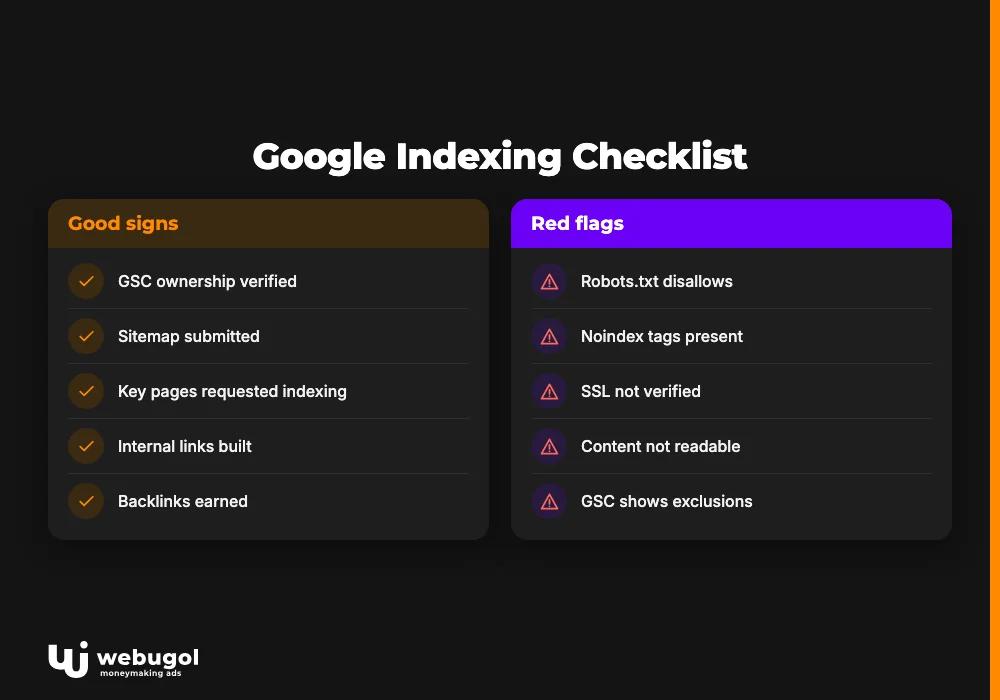
Step 4: Fix technical blocks. Work through the diagnostic table at the top of this guide. Check robots.txt for global disallow rules, review GSC's coverage report for noindex tags, verify SSL, and confirm your content is readable in raw HTML source.
Step 5: Build internal links. Every important page should have at least one link pointing to it from an already-indexed page. Start with navigation links and homepage mentions.
Step 6: Earn backlinks. Contact partners, suppliers, or industry directories to secure your first external links. Even a small number of quality links signals to Google that your site is legitimate and worth returning to.
Step 7: Monitor GSC weekly. The Coverage and Indexing reports show which pages are indexed, which are excluded, and the reason for each exclusion. Check them every week for at least the first month after making changes.
Action checklist to get website indexed on Google:
- GSC ownership verified
- Sitemap submitted to GSC
- Noindex tags removed from all key pages
- Homepage and main pages indexing requested
- Robots.txt reviewed and corrected
- Internal links added to new pages
- SSL certificate confirmed active
- First backlinks secured
Why is my website indexed but not ranking on Google?
Indexing and ranking are separate outcomes. A page can appear in Google's index and still not show up on page one for your target keywords.
The most common reason is authority. If your site is new and competitors have years of backlinks, content depth, and user engagement history, Google rates their pages as more relevant. Being indexed means Google knows you exist. Ranking means Google trusts you enough to show you at the top.
Content format matters too. Search the keywords you want to rank for and examine what Google currently shows. If the top results are all comprehensive, long-form guides and your page is 300 words, that format mismatch will suppress your position regardless of technical quality.
Technical ranking factors add another layer beyond indexing. Page speed, mobile usability, Core Web Vitals, and structured data all influence where an indexed page appears. The SEO services that address these ranking signals go beyond the indexing checklist and form the next phase of visibility work once a solid indexing foundation is in place.
Ready to get your site visible in search?
If your site is not showing up on Google, start with the site: operator to confirm whether you face an indexing problem or a ranking problem. Work through the diagnostic table, fix robots.txt and noindex issues first, then address content depth and authority. Our team runs through this exact diagnostic sequence with clients every week, and the fixes are usually faster than most site owners expect.
Contact us if you need a review of your google search console indexing data or help resolving a technical block you cannot diagnose alone.
FAQ
How do I check if my site is indexed by Google?
Type site:yourdomain.com into Google and press enter. If pages appear, the site is indexed. For a specific URL, use the URL Inspection Tool in Google Search Console to see the current indexing status and any coverage issues.
How long does it take Google to index a new website?
Google can review pages within a few days of a GSC indexing request for established sites. For new domains with no backlinks, discovery can take weeks or months. Submitting a sitemap and earning a few incoming links from established sites shortens the wait considerably.
What is a noindex tag and how do I remove it?
A noindex tag is a meta tag in a page's <head> that tells Google not to show the page in search results. Remove it by editing the HTML directly or using your CMS's SEO plugin settings, then request re-indexing in Google Search Console.
What are crawl budget issues and do they affect small sites?
Crawl budget is the number of pages Google crawls on your site within a given period. Small sites with a few hundred pages rarely face constraints. The problem primarily affects large sites with thousands of low-value, duplicate, or parameter-based URLs that drain the budget before important pages are reached.
Why does my site show in Google but not rank for my target keywords?
Being indexed and ranking are separate steps. Low domain authority, mismatched content format, thin content, and technical factors like slow page speed all reduce rankings for an indexed page. Compare your page directly to what Google currently ranks for your target keywords to identify the specific gaps.

