



Google Workspace and HIPAA: What the BAA Covers, What It Misses, and What Your Clinic Must Configure
Is Google Workspace HIPAA compliant? Yes, when three conditions hold: your organization uses a Business Starter, Standard, Plus, or Enterprise plan; a Super Admin has signed the HIPAA Business Associate Amendment inside Admin Console; and all non-covered services have been disabled org-wide. Miss any one condition and PHI in Workspace falls outside BAA protection. This guide maps each condition, lists what the BAA explicitly excludes, and covers the patient acquisition tracking gaps the BAA does not reach.
The short answer: yes, but three conditions must be met
Many clinic owners ask is Google Workspace HIPAA compliant as though it has a binary answer. It does not. Google Workspace is HIPAA-eligible on qualifying plans, which is different from HIPAA-configured. Three requirements must be satisfied at the same time.
Eligible plan. Business Starter through all Enterprise tiers support the BAA. Workspace Individual does not. Solo practitioners and small clinic operators who set up on Individual plans face a compliance gap that no configuration in Admin Console can fix.
Signed BAA. The HIPAA Business Associate Amendment is the legal mechanism that makes Google a covered Business Associate for your organization. Without it, using Workspace to create, store, or transmit PHI is a direct violation regardless of plan.
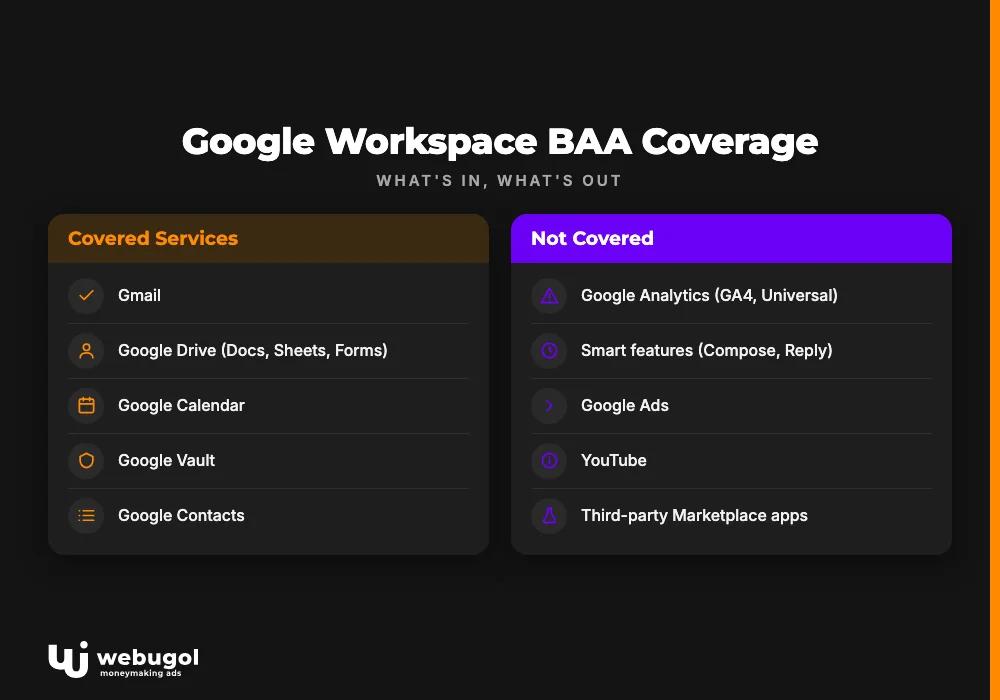
Disabled non-covered services. Google's BAA covers a defined set of core services. Smart features, Google Analytics, Google Ads, and third-party Marketplace apps are excluded. PHI that reaches any of those services falls outside BAA protection, and in a typical clinic marketing stack, it gets there by default.
The BAA handles one layer of the compliance surface. For clinics running patient acquisition, the critical gaps are usually in the analytics tools, ad stack, CRM, and scheduling platforms surrounding Workspace, where a single-vendor BAA offers no coverage. Signing the agreement is the easy step. Most clinics discover the broader exposure only when a compliance review or tracking audit surfaces what has been moving outside BAA scope for months.

Which Google Workspace plan is HIPAA compliant?
Business Starter, Standard, Plus, and all Enterprise tiers support the BAA. Workspace Individual does not. The direct answer to which Google Workspace plan is HIPAA compliant: any Business or Enterprise tier qualifies; Individual does not.
Business vs. Individual: the compliance boundary
Workspace Individual is a personal productivity tier, not a business product. Google has explicitly excluded it from BAA eligibility. For a solo practitioner or a clinic that migrated to an Individual plan years ago, this is an active compliance gap. PHI stored in Drive, sent via Gmail, or scheduled through Calendar on an Individual account has no BAA coverage regardless of how carefully the rest of the account is managed.
Plan migration is the fix, not configuration. Move to Business Starter before handling PHI, then sign the BAA in Admin Console after that.
Google Workspace plans and HIPAA BAA eligibility
| Plan | BAA Available | HIPAA-Eligible |
|---|---|---|
| Business Starter | Yes | Yes |
| Business Standard | Yes | Yes |
| Business Plus | Yes | Yes |
| Enterprise Starter | Yes | Yes |
| Enterprise Standard | Yes | Yes |
| Enterprise Plus | Yes | Yes |
| Workspace Individual | No | No |
No top-10 competitor delivers this as a structured table. For a clinic auditing an inherited setup or selecting a plan for a new location, the compliance boundary is clear at a glance.
What does the Google Workspace BAA actually cover?
The BAA covers a named list of core services and explicitly excludes others. For a clinic marketing team running patient acquisition, the exclusions matter as much as the inclusions. Several excluded services are already active in a typical healthcare acquisition stack, often without the compliance or marketing team realizing the gap exists.
Services included under the BAA
Per Google's published HIPAA BAA amendment, covered services currently include:
- Gmail
- Google Drive (including Docs, Sheets, Slides, Forms, and Sites)
- Google Calendar
- Google Meet
- Google Vault
- Google Chat
- Google Contacts
- Google Groups
- Google Keep
For practices whose primary concern is communication: is Google Workspace email HIPAA compliant on covered plans? Yes, Gmail falls within the BAA when the amendment is signed and Smart features are disabled. Google revises this service list when the BAA amendment is updated, so confirm the current version in Admin Console under Account then Legal before finalizing your compliance posture.
Services NOT covered, and why it matters for your marketing stack
These services fall outside the BAA and must not be used to process PHI:
- Google Analytics (GA4 and Universal Analytics)
- Smart features: Smart Compose, Smart Reply, Smart Summarize
- Google Ads
- YouTube
- Third-party Workspace Marketplace apps (each requires its own individual BAA)
For a telehealth practice or clinic running paid patient acquisition, this exclusion list is operationally significant. GA4 fires on appointment confirmation pages. Smart Compose runs while staff draft patient emails. A scheduling tool added from Marketplace last quarter may carry no BAA at all.
GA4's exclusion from BAA scope is where most acquisition-stage HIPAA exposure originates. Confirmation page URLs routinely carry appointment type, service category, or location data as query parameters. GA4 collects those parameters by default, outside any BAA coverage. What that data collection means for your patient acquisition reporting requires a dedicated review before any acquisition campaign launches.
How to enable HIPAA compliance in Google Workspace: a 5-step checklist
These five steps answer the practical question of is Google Workspace HIPAA compliant for your organization's covered use cases once implementation is complete. They move your deployment from an eligible plan to an actively configured, HIPAA-supported environment.
Step 1: Sign the BAA in Admin Console
Path: Admin Console, then Account, then Legal, then HIPAA Business Associate Amendment. Only a Super Admin can execute this step. Signing is free and takes a few minutes. Without it, no use of Workspace qualifies as HIPAA-covered regardless of plan or any other configuration in place.
Step 2: Disable services not covered by the BAA
Turn off at the org level: Smart features in Gmail settings, additional Google services under Apps in Admin Console, and any Marketplace apps without their own BAA. Per-user toggles are not sufficient. One misconfigured account creates org-wide exposure because PHI does not stay within individual account boundaries once it is in motion.
Step 3: Configure security and access controls
Specific Admin Console actions required for HIPAA Security Rule compliance:
- Enforce multi-factor authentication for all accounts
- Set session length limits for PHI-handling roles
- Restrict Drive external sharing to approved domains only
- Enable audit logs for Gmail, Drive, and Admin actions
- Configure mobile device management to enforce screen lock and remote wipe
None of these settings default on. Each requires a deliberate Admin Console configuration.
Step 4: Train staff on PHI handling in Workspace
Three rules must be clear to every staff member who uses Workspace. PHI cannot be forwarded to personal Gmail accounts outside the covered domain. Smart Compose and Smart Reply process email context; if not disabled before training, staff may not realize those features are reading patient data during normal communication. Drive sharing links sent externally require expiration dates to prevent indefinite open access.
Per Google's official HIPAA implementation guidance, training on acceptable use is a required component of a covered entity's compliance program, not an optional addition.
Step 5: Schedule a periodic compliance audit
One-time setup is not sufficient. Google revises the BAA service list. New staff onboarding creates accounts outside the original configuration. Marketplace integrations added for convenience can bypass controls set months earlier. A quarterly Admin Console review covering MFA status, external sharing settings, Drive retention policies, and active Marketplace apps prevents configuration drift from becoming a reportable incident.
Running patient acquisition alongside this compliance setup? Tracking breaks at the handoff between Workspace and your ad stack. If you want an audit of where your current martech stack leaks PHI outside BAA coverage, the Healthcare Growth System starts with exactly that diagnostic.
The marketing compliance gap Google doesn't solve
Is Google Workspace HIPAA compliant with a signed BAA and correct configuration? Yes, for the covered services. Is your full patient acquisition stack compliant? That is a separate question, and it is the one clinic marketing teams are least equipped to answer without a full-stack review.
The BAA secures internal communications. It does not cover what happens when a patient fills out a lead form, books through a third-party scheduler, or lands on a page with GA4 or Meta Pixel running. PHI travels through URL parameters into analytics platforms, pixel data is collected before consent is captured, and CRM integrations sit entirely outside BAA scope. A practice can have Workspace configured correctly and still have every new patient record touching uncovered systems from first click to booked appointment.
Your CRM requires its own assessment. Tools like HubSpot, GoHighLevel, and ActiveCampaign are not automatically BAA-covered. Each requires a separate amendment with that vendor. Whether your CRM holds patient data under BAA protection determines whether the revenue attribution your marketing team relies on is legally defensible. That review belongs in the same compliance audit as Workspace.
Third-party scheduling tools add a third gap. Platforms that integrate with Google Calendar can appear to be extensions of a covered service. They are not. The scheduling platform needs its own BAA, and data it collects before an appointment lands on Calendar sits outside any Workspace coverage. A HIPAA-compliant scheduling software review covers the BAA criteria to evaluate in that category.
Webugol builds acquisition systems for telehealth practices and clinics where tracking, website, CRM, and campaigns are designed and managed as one system, not assembled vendor by vendor. The compliance layer is part of the initial build, not retrofitted after the stack is in production.
Common mistakes that trigger HIPAA risk in clinical marketing
These are patterns that appear in clinic setups after the Workspace BAA is signed but the surrounding stack has not been audited:
- PHI in Gmail subject lines. Staff include appointment type, condition references, or patient identifiers in subject lines. Subject lines appear in search and audit logs in a less protected format than message body content. Training corrects this. Configuration alone does not.
- GA4 firing on confirmation pages. Appointment confirmation URLs often carry appointment ID, service type, or location data as URL parameters. GA4 collects them by default and transmits them outside BAA coverage. Removing PHI from post-conversion URLs, or switching to a BAA-covered analytics platform, closes this gap.
- Smart features left enabled org-wide. Smart Compose and Smart Reply process email context to generate suggestions. When staff handle patient communications in Gmail, these features process patient data outside the BAA. The Admin Console toggle is simple; most teams miss it because Smart features default to enabled.
- Drive retention policy never configured. HIPAA requires PHI to be retained per a defined schedule and disposed of securely. Drive without a Vault retention policy accumulates files indefinitely. The exposure surface grows without anyone tracking it.
- A form tool added without BAA review. An intake form built in a third-party platform gets added to a landing page without compliance review. If it collects PHI, it creates uncovered exposure from the first submission.
- Marketplace apps approved without BAA verification. A video consultation plugin or a task management tool with patient note fields can run in staff accounts without any BAA in place. Quarterly Marketplace reviews prevent gradual accumulation.
Is your patient acquisition stack actually HIPAA-safe?
For most clinics actively running patient acquisition, the Workspace configuration addresses the internal communications layer. Every tool surrounding Workspace, from analytics to CRM to scheduling, requires its own BAA assessment. The total risk surface is larger than any single vendor's agreement covers.
Signing the Google Workspace BAA and completing the five-step configuration is necessary. A clinic that has Workspace configured correctly while still running GA4, an uncovered CRM, and unreviewed ad pixels has addressed one layer of that surface. The remaining exposure lives in the handoffs between tools that were never designed to work together as a HIPAA-covered acquisition system.
Webugol starts each Healthcare Growth System engagement with a full-stack diagnostic that maps the compliance surface across Workspace, analytics, CRM, and campaigns. The program is built for telehealth and clinic operators running or scaling patient acquisition at $500k or more in monthly revenue, where the compliance layer must hold under that volume. Book a Strategy Call to start with that diagnostic.
FAQ
Is Gmail HIPAA compliant for sending patient emails?
Gmail is HIPAA-eligible once your organization is on a Business or Enterprise plan and has signed the BAA. Staff must be trained not to include PHI in subject lines, not to use Smart Reply or Smart Compose when patient data is in context, and not to forward PHI to personal accounts outside the covered domain.
Can I use Google Workspace Individual for HIPAA compliance?
No. Google Workspace Individual does not support the HIPAA BAA and cannot be used to create, store, or transmit PHI. HIPAA compliance requires a Business Starter plan or higher, where the BAA is available in Admin Console.
What happens if I use Google Workspace without a BAA?
Using Google Workspace to handle PHI without a signed BAA means Google is not acting as a covered Business Associate, which is a direct HIPAA violation. The absence of a BAA can trigger enforcement action and civil monetary penalties regardless of whether a breach occurred.
Is Google Meet HIPAA compliant?
Google Meet is covered by the Workspace BAA when your organization holds a BAA-eligible plan and the BAA is signed. The session is protected, but recordings stored in Drive must also meet the retention and access control requirements configured separately in Admin Console.
Is Google Workspace HIPAA compliant out of the box?
No. Google Workspace is HIPAA-eligible on Business and Enterprise plans, but it is not HIPAA-compliant by default. Compliance requires a signed BAA and deliberate Admin Console configuration, including disabling Smart features, restricting non-covered additional services, and enforcing access controls. Out-of-the-box settings leave several exclusions active that must be addressed before PHI can move through covered services safely.

