



HIPAA compliant cloud storage: requirements, providers, and what a BAA actually covers
HIPAA compliant cloud storage is any cloud service configured to satisfy all four Security Rule technical safeguard categories under 45 CFR §164.312, backed by a signed Business Associate Agreement from the vendor. The BAA sets a legal floor, not a compliance finish line. It covers the vendor's infrastructure obligations; it does not configure your access controls, set retention schedules, or close the gaps in intake forms and marketing systems upstream of the storage layer. This guide covers what storage compliance actually requires, which providers deliver it, and what your team remains responsible for after the BAA is signed.
What makes cloud storage HIPAA-compliant?
A service qualifies as HIPAA compliant cloud storage when it satisfies all four Security Rule technical safeguard categories under 45 CFR §164.312 and the provider executes a BAA covering their infrastructure. That combination is the minimum. Neither element alone is sufficient.
The BAA documents the provider's accountability for breach notification and PHI use restrictions. It does not configure user permissions, set retention schedules, or review audit logs on your behalf.
Cloud storage that is compliant on the vendor side still requires correct configuration and documented procedures on yours. For a practice owner or marketing leader, the meaningful question is not "does this vendor offer a BAA" but "does this platform support all four technical safeguards, and does our team have the documented procedures to operate it correctly." This is the shared responsibility model, and it is where most OCR enforcement actions originate.
What are the four HIPAA technical safeguards for cloud storage?
The four categories are required under 45 CFR §164.312. Every evaluation of cloud storage for healthcare starts here, before comparing pricing tiers or storage limits.
| Safeguard | What it requires | Common failure point |
|---|---|---|
| Access controls | Unique user IDs, emergency access procedures, automatic session logoff, encryption and decryption mechanisms | Shared credentials; no automatic logoff configured |
| Audit controls | Hardware, software, or procedural mechanisms that record and examine activity in PHI-containing systems | Logs generated but never reviewed on a documented schedule |
| Integrity controls | Mechanisms protecting PHI from improper alteration or destruction without detection | No version history; no deletion policy preventing undetectable tampering |
| Transmission security | Protection against unauthorized access to PHI in transit | TLS version below 1.2; at-rest encryption disabled on specific buckets |
Encryption gets the most attention in vendor marketing. It is not the most commonly misconfigured safeguard. Audit controls and access controls create the most consistent compliance gaps, because fixing them requires decisions about your own team structure and documented procedures, not just a vendor checkbox.
Every team member must authenticate individually. Shared credentials fail the access controls requirement outright. These are not configuration suggestions; they are regulatory requirements under the Security Rule.
Encryption standards for PHI cloud storage
For healthcare data storage, the standard is AES-256 for data at rest and TLS 1.2 or higher for data in motion. Every provider in the comparison table below meets these minimums. The real question for covered entities is not whether the provider encrypts, but whether your team has configured access controls and audit review schedules to match.
PHI cloud storage with end-to-end encryption, as Proton Drive provides, adds a layer that standard AES-256-at-rest does not: the provider cannot read the data even under subpoena or an internal access request. That distinction matters for high-sensitivity use cases. It also limits audit log granularity, a trade-off to evaluate against your operational needs.

What does a Business Associate Agreement actually cover?
A BAA obligates the provider to protect PHI on their infrastructure, report breaches within the required notification window, and restrict PHI use to the contracted purpose. That covers the provider's half of the shared responsibility model. Nothing more.
The covered entity's half is everything outside the infrastructure boundary: configuring user permissions and offboarding procedures, documenting workforce training on PHI handling, reviewing audit logs on a scheduled basis, and maintaining a documented incident response plan. Each item must exist as its own procedure, not as an assumption the BAA covers.
Practices that treated signing a BAA as the end of compliance work have generated a consistent stream of OCR enforcement actions, with cases spanning from 2018 through the present. The pattern is always the same: compliant vendor infrastructure, signed BAA, misconfigured covered-entity environment.
A BAA is not available on free or personal tiers. Personal Google Drive, free Dropbox, and iCloud have no BAA option; using any of them for patient records violates HIPAA regardless of how the files are labeled or organized.
Which cloud storage providers offer a BAA for HIPAA?
No cloud storage platform is HIPAA compliant by default. Every major provider requires explicit configuration and a signed BAA before it qualifies for healthcare data storage. The table below covers eight providers most referenced across enterprise healthcare contexts. "BAA tier" is the lowest plan at which a Business Associate Agreement is available.
When evaluating BAA cloud providers, look beyond the tier price to how each one handles audit log access and access control granularity for your specific workflow.
| Provider | BAA available | Encryption at rest | Encryption in transit | Audit log access | BAA tier | Best fit |
|---|---|---|---|---|---|---|
| AWS S3 | Yes | AES-256 | TLS | CloudTrail (full) | Any paid | Developer-built systems |
| Google Cloud Storage | Yes | AES-256 | TLS | Cloud Audit Logs | Workspace Business Starter+ with signed BAA | Google Workspace environments |
| Microsoft Azure Blob | Yes | AES-256 | TLS | Azure Monitor | Any paid | Microsoft-stack enterprises |
| Box | Yes | AES-256 | TLS | Full audit trail | Business tier | Team collaboration, legal |
| Dropbox Business | Yes (Advanced, Plus only) | AES-256 | TLS | Admin audit log | Business Advanced | Mid-size clinical teams |
| Sync.com | Yes | AES-256 | TLS | Full admin logs | Business plans | Privacy-first practices |
| Egnyte | Yes | AES-256 | TLS | Full audit trail | Business tier | Multi-location clinics |
| Proton Drive | Yes | AES-256 + end-to-end | TLS | Admin logs | Business plans | High-privacy use cases |
Tier availability and pricing change. Confirm BAA coverage directly with each vendor before purchase. Several providers updated their BAA processes and tier eligibility after 2020 and 2022; a configuration validated at either of those points should be re-audited against current platform terms.
Is Dropbox HIPAA compliant?
Dropbox Business Advanced and Business Plus include a BAA and meet the technical requirements for HIPAA compliant cloud storage. The free, Plus, and Professional tiers include no BAA and cannot legally store PHI under any circumstances.
Signing the BAA is step one. Four configuration actions still fall on the covered entity: disabling shared link access for PHI-containing folders, enabling two-step verification for all team members, activating remote wipe on linked devices, and reviewing the admin audit log on a documented schedule. Dropbox does not apply these configurations automatically upon BAA execution.
The gap between "BAA signed" and a Dropbox environment that is actually configured correctly is precisely where OCR enforcement finds covered entities exposed.
Is Google Drive HIPAA compliant?
Google Workspace Business and Enterprise tiers support HIPAA compliance when a BAA is signed with Google and the account is configured per Google's HIPAA implementation guide. Personal Google Drive accounts have no BAA option and cannot be used to store PHI under any circumstances.
Google Workspace for Nonprofits offers an accessible path: eligible 501(c)(3) organizations can access Business Starter with a BAA at no cost, subject to Google's application review process. The audit log access at that tier is less granular than enterprise-tier options, a trade-off to evaluate before committing.
HIPAA compliant cloud storage by use case
Provider selection depends on workflow type, existing integrations, team structure, and the data types being stored. The right choice for a distributed telehealth practice differs substantially from the right choice for an imaging center or a law firm handling patient records.
For telehealth platforms
Distributed telehealth teams face storage requirements that clinic-focused compliance content rarely addresses. Clinical staff access PHI from personal and employer-issued devices across multiple locations. Session recordings (video, audio, transcripts) need per-session access controls, not folder-level permissions. Remote device wipe capability is a functional necessity.
The right cloud storage for healthcare telehealth supports granular user-level access, integrates with mobile device management for remote wipe, and generates file-level audit logs rather than folder-level summaries. AWS S3, Egnyte, and Box handle these requirements well. Sync.com is a strong choice for practices prioritizing end-to-end encryption on session recordings without building full cloud infrastructure.
BYOD access policies create a compliance gap that surfaces only when something goes wrong. If the platform cannot revoke access to a specific device after an employee departure or a lost phone, a routine HR event becomes a potential breach notification obligation. Document your device access policies before that gap surfaces.
For telehealth teams, your video conferencing platform's HIPAA documentation is a parallel compliance evaluation, not a separate one.
For clinics and medical imaging (DICOM)
HIPAA compliant cloud storage for medical images adds requirements that general document storage platforms are not built to meet. A single DICOM study can run several gigabytes; the files are structured differently from standard documents and rendering them requires a compatible viewer, not a browser.
Clinics running their own imaging workflow need storage that either supports native DICOM compatibility or connects cleanly to a PACS system without custom middleware. AWS S3 and Azure Blob are both used in compliant PACS architectures; Google Cloud Storage is supported in several clinical imaging solutions. On-platform DICOM viewing is not standard in general-purpose cloud storage.
State-level retention requirements for medical images frequently exceed the federal HIPAA minimum. Configure automated deletion at the storage level rather than relying on manual procedures, which become audit findings the moment someone forgets.
For law firms and legal practices
Law firms that handle client PHI fall under HIPAA's Business Associate rules. This applies to litigation support firms, e-discovery vendors, and any legal practice that receives patient records as part of a client engagement. Medical records cloud storage for legal use requires the same four technical safeguards that covered entities maintain, plus a BAA executed with the storage provider.
Practical requirements for legal use include matter-specific folder access controls so staff on one case cannot access files from another, litigation hold capability that prevents deletion of records under legal preservation obligations, and detailed audit trails for e-discovery purposes. Box is frequently deployed in legal environments because of its access control granularity and audit trail completeness. Egnyte provides comparable capability with stronger support for hybrid on-premises configurations.
Free and low-cost HIPAA compliant cloud storage
Most free tiers do not include a BAA and cannot be used to store PHI. Genuinely free HIPAA compliant cloud storage does not exist as a complete category in this market.
The closest low-cost options with a BAA upgrade path are Proton Drive and Google Workspace for Nonprofits. Both carry trade-offs: Proton Drive's audit log access is less granular than enterprise options; Google Workspace Nonprofit eligibility requires an approval process. There is no free solution that simultaneously provides full audit log access, a BAA, and enterprise-grade access controls.
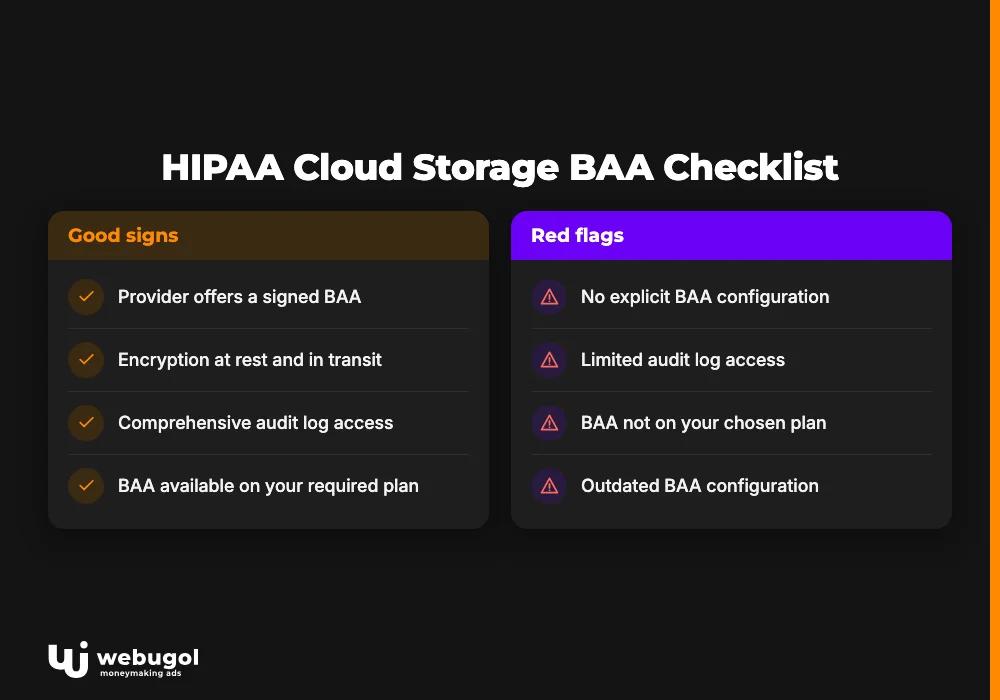
What stays your responsibility after signing a BAA
Signing a BAA shifts contractual liability for the provider's infrastructure. The covered entity retains every Security Rule obligation that applies to its own operations. Here is the post-BAA checklist that most providers do not hand you:
- User access control review: a documented schedule for auditing active permissions, including offboarding procedures that revoke access within a defined window after an employee's last day.
- Workforce training documentation: HIPAA requires documented evidence of PHI handling training for all workforce members; the BAA does not generate this on your behalf.
- Audit log review schedule: logs that are generated but never reviewed do not satisfy the audit controls requirement under 45 CFR §164.312(b). The review process must be documented and periodic.
- Data retention and disposal policy: retention periods must match both federal HIPAA guidance and applicable state law; automated deletion at end of retention is preferable to manual procedures.
- Incident response procedure: a documented process for detecting, containing, and notifying affected parties in the event of a breach involving cloud-stored PHI.
These gaps drive OCR enforcement consistently. The provider's infrastructure can be fully configured, the BAA correctly signed, and the practice still carries liability if its own procedures are absent or undocumented.
How do I verify my cloud storage meets HIPAA requirements?
Start with the four technical safeguards in the table above. Check each one against your current configuration, not the vendor's feature list. A provider that offers two-step verification does not give you credit for not enabling it.
Five concrete verification steps for covered entities:
- Confirm the BAA exists and is current. Request a copy from the vendor and verify it covers the specific storage service and data types you use. BAA terms change; a document signed in 2020 or 2022 may not reflect current platform terms.
- Audit active user permissions. Pull a full list of users with PHI access and verify each still requires that access. Former employees and inactive accounts with live permissions are a consistent OCR finding.
- Review audit logs for the past 90 days. Verify the logs are being generated and that someone on your team has reviewed them within the documented review window. Unreviewed logs are treated as an audit controls failure.
- Test the offboarding procedure. When the last employee departed or a device was lost, was access revoked within your documented window? If no procedure exists, create one before the next departure.
- Verify encryption configuration. Confirm TLS 1.2 or higher is in use for in-transit data and that at-rest encryption is enabled on all storage locations used for PHI, not just the default tier.
A verification pass against these five points, documented in writing, is the baseline for HIPAA storage requirements compliance. OCR audits look for documented evidence of review, not just the technical configuration. Undocumented reviews do not count.
What non-compliance costs: OCR fines and enforcement examples
The financial structure of HIPAA violations follows the HITECH Act. Violations are categorized by culpability: unknowing violations start at $100 per violation; willful neglect that is not corrected reaches $50,000 per violation, with a maximum of $1.9 million per violation category per calendar year, per HHS Office for Civil Rights enforcement data.
Named OCR settlements illustrate the pattern clearly. The University of Rochester Medical Center paid $3 million to settle violations that included unencrypted PHI on portable storage devices. Lifespan Health System paid $1.04 million after an unencrypted laptop containing PHI was stolen.
In both cases, the storage vendor's configuration was not at issue; the violations traced to the covered entity's own access control and encryption policies, not the provider's.
The consistent finding: compliant vendor, signed BAA, misconfigured covered-entity environment.
The Breach Notification Rule adds a second cost dimension. Covered entities must notify affected individuals within 60 days of discovering a breach, notify HHS, and for breaches affecting 500 or more individuals in a state, notify prominent media in that state. Public media notification exposure frequently exceeds the direct fine. Both costs trace to configuration decisions made long before any breach is detected.

How HIPAA cloud storage connects to your marketing stack
Cloud storage compliance covers one layer of a picture that, for practices running paid acquisition, extends through every system PHI touches. The exposure starts at the ad click, not at the storage layer.
Three pathways move PHI into non-compliant environments that storage compliance alone cannot close.
First: unprotected intake form submissions where pixel-fired session data includes medical conditions or appointment types in the query string. Second: CRM records imported from EHR or scheduling exports, entering a marketing platform without a BAA covering that specific system. Third: session recording and heatmap tools that capture PHI entered into intake fields before form submission.
The analytics compliance gap on healthcare intake pages operates entirely outside the storage layer. Equally, how PHI flows from intake into your marketing platform determines whether the CRM creates OCR exposure regardless of how well files are stored upstream. Both surfaces can carry active liabilities even when your HIPAA compliant cloud storage configuration is correct.
Compliance lives in the handoffs between systems. A practice can sign every required BAA, configure encryption correctly on every file, and still face enforcement because a non-compliant pixel fired on the intake confirmation page. Storage is part of the compliance system. It is not the whole system.
Audit your compliance stack from ad click to storage
For most growth-stage healthcare practices, the honest answer to "is our stack fully HIPAA-compliant" is no. PHI flows through ad platforms, intake forms, CRM systems, and storage layers that each require independent compliance work. A gap in any one creates OCR exposure regardless of how well the others are configured.
Webugol builds end-to-end acquisition systems for healthcare practices where compliance is not a separate workstream from growth.
The Healthcare Growth System starts with a tracking and compliance audit covering the full path from ad click to recognized revenue, built for practices running paid acquisition that cannot afford to grow into an enforcement action.
The program has supported 50+ healthcare clients and generated $50M+ in revenue. Book a Strategy Call to start with a full audit of your compliance and tracking posture.
FAQ
Does signing a BAA make my organization HIPAA-compliant?
No. A BAA makes the vendor contractually accountable for their infrastructure's security and breach notification obligations, but the covered entity remains responsible for access controls, workforce training, audit log review, and data governance. HIPAA compliance is a shared responsibility model, and the BAA covers only the provider's half.
What is the best free HIPAA-compliant cloud storage?
Most free tiers do not include a BAA and cannot legally store PHI. The closest low-cost options with a BAA upgrade path are Proton Drive and Google Workspace for Nonprofits; using personal Google Drive, Dropbox free, or any consumer storage tier for patient records violates HIPAA regardless of how the files are structured.
What are the technical requirements for HIPAA-compliant cloud storage?
HIPAA requires four categories of technical safeguards under 45 CFR §164.312: access controls (unique user IDs, automatic logoff, encryption), audit controls (activity logging and monitoring), integrity controls (protection against PHI alteration or destruction), and transmission security (encryption in transit). The provider's configuration options and your organization's policies together must satisfy all four categories.
How does HIPAA cloud storage compliance affect my marketing tracking setup?
If patient intake data, form submissions, or EHR exports flow into your marketing CRM or analytics tools, those systems also fall under HIPAA's Business Associate rules, and your storage architecture upstream affects what data can legitimately enter the marketing stack. A compliant storage layer does not sanitize PHI that your pixels, forms, or CRM have already captured from other surfaces.
Is Google Drive HIPAA compliant?
Google Workspace Business and Enterprise tiers support HIPAA compliance when a BAA is signed with Google and the account is configured per Google's HIPAA implementation guide; personal Google Drive accounts have no BAA option and cannot be used to store PHI under any circumstances.

