



HIPAA Compliant Forms: Capture Leads Without a Compliance Time Bomb on Your Landing Page
HIPAA compliant forms protect patient data through three non-negotiable conditions: the vendor has signed a Business Associate Agreement (BAA), data travels over TLS 1.2 or higher encryption in transit, and submissions are stored with AES-256 encryption at rest. Tools such as Google Forms and Wix process protected health information with no BAA, turning every patient submission into a provable compliance gap. The HHS Office for Civil Rights enforces violations at $100 to $50,000 per incident. Before your next landing page goes live, verify three things: BAA signed, encryption confirmed, audit log retention active.
What actually makes an online form HIPAA compliant?
Compliance is not a design feature. A form earns HIPAA compliance through the vendor's signed BAA and the technical safeguards the vendor contractually backs, not through your privacy policy language, the form's visual layout, or the presence of a HIPAA logo. A vendor without a signed BAA has accepted zero legal accountability for the PHI passing through their servers.
This distinction matters for clinic owners and marketing leads choosing hipaa compliant online forms under deadline. The responsibility shifts to the vendor only when the vendor has accepted it in writing.
The 5 technical requirements every form must meet
All hipaa compliant web forms rely on the same five controls, regardless of which builder you choose:
- End-to-end encryption: data must travel via TLS 1.2 or higher in transit and be stored with AES-256 encryption at rest; without both layers, a breach at either point exposes PHI.
- Role-based access controls: only staff with a defined role should view submitted patient data; unrestricted team-wide access is a HIPAA violation.
- Audit logs with tamper protection: every access, edit, and export must be logged with a timestamp that cannot be altered after the fact.
- Automatic encrypted backups: data loss qualifies as a breach; backups must be encrypted, retained, and tested for restorability.
- Signed Business Associate Agreement: a complete technical stack without a signed BAA means none of the above protections count legally; the BAA is the contract that makes the vendor accountable.
What a BAA must cover: 3 red flags to watch
A BAA is a legal contract that assigns vendor responsibility for PHI your practice sends through their system. Most BAAs in the market are not equal, and the gap usually lives in the fine print.
Watch for these three patterns in real vendor contracts:
No subcontractor BAA coverage. If the vendor uses a third-party cloud host, email relay, or payment processor, ask whether those subcontractors are covered by a downstream BAA. PHI that passes through uncovered infrastructure is an exposure point outside your control.
No data deletion clause on contract termination. A BAA without an explicit deletion or return clause leaves patient data on the vendor's servers after the relationship ends. This is a common omission that few practices notice before it matters.
Vague "best efforts" language instead of named technical controls. A BAA that promises "commercially reasonable measures" rather than specific encryption standards and audit log retention periods gives you almost nothing you can enforce in a breach investigation. Review BAA language before signing, not after your first form submission.

Is Google Forms HIPAA compliant?
When practices search "are Google Forms HIPAA compliant," the answer is definitive: No. Google does not sign a BAA for standard Workspace accounts or free accounts, which means PHI submitted through Google Forms is handled entirely outside HIPAA safeguards. Google Workspace for Healthcare has a more limited BAA scope than most healthcare marketers assume and does not cover Google Forms by default.
For a clinic or telehealth practice capturing patient contact information, symptoms, or intake details through a Google Form, every submission is a compliance exposure event. The question is not whether a violation occurred; it is whether it has been discovered yet. If your current intake workflow routes through Google Forms, replacing it with a HIPAA-capable builder is a higher-priority fix than most practices treat it.
HIPAA compliance extends beyond forms into every tool that touches patient data. If you are also rethinking appointment booking, how HIPAA-compliant scheduling software handles the same BAA requirements applies the same verification logic to scheduling systems.
Are Wix forms HIPAA compliant?
No. Wix does not sign BAAs and does not provide HIPAA-compliant data storage on any plan tier, making it unsuitable for any form that captures PHI.
Wix's design-first positioning attracts healthcare clients who want a polished landing page with minimal setup. The compliance exposure is invisible at build time and surfaces the moment a patient submits intake information. If your practice currently uses Wix forms for patient-facing data collection, one practical interim step is embedding a HIPAA-capable third-party form while a compliant site rebuild is planned. Selecting compliant web infrastructure for a healthcare site build or rebuild covers the full stack decisions that determine whether the patient-facing experience meets HIPAA requirements.

HIPAA compliant WordPress forms: what you need
WordPress itself is not the compliance variable. The plugin, the hosting environment, and the BAA chain across both are what determine whether HIPAA compliant forms on WordPress actually qualify.
Two paths work for most practices seeking HIPAA compliant WordPress forms. Gravity Forms with a HIPAA add-on gives you flexible form logic on a platform most healthcare marketers already know, but the add-on and a HIPAA-capable hosting environment are both required. WPForms on HIPAA-capable managed hosting is a simpler setup for practices without complex routing needs. In both cases, the hosting provider's BAA is required alongside the form plugin's BAA; one without the other leaves an exposure gap.
WordPress HIPAA compliance checklist:
- Choose a form plugin whose vendor offers a signed BAA, not just SSL
- Confirm your hosting provider offers a signed BAA for your specific plan tier
- Configure SSL/TLS for the entire domain, not only the form page
- Restrict form submission access in the WordPress admin to authorized roles only
- Verify audit log retention meets your state's medical records requirement, typically six years minimum
Best HIPAA compliant form builders compared
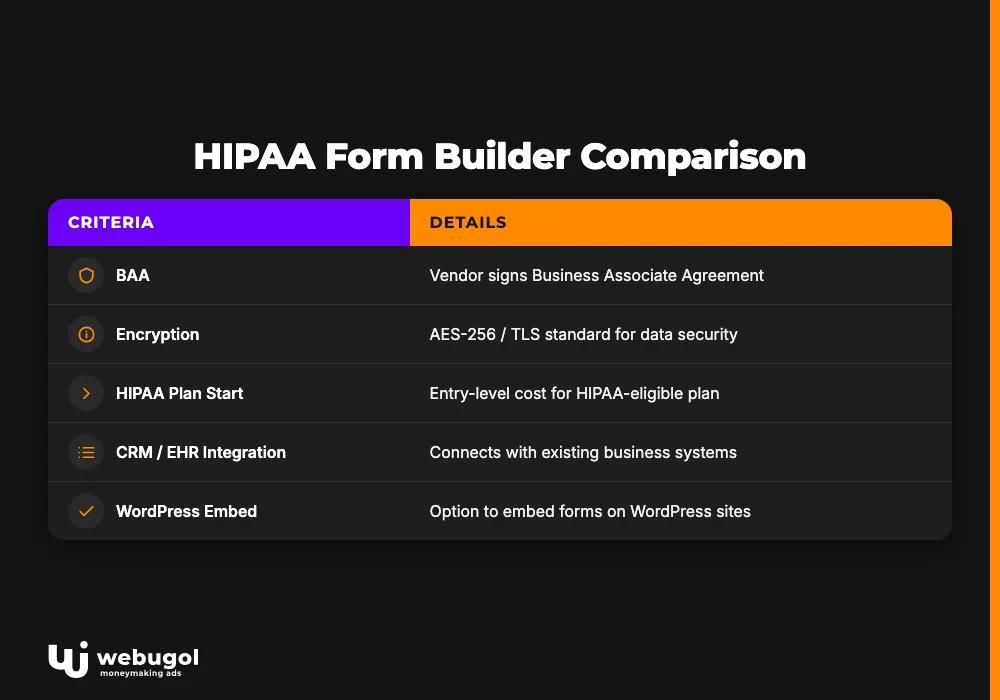
Finding the right hipaa compliant forms online for a practice means evaluating five criteria, starting with the BAA column: whether the vendor signs one, what it actually covers, the encryption standard, the starting price on a HIPAA-eligible plan, and CRM or EHR integration depth. Whether you need hipaa compliant intake forms for new patients or consent workflows for existing ones, these criteria apply equally across every builder type.
| Builder | BAA | Encryption | HIPAA plan starts | CRM / EHR integration | WordPress embed |
|---|---|---|---|---|---|
| Jotform | Yes (HIPAA plan) | AES-256 / TLS | ~$39/mo | HubSpot, Salesforce, 100+ | Yes (plugin + embed) |
| Formstack | Yes (Business+) | AES-256 / TLS | Mid-range | Salesforce, HubSpot, EHRs | Yes |
| HIPAAtizer | Yes | AES-256 / TLS | Lower-cost | Limited native | Yes (script embed) |
| FormDr | Yes | AES-256 / TLS | Mid-range | Practice management tools | Yes |
| Cognito Forms | Yes (Enterprise) | AES-256 / TLS | Enterprise tier | Limited | Yes |
The BAA column eliminates candidates first. After that, the right choice depends on your stack. For practices running on GoHighLevel or HubSpot, Jotform's integration breadth and ~$39/month entry point make it the most accessible starting option. FormDr is purpose-built for healthcare intake and prioritizes clinical workflow depth over general flexibility. Cognito Forms requires an Enterprise upgrade for HIPAA eligibility, limiting its appeal for practices that do not need its broader form capabilities.
Free HIPAA compliant forms: what's real vs. what has a catch
No major form builder offers a free tier that includes a signed BAA. This holds across every vendor in the category, regardless of how the trial is marketed.
Searching for hipaa compliant electronic forms or free hipaa compliant forms surfaces vendors that frame their trial period as a free option. The distinction is material: free to configure is not free to use with real patients. No BAA is active during a trial, and submissions collected without an active BAA are unprotected PHI.
HIPAA-capable collection starts at approximately $39 per month. Practices that search "hipaa compliant online forms free" find that the compliance infrastructure (BAA, encryption, audit logs) does not exist at zero cost. The free tier tests the builder's interface; it does not protect your patients.
How HIPAA forms fit into your patient intake funnel
HIPAA compliant forms that patients abandon halfway through are still a revenue problem. Compliance and conversion move in the same direction when the form is built well. A technically protected form with too many fields, a broken mobile layout, or a slow load time reduces show rate and consult booking rate, the KPIs the marketing lead defends on Mondays.
Field count directly affects completion rate. Intake forms that ask for unnecessary information before the first appointment push patients out before they book. Mobile layout determines how many patients complete the form at all, since most healthcare search happens on a phone. Improving mobile patient UX and intake form completion on your healthcare site covers the site-level performance decisions that affect how many patients reach and complete the form.
HIPAA compliant forms are one handoff in an intake system, not the destination. What happens between submission and a booked consult determines whether compliance spend produces revenue.
Connecting your forms to your CRM (GoHighLevel / HubSpot)
The form's BAA alone does not cover the full PHI data path. If the receiving CRM processes patient data without a signed BAA, the compliance gap continues after submission. Both GoHighLevel and HubSpot offer BAAs on paid plans, but the BAA must be confirmed and executed before routing any patient data.
CRM integration compliance steps:
- Confirm your CRM vendor's BAA status on your current plan before routing any PHI
- Map PHI fields explicitly in the form-to-CRM integration; unnamed fields can route to uncontrolled contact properties
- Set automation triggers for speed-to-lead at the moment of form submission, not at the CRM's next sync interval
- Configure audit log retention in the CRM to match your practice's records retention policy
Speed-to-lead is the conversion metric this integration directly controls. A hipaa compliant online intake form that routes to a CRM with a four-hour response delay loses leads that faster competitors book. If you also track form events in an analytics platform, whether that analytics tool is HIPAA compliant is the next BAA question in the same chain.
If leads are going cold between form submission and first CRM contact, an intake and acquisition system audit maps every handoff before any budget shifts.

Build a patient intake system that converts without the compliance risk
OCR violations run $100 to $50,000 per incident, and a form tool without a signed BAA is a provable, auditable gap. A missing BAA is exactly the documentation OCR requests during a breach investigation.
Webugol connects HIPAA compliant forms, CRM, conversion tracking, and follow-up automation into one audited path from ad click to booked consult. With 50+ healthcare clients and over $50M in generated revenue, the Healthcare Growth System is built for clinic owners and marketing leads who need the entire intake chain to work, compliant and converting, not just individual tools switched on. The program addresses the handoffs between form, CRM, and follow-up where most practices lose revenue they have already paid to acquire.
Book a Strategy Call to audit your current intake path before the next form submission becomes a compliance event.
FAQ
Is Google Forms HIPAA compliant?
No. Google does not sign a Business Associate Agreement for standard or free Workspace accounts, which means any PHI submitted through Google Forms is handled outside HIPAA safeguards. Healthcare providers collecting patient data must use a platform that provides a signed BAA as part of its plan.
Do I need a BAA with every vendor that handles my form data?
Yes. Any software that stores, transmits, or processes PHI on your behalf qualifies as a Business Associate and legally requires a signed BAA before you use it with patient data. This includes your form builder, CRM, email platform, and any analytics tool that logs form submissions containing PHI.
Are Wix forms HIPAA compliant?
No. Wix does not offer HIPAA Business Associate Agreements and does not provide the technical safeguards required for PHI storage. Using Wix forms to collect patient contact information or intake details puts your practice at direct regulatory risk.
What is the cheapest HIPAA compliant form builder?
Jotform's HIPAA plan starts around $39 per month and includes a signed BAA, making it one of the most accessible paid options for smaller practices. There is no free tier from any major vendor that provides a valid BAA and meets the encryption requirements for live PHI collection.
Can I make my existing WordPress contact form HIPAA compliant?
Only if both the form plugin and your hosting provider sign BAAs and meet the required technical safeguards. Swapping the plugin alone is not sufficient; you need the entire stack covered: plugin, hosting environment, and every downstream system receiving the submitted data.

