



Google reviews for business: how to get more and manage them
Google reviews for business are ratings and written comments customers post on your Google Business Profile, visible in Google Search and Maps whenever someone looks up your company. They directly shape whether a new prospect contacts you or clicks to a competitor. A well-managed review profile strengthens local SEO rankings and builds trust without ad spend.
Do Google reviews affect local SEO rankings?
Yes, directly. Google's local algorithm factors in review count, average star rating, and recency. Local SEO reviews signals like these are among the few local ranking factors you can actively influence through consistent action.
The indirect effects compound this. A higher star rating draws more clicks from search results. More clicks signal relevance to Google's algorithm. That cycle builds on itself.
Four ways google reviews for business create measurable advantage:
- They push your listing higher in Google's Map Pack, the three local results shown above organic search
- A higher rating increases click-through rate when your listing appears alongside competitors
- Prospects read reviews before they visit your website, so reviews often decide the outcome before you explain your offer
- Critical feedback surfaces real operational problems early, before they escalate
Core Google Business Profile tips apply here. Keep hours, categories, photos, and contact details accurate. Consistent listing data across search platforms also affects how Google reconciles your business identity, so accuracy matters beyond review count alone.
How do I get more Google reviews for my business?
The most effective review request strategy is also the simplest: ask at the right moment, remove friction, and follow up once. Most satisfied customers do not post reviews without a prompt. Not because they do not care, but because no one asked. Proactive outreach changes that ratio.
Businesses that wait passively hand an advantage to their unhappiest customers. Unhappy customers write reviews spontaneously. Happy ones need an invitation. That asymmetry is the starting point for any get more google reviews effort that actually works.
How do I ask customers to leave a Google review?
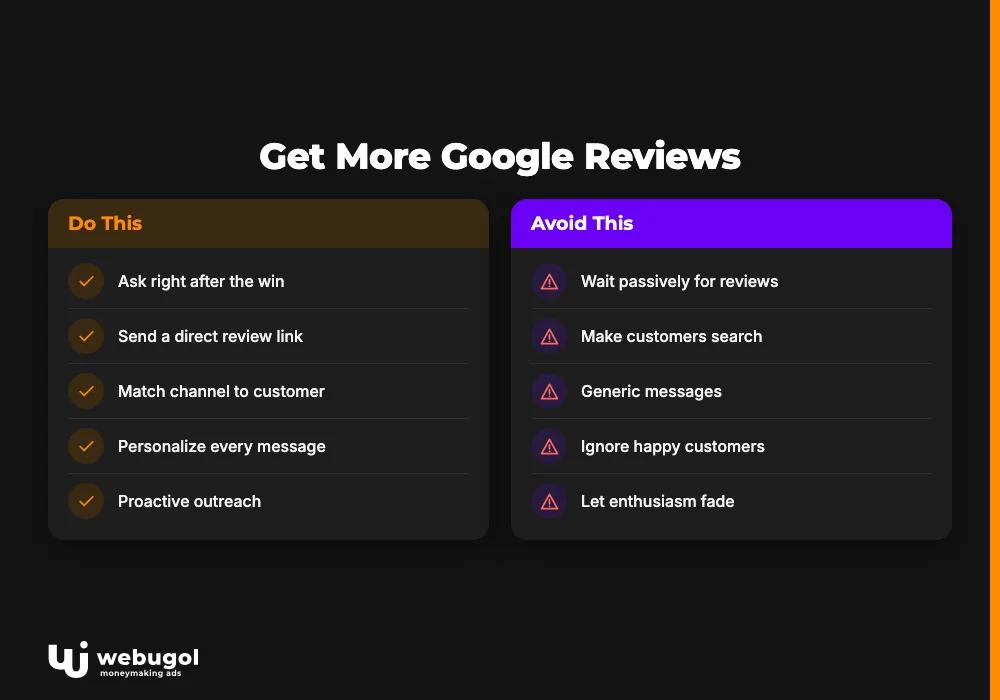
Ask right after the win. The best moment is when the customer receives their product, finishes the service, or gets their problem resolved. For service businesses, ask immediately after the job wraps. For e-commerce, a few days after confirmed delivery. Enthusiasm fades. Ask while it is high.
Send a direct link. Friction stops reviews from happening. If a customer has to search for your business, locate the profile, and find the review button, most abandon the attempt. Google Business Profile lets you generate a short review link that goes straight to the review form. Send it by SMS or email. One tap.
Match the channel to the customer. Different customers respond to different touchpoints:
- SMS reaches customers already on their phones; short messages work best
- Email allows more detail and supports automated follow-up sequences
- QR codes on receipts, front desks, or business cards capture in-person visitors
- A direct ask from a staff member after a clearly positive interaction still converts well
Personalize every message. Use the customer's name and reference the specific service or product they received. Generic messages get deleted. A message that reads "Hi Sarah, glad the repair went smoothly. Would you mind sharing your experience on Google?" converts far better than a form letter.
Follow up once. Send one polite reminder three to five days after your first request. That is the limit. More follow-ups become pressure, and pressure does not produce good reviews.
As your business grows, CRM automation can trigger review requests after purchase events without manual effort. This is how local search visibility for your business compounds: systematic processes rather than heroic individual effort.
How should I respond to negative Google reviews?
Respond promptly, calmly, and without arguing. Future customers read your replies before they ever meet you. A composed response to a difficult review demonstrates accountability more clearly than any marketing message.
Four steps to respond to negative reviews effectively:
- Stay calm. A public argument damages your reputation regardless of who is factually correct.
- Acknowledge the issue. State clearly that you heard the complaint and take it seriously.
- Apologize for the experience. Apologize for the dissatisfaction, even when the underlying facts are in dispute.
- Take it offline. Offer a phone number or direct email so the issue can be resolved privately.
Apply the same discipline to positive reviews. Thank the reviewer by name, mention the specific detail they shared, and invite them back. Every reply is visible to the next prospect reading that thread.
Consistent, professional responses to negative reviews build more trust than silent five-star ratings. Prospects notice how a business handles problems. That is online reputation management in action.

What should I do about fake Google reviews?
Flag them through your Google Business Profile dashboard. Select the review, click the flag icon, and submit a report that identifies the policy violation: spam, conflict of interest, off-topic content, or hate speech. Google evaluates the report against its content policies and may remove the review.
Do not write an apologetic response to a review you believe is fabricated. A thoughtful reply treats it as legitimate and draws more attention to it. Report it, then monitor for a decision.
One rule covers everything in this area: never offer gifts, discounts, or payment in exchange for reviews. Google can remove your entire review pool or suspend your Google Business Profile for incentivized feedback. Authentic reviews are the only kind that holds long-term value for your online reputation management.
Take control of your Google reviews for business
A consistent review request strategy, prompt responses, and solid Google Business Profile management compound into measurable local SEO improvement over months. The businesses that rank well locally built repeatable systems for generating and managing reviews, not one-off campaigns.
Webugol helps local businesses build those systems, from automated review workflows to full online reputation management strategy. Reach out to discuss what a structured review approach would look like for your business.
FAQ
Do I need to respond to every Google review?
Responding to both positive and negative reviews signals active management to Google and reassures prospects evaluating your business. Even a brief, personalized thank-you on a five-star review shows that real people run the company.
Can I delete a negative Google review?
You cannot delete a review yourself. You can flag it for Google to evaluate against its content policies. If the review violates those policies, Google may remove it, but removal is not guaranteed.
How many Google reviews do I need to rank in local search?
There is no published minimum. Google's local algorithm weighs review count alongside proximity, profile completeness, and user engagement signals. More current, specific reviews generally correlate with better local rankings in competitive markets.
Is it against Google's rules to ask customers for reviews?
Asking customers to leave honest reviews is allowed and standard practice. What Google prohibits is incentivizing reviews with gifts, discounts, or payment, and writing or buying fake ones. Direct, polite requests are a core part of any online reputation management strategy.
How do I get my Google review link to share with customers?
Open your Google Business Profile dashboard, click "Ask for reviews," and copy the short link provided. Share it via SMS, email, or QR code to let customers reach the review form in one tap.

