



Is HubSpot HIPAA Compliant? A Healthcare Marketer's Practical Guide (2026)
Is HubSpot HIPAA compliant? Yes, under three specific conditions: an Enterprise plan, a signed Business Associate Agreement, and Sensitive Data features manually activated in your portal settings. A default HubSpot portal at any plan tier is not HIPAA-ready, regardless of your team's data-handling practices. Healthcare practices that meet all three conditions can store PHI in contact records, run compliant patient outreach, and manage consultation pipelines, but several platform features, including all AI tools, remain outside BAA coverage regardless of plan. At Webugol, we build the compliance architecture and the patient acquisition system together as one audited program, so the tracking foundation and the revenue engine are reviewed before campaigns go live.
The short answer: yes, with specific conditions
HubSpot can be HIPAA compliant. It is not compliant by default. The full answer to is HubSpot HIPAA compliant depends on three simultaneous conditions: Enterprise plan, executed BAA, and Sensitive Data activated in Account Settings by a super admin. Miss any one, and storing PHI in HubSpot creates a compliance exposure.
The practical implication for healthcare owners and marketing leaders is direct: many practices use HubSpot today on Professional plans, without a BAA, and process contact data that qualifies as PHI. That configuration is not HIPAA-compliant regardless of the security measures otherwise in place.
Does HubSpot sign a BAA, and which plans qualify?
Yes. HubSpot signs a Business Associate Agreement, but only with Enterprise plan customers. Free, Starter, and Professional accounts cannot obtain a BAA regardless of portal configuration or data-handling practices.
Enterprise requirement and what it actually costs
Every practice asking is HubSpot HIPAA compliant eventually lands on the plan question. The BAA requirement applies to any Hub used to process PHI: Marketing Hub Enterprise, Sales Hub Enterprise, Service Hub Enterprise, or the Customer Platform Enterprise bundle. The Smart CRM layer becomes BAA-eligible only through an Enterprise-tier Hub subscription, which is also the technical answer to is HubSpot CRM HIPAA compliant.
| Plan | BAA available | Sensitive Data access | HIPAA eligible |
|---|---|---|---|
| Free | No | No | No |
| Starter | No | No | No |
| Professional | No | No | No |
| Enterprise | Yes | Yes | Yes |
The Enterprise investment is substantial relative to lower tiers. For practices generating $500k or more in monthly revenue with an established marketing budget, the cost is typically within operational range. HubSpot does not charge a separate HIPAA compliance fee. The BAA is included with qualifying Enterprise contracts, not sold as an add-on.
Practices on growth trajectories with existing HubSpot usage face a genuine platform decision: upgrade to Enterprise for HIPAA compliance, or evaluate alternatives. The comparison section below maps those alternatives directly.
What the HubSpot BAA covers (and what it doesn't)
Answering is HubSpot HIPAA compliant with precision requires understanding where the BAA boundary sits. The BAA is a contractual boundary, not a blanket compliance certification for everything in your portal. HubSpot defines a specific set of covered services, and anything outside that boundary is the covered entity's independent compliance responsibility.
Services covered under the agreement
When Sensitive Data is properly enabled on an Enterprise portal, these services fall within BAA scope:
- Core CRM contact, company, and deal records using designated Sensitive Data properties
- Marketing Hub email sends and workflow automation operating on Sensitive Data fields
- Sales Hub pipelines and sequences with PHI stored in Sensitive Data properties
- Service Hub tickets configured with Sensitive Data fields
- Forms set to write submissions directly into Sensitive Data properties
- HubSpot's data layer and custom object records with Sensitive Data enabled
- Email sequences to existing patients under consent flows that comply with HIPAA's Marketing Rule
The covered scope is broader than most teams assume. A well-configured Enterprise portal can handle a significant share of a healthcare marketing stack within BAA coverage.
Features explicitly excluded from the BAA
The exclusions are where healthcare marketing teams run into compliance risk:
- All AI tools: Breeze, Content Assistant, and AI Agents are explicitly excluded in the BAA
- Third-party integrations via the HubSpot App Marketplace, each requiring its own separate BAA
- Analytics and reporting modules that aggregate PHI into summarized datasets
- The HubSpot Ads tool and its audience sync features
- HubSpot's tracking code on pages that collect or display PHI
- Any Hub operating below Enterprise tier, including all free tools
- Data processed by excluded tools, regardless of where it originated
These exclusions create a structural problem for healthcare marketing operations. The features most commonly used for acquisition growth, including ad pixels, AI-assisted workflows, and audience targeting, sit outside BAA coverage.
What you can and cannot do in HubSpot under HIPAA
For healthcare marketing leaders, is HubSpot HIPAA compliant in operational terms depends on what the BAA actually permits you to run. The boundary defines the infrastructure; what you can do inside it is the more actionable question for a CMO managing patient acquisition.
Permitted: CRM, patient records, and secure communication
Within a properly configured Enterprise portal, these uses are within compliance:
- Storing patient contact records with clinical or diagnosis-related fields as Sensitive Data properties
- Running automated email sequences to existing patients, drawing on Sensitive Data fields under proper consent
- Managing consultation and appointment pipelines with PHI accessible only to authorized roles
- Assigning inbound leads with PHI to specific reps using role-based Sensitive Data visibility controls
- Segmenting existing patient lists for care follow-up, reactivation, or lifecycle-based outreach
- Creating ticket workflows in Service Hub for support cases that contain PHI
- Lifecycle nurture sequences referencing patient service history, without pushing data to ad platforms or excluded tools
For practices ready to move from compliance verdict to actual implementation, running HubSpot as a patient acquisition and pipeline system for healthcare practices requires configuration decisions that go well beyond the BAA alone.
Restricted: ad pixels, remarketing, and third-party integrations
The restrictions that land hardest on healthcare marketing operations:
- The Meta Pixel and Google Tag cannot fire on pages that collect or display PHI; this removes a primary conversion signal for campaign optimization
- Remarketing audiences cannot be built from medical condition signals, diagnosis fields, or PHI-derived data; Meta's Special Ad Categories policy and Google's healthcare ad restrictions enforce this at the platform level, independently of HubSpot
- Google Consent Mode v2 is required before any conversion data flows to Google Ads; event-level data for healthcare must be consent-gated before it reaches ad platforms
- Third-party tools connected via HubSpot integrations need their own BAA; a scheduling platform, EHR system, or billing tool that syncs with HubSpot creates a new compliance obligation
- HubSpot's reporting modules that aggregate PHI are outside BAA scope; any BI tool connected to HubSpot requires independent compliance review
Practices evaluating their broader analytics compliance alongside HubSpot will find the HIPAA compliance question for web analytics tracking runs as a parallel decision worth addressing at the same time.
Are HubSpot AI features HIPAA compliant?
No. Breeze, Content Assistant, and AI Agents are explicitly excluded from the HubSpot BAA. This is a deliberate architectural exclusion in the agreement, not a gap that any portal configuration can close.
The risk is structural. When staff use AI tools inside a portal that holds PHI in Sensitive Data fields, data can pass through infrastructure that HubSpot has not committed to cover under the BAA. A sales rep using Breeze to summarize a contact record containing PHI is processing that PHI through an excluded tool. The compliance exposure exists regardless of user intent.
The correct response is to restrict AI feature access at the role level. Disable Breeze and Content Assistant for any user role with Sensitive Data visibility under Settings > Users > User Permissions. Leaving AI features active for roles that can access PHI is the most common active compliance gap in otherwise well-configured HubSpot portals.
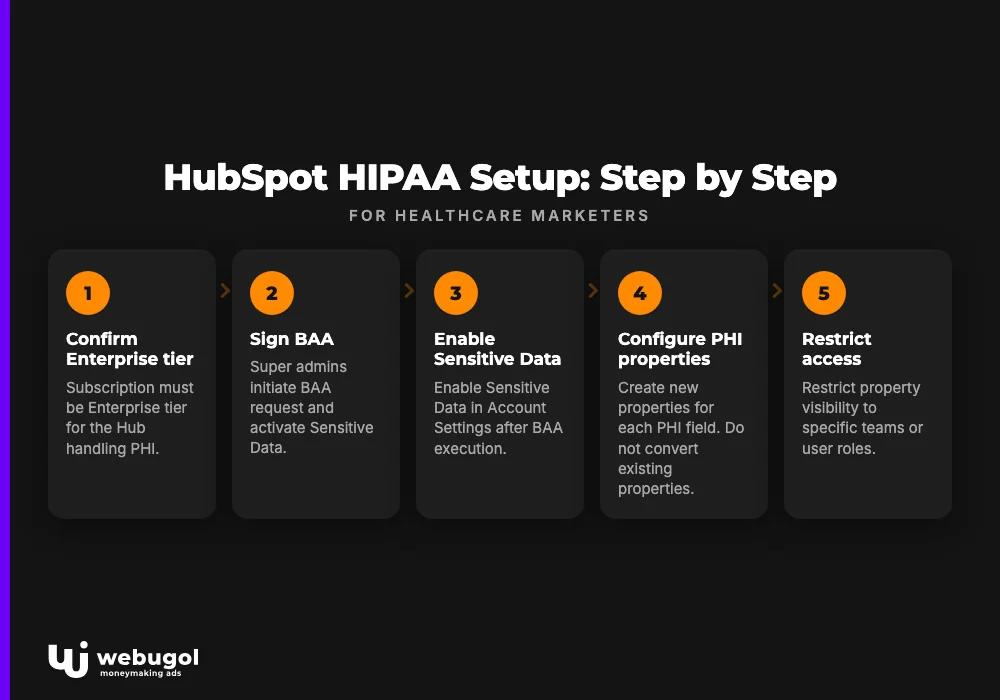
How to set up HubSpot for HIPAA compliance: step by step
This is where is HubSpot HIPAA compliant moves from a policy statement to an operational fact. Configuration sequence matters: the BAA must be executed before Sensitive Data is enabled, and access controls must be in place before PHI enters the system.
Enable Sensitive Data and sign the BAA
- Confirm the subscription is Enterprise tier for the Hub handling PHI, whether Marketing, Sales, or Service Hub, or the Customer Platform Enterprise bundle
- Log in as a super admin; only super admins can initiate the BAA request and activate Sensitive Data
- Navigate to Settings > Account > Account Defaults > Sensitive Data to access the activation workflow
- Review HubSpot's Data Processing Agreement before executing the BAA
- Complete the BAA signing workflow through the portal; HubSpot processes the agreement within the portal interface
- Confirm BAA execution appears in Legal Documents before proceeding to the next step
- Enable Sensitive Data in Account Settings; this activates the feature but does not automatically protect existing properties
The BAA must be fully executed before PHI enters any record in the system.
Configure HIPAA-compliant properties and access controls
- Navigate to Settings > Properties for the relevant object (Contact, Company, Deal, or Ticket)
- Create new properties for each PHI field; do not convert existing properties that already hold unprotected data
- Enable the Sensitive Data toggle on each PHI property at the time of creation
- Restrict property visibility to specific teams or user roles with a legitimate need to access that PHI
- Set field-level permissions to prevent PHI from surfacing in list views, bulk exports, or roles without PHI access
- Disable AI features for any role with Sensitive Data visibility (Settings > Users > User Permissions)
- Audit all active automation workflows to confirm no PHI fields flow into excluded integrations or public-facing tools
- Test form submissions to confirm PHI writes into Sensitive Data properties rather than standard CRM fields
Audit log setup and staff access review
HubSpot's audit log records user actions on Sensitive Data properties and account-level configuration changes. Enable audit log access for compliance officers or super admins under Settings > Account > Audit Log.
A quarterly access review should address four questions: which users have Sensitive Data visibility and whether their role still requires it; whether any new integrations have been added connecting to PHI records; whether AI features remain disabled for all roles with PHI access; and whether any Sensitive Data properties have been exported or synced to tools outside BAA scope.
Staff with purely marketing or administrative functions, those writing campaigns, managing ad accounts, or building reports, do not need Sensitive Data visibility unless their role genuinely requires patient-level PHI access. Restrict by default, expand only when a business reason exists.
HIPAA-compliant marketing in HubSpot: what healthcare marketers need to know
Getting the technical configuration right is the compliance prerequisite. Running a revenue-trackable marketing operation inside that configuration is the actual challenge for marketing leaders managing patient acquisition programs.
The restrictions reshape what is possible. They do not eliminate marketing capability. Email marketing to existing patients through a BAA-covered portal is permitted with appropriate consent flows in place. Nurture sequences built on lifecycle stage and service history operate within covered scope, without pushing data to ad platforms or excluded tools. Reactivation campaigns to lapsed patients and program-specific outreach are operational within the Sensitive Data architecture.
The constraint lands hardest on new patient acquisition. Ad platform pixels cannot fire on PHI-collecting pages, which limits the conversion signal available to Google and Meta for campaign optimization. Audience segments derived from medical condition data cannot flow to ad platforms. This is not unique to HubSpot. It is a HIPAA constraint that applies across any marketing platform handling PHI.
Healthcare practices evaluating CRM options for this specific challenge will find detailed evaluation criteria in the guide to managing HIPAA-compliant patient data across the full acquisition and retention cycle.
The tracking infrastructure, attribution model, and CRM configuration must be built as one audited system before paid acquisition scales. The M2 Tracking Foundation sprint inside the Healthcare Growth System is where Webugol builds that compliance and acquisition foundation together, not as separate deliverables handed off between vendors.
HubSpot vs. other healthcare CRMs: HIPAA compliance compared
For practices asking is HubSpot HIPAA compliant against the alternatives, plan tier is only one variable. The three platforms most commonly evaluated by healthcare marketing decision-makers:
| HubSpot | GoHighLevel | Salesforce Health Cloud | |
|---|---|---|---|
| BAA available | Yes (Enterprise only) | Yes (HIPAA Add-on, separately priced) | Yes (Health Cloud contract) |
| PHI storage | Yes (Sensitive Data properties) | Yes (with HIPAA Add-on active) | Yes (purpose-built for clinical data) |
| Marketing under HIPAA | Restricted: no pixel on PHI-collecting forms, no PHI-derived ad audiences | Similar restrictions; compliance documentation less mature | Supported with configuration; marketing tools require separate licensing |
| AI features under BAA | No, all AI tools explicitly excluded | Limited; compliance documentation evolving | Einstein AI requires separate compliance review |
| Required plan | Enterprise Hub subscription | Any plan plus HIPAA Add-on | Health Cloud Enterprise contract |
| Best fit | Multi-channel healthcare marketing with established HubSpot investment | Growth-stage telehealth practices running simpler acquisition funnels | Large health systems and EHR-integrated patient management |
GoHighLevel's HIPAA Add-on creates a lower-barrier entry point for telehealth practices that cannot justify an Enterprise HubSpot investment. The trade-off is a less mature compliance documentation trail and a smaller ecosystem of HIPAA-ready native integrations.
Salesforce Health Cloud is purpose-built for healthcare data management at scale. The depth of PHI handling and EHR integration capability exceeds what HubSpot currently offers for health system-scale use cases. The implementation cost and enterprise sales cycle place it outside practical reach for most single-location or early multi-location operators.
HubSpot at Enterprise occupies the practical middle: strong marketing infrastructure, a defined compliance architecture, and a cost structure that fits practices with established revenue and marketing investment.
What happens if PHI is exposed through HubSpot?
The healthcare practice, as the covered entity, bears primary responsibility for any PHI breach, regardless of which vendor's infrastructure was involved. The BAA shifts some liability to HubSpot as a business associate. It does not transfer the covered entity's regulatory obligations.
According to the HHS Office for Civil Rights, HIPAA civil monetary penalties are tiered by culpability level. Unknowing violations carry per-violation penalties starting in the hundreds of dollars, capped at a lower annual maximum per violation category. Willful neglect that is not corrected reaches the highest tier, at over $1.9 million per violation category per year. The liability is yours. The covered entity carries that exposure regardless of whether HubSpot's infrastructure, a third-party integration, or an internal misconfiguration caused the breach.
A breach notification obligation activates within 60 days of discovering a PHI exposure. For breaches affecting more than 500 individuals, the covered entity must notify HHS and affected individuals simultaneously, and HHS publishes those notifications publicly on its breach portal.
The specific risk in HubSpot configurations: if PHI was processed through an excluded tool, such as an AI feature, an uncovered integration, or a portal below Enterprise tier, the covered entity cannot use the BAA as a compliance defense. Storing PHI in a standard HubSpot property on a Professional plan while assuming the BAA applies is a common misconfiguration in practices that upgraded incrementally from lower tiers. It is also the scenario most likely to be classified as reasonable cause rather than unknowing violation, which carries a higher penalty floor.
Ready to build a compliant, revenue-trackable patient acquisition system?
HIPAA compliance in HubSpot is a configuration problem, not a product problem. But compliance alone does not make the system revenue-trackable. A signed BAA and correctly labeled Sensitive Data properties protect you legally. They do not build the attribution model, the conversion tracking infrastructure, or the campaign architecture that shows which channels and messages are driving consult bookings and program starts.
Healthcare practices working through the Healthcare Growth System have tracking architecture, CRM configuration, and campaign infrastructure built as one audited system in the M2 Tracking Foundation sprint, before paid acquisition goes live. Compliance infrastructure and revenue infrastructure are built together, not handed off between a compliance consultant and a media buyer.
Book a Strategy Call to diagnose your current configuration, tracking gaps, and acquisition architecture, and map what a growth-ready, compliant system looks like for your practice.
FAQ
Is HubSpot HIPAA compliant out of the box?
No. HubSpot requires an Enterprise plan, a signed BAA, and manual activation of Sensitive Data features before PHI can be stored or processed. A default HubSpot portal at any plan tier is not HIPAA-ready without this configuration.
Does HubSpot sign a BAA for free accounts or Professional plans?
HubSpot signs a Business Associate Agreement only with Enterprise plan customers. Free, Starter, and Professional accounts are ineligible regardless of how the portal is otherwise configured.
Can you use HubSpot email marketing for patient outreach under HIPAA?
Yes, with restrictions. Email sequences through a BAA-covered portal are permissible for existing patients, but PHI-derived audience segments cannot be used for broad acquisition campaigns or synced to advertising platforms.
Are HubSpot AI features like Breeze HIPAA compliant?
No. Breeze, Content Assistant, and AI Agents are explicitly excluded from the HubSpot BAA. Healthcare teams should restrict staff access to these features in any portal that stores PHI.
What is the fine if PHI is exposed through HubSpot?
OCR HIPAA penalties are tiered by culpability level, ranging from hundreds of dollars per violation for unknowing breaches to over $1.9 million per violation category annually for willful neglect. The covered entity bears primary liability regardless of which vendor's infrastructure was involved in the breach.

