



Website Requirements Document: The Template That Gets Marketing and Dev Aligned
A website requirements document is a structured brief that defines what a web project must accomplish, who it serves, and what constraints apply before any design or development begins. It is the shared source of truth between marketing and dev, written before anyone opens a design tool or creates a sprint ticket. Without one, marketing-initiated requests routinely fail in the dev queue, not because developers are unresponsive, but because tickets arrive as proposed solutions rather than defined problems. A well-structured WRD gives both teams a common language and a clear handoff point before a single line of code is written.
What is a website requirements document?
A website requirements document is a pre-build alignment tool. It is not a scope of work, which is a delivery contract, and not a Figma file, which is a proposed solution. It answers three questions before development begins: what business problem does this page need to solve, who exactly will visit it, and what constraints does the team need to respect. A WRD sits upstream of both contracts and designs.
The core problem a WRD prevents is familiar to any marketing leader at a growing clinic or telehealth practice. Marketing identifies a campaign window, creates a landing page concept, and submits it to dev. The ticket gets deprioritized. When it finally surfaces, it comes back with questions that should have been answered before submission. This pattern repeats regardless of team size or budget.
Whether you are writing your first WRD as a newer marketing hire or managing your fifth clinic launch under a replatform deadline, the structural weakness is the same: requirements arrive as finished solutions, the handoff stalls, and the launch slips. The document is the tool that breaks that cycle.
For healthcare operators, this problem carries a compliance layer that most general-purpose guides ignore. A landing page for a GLP-1 program or a TRT consult requires design and dev alongside tracking configuration, HIPAA consent language, pixel restrictions, and clinical claim review. A website requirements document that skips these sections does not reduce the sprint. It moves the delays to post-launch.
Who is responsible for writing a website requirements document?
No single role owns the document by default. That gap is precisely why landing page requests die in the backlog. The document sits at the intersection of marketing's goals, dev's constraints, and compliance's approval chain, and nobody's job description covers all three.
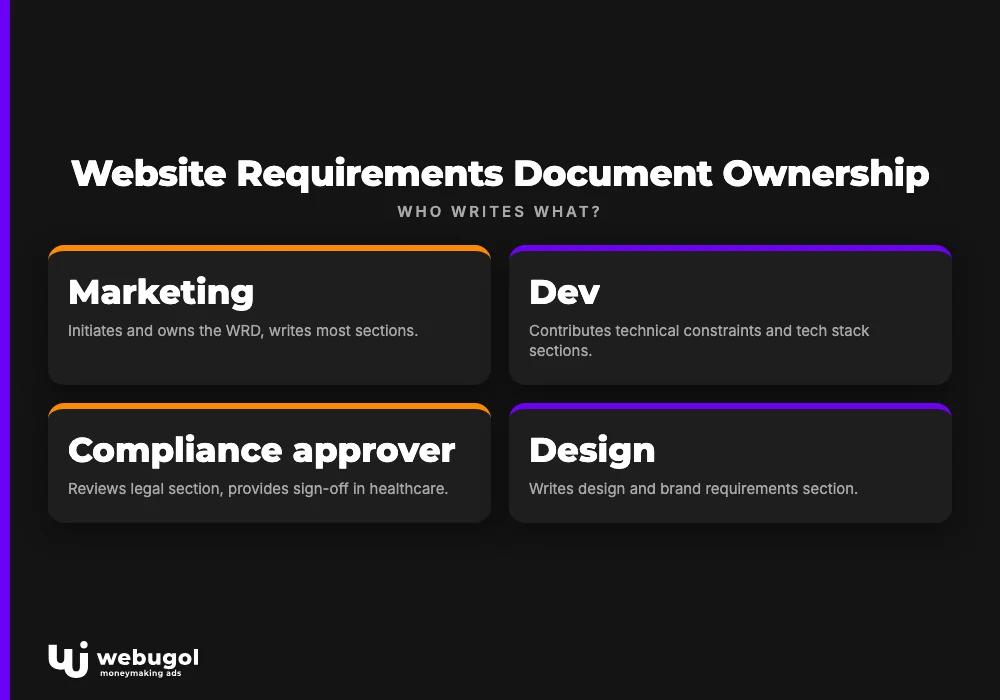
The practical answer: marketing initiates and owns the WRD. Dev contributes the technical constraints section. In healthcare, the compliance approver must review the legal section before the document reaches dev.
Responsibility matrix:
| WRD section | Primary author | Approver |
|---|---|---|
| Project overview and business goals | Marketing | Marketing lead |
| Target audience and user stories | Marketing | Product or clinical lead |
| Sitemap and content architecture | Marketing | Dev lead |
| Design and brand requirements | Design | Brand or compliance |
| Functional requirements | Marketing + Dev | Dev lead |
| Tech stack and integrations | Dev | Dev lead |
| Tracking and analytics | Marketing | Dev + compliance |
| Compliance and legal | Marketing + legal | Compliance approver |
| Performance and hosting SLAs | Dev | Dev lead |
| Timeline and milestones | Marketing | Project lead |
The compliance approver is not an author. Their role is sign-off. In healthcare, that sign-off is a launch prerequisite, not a formality. Marketing must build the compliance review window into the timeline explicitly, not assume it happens in parallel with dev work.
When to create a website requirements document
The right moment is before anyone opens a design tool or creates a sprint ticket. That sounds obvious. In practice, most WRDs get written after the first round of dev questions, which means alignment is happening reactively rather than proactively.
Triggers that require a WRD from day one:
- Replatform or major redesign with a campaign deadline attached
- New clinical program or service line launching with paid media
- Landing page for a split test with a new URL structure, which can break existing SEO rankings if uncoordinated
- CRM or booking system change that affects form behavior and lead routing
- Compliance-mandated copy rewrite on a live page
The late-entry pattern is worth recognizing. A ticket reaches dev as a finished mockup. It has no problem statement, no defined conversion event, no mention of CRM integration, and no note on HIPAA consent requirements. Dev asks four clarifying questions. Marketing answers two. The ticket goes back in the queue. Three weeks pass. This is not a capacity problem. It is a document problem.
For healthcare operators under a replatform or major redesign deadline, the absence of a WRD is the single most common cause of missed launch dates. Not dev slowness. Not design revisions. The missing brief.

The 10 sections every website requirements document needs
This is the structural core of any effective WRD and the basis for the free template below. Each subsection below defines what belongs there, what a vague version looks like, and what a specific version looks like for a healthcare landing page.
Overview of all 10 sections:
- Project overview and business goals
- Target audience and user stories
- Sitemap and content architecture
- Design and brand requirements
- Functional requirements
- Tech stack and third-party integrations
- Tracking and analytics requirements
- Compliance and legal requirements
- Performance and hosting SLAs
- Timeline, budget, and milestones
1. Project overview and business goals
State the business problem the page must solve, the conversion event, and the success metric. For a telehealth landing page, this means the specific service line, the patient population, and what "conversion" means to both marketing and dev.
Vague: "build a landing page for our weight loss program." Specific: "build a landing page for the GLP-1 consult program targeting adults 35-60 in Texas; primary conversion event is consult booking via the embedded Calendly widget; secondary event is lead capture form submission." This section is not a creative brief. It is a problem statement with a measurable outcome attached.
2. Target audience and user stories
Describe the visitor in job-to-be-done terms: "A patient evaluating GLP-1 options wants to understand eligibility and book a consult without a phone call." User stories translate marketing personas into acceptance criteria a developer can test against.
Vague: "our target is adults interested in weight loss." Specific: "primary user is an adult 35-60 who has tried diet and exercise, is researching medically supervised options, and will leave the page if eligibility requirements are not clear within the first scroll." User stories written here become functional acceptance criteria in section 5. Write them once; reference them twice.
3. Sitemap and content architecture
Define every URL, its parent-child relationship, and the content type. Include a draft sitemap or reference the live one. Skipping this section causes dev to architect something that breaks existing SEO structure or duplicates a page already ranking for a target keyword.
For a campaign landing page, the specification can be simple: /programs/glp1-consult under /programs/, noindex link, canonical pointing to itself, no footer nav. That one paragraph prevents three common architectural mistakes and keeps the SEO structure intact.
4. Design and brand requirements
Link to the brand style guide, specify which existing components are available for reuse, and flag creative deviations that require brand or compliance review. This section defines constraints, not solutions. Reference the design system; do not paste the mockup. If the mockup exists before the WRD, that is a process problem, not a design problem.
For healthcare practices, compliance constraints belong here too: prohibited imagery, claim formatting rules, required disclaimers that affect layout. These are not edge cases. They are standard requirements for any health program landing page.
5. Functional requirements
List every interactive element and write each as an outcome, not an implementation. "Visitor can submit date of birth without leaving the form" rather than "use a date picker component." This is where most marketing tickets break down. Describing the solution instead of the requirement is the single most common reason a ticket gets sent back.
A functional requirement must be testable. If a developer cannot write a pass/fail test for it, the requirement is not specific enough. Work through each interactive element and ask: how would a QA tester confirm this works correctly?
6. Tech stack and third-party integrations
Specify the CRM, booking system, or EHR the form must feed. For healthcare, include whether the integration requires HIPAA-compliant data handling and flag API dependencies with existing credentials. Dev cannot scope the work without this section.
Vague: "it should connect to our CRM." Specific: "form data must route to GoHighLevel pipeline 'GLP-1 Leads' via the existing webhook; Calendly widget uses the existing team account; no new API keys required." Third-party integrations with active credentials take less than a day to wire. Third-party integrations where credentials are missing or permissions are wrong take weeks.
7. Tracking and analytics requirements
This section is absent from the top-ranking guides on this topic. That absence is expensive. Define every conversion event marketing needs to measure, which tool it fires in, and whether it requires server-side firing for HIPAA compliance.
For a GLP-1 landing page: consult booking fires in GA4 as a purchase event, in Google Ads as a conversion action, and in Meta CAPI as a lead event (server-side only, no health condition data passed). Confirming the Google Analytics permissions and access structure for these events before dev builds the tag layer prevents the most common post-launch discovery: a live page generating real leads with zero conversion data while ad spend optimizes toward no signal.
Vague: "we need conversion tracking." Specific: "consult booking fires as GA4 purchase event named 'consult_booked', value $0; Google Ads conversion action 'GLP1_Consult'; Meta CAPI lead event, server-side only." Write it at this level of specificity or the tracking section is effectively blank.
8. Compliance and legal requirements
Document HIPAA consent language, cookie consent mode requirements, pixel restrictions on health conditions, and which claims require medical or legal review before the page can go live. Link to the internal approval workflow. Healthcare landing pages stall in dev because this section was missing, not because of dev capacity.
Specific requirements for a GLP-1 program page: HIPAA-compliant consent checkbox before form submission; Meta pixel fires only after consent (Consent Mode v2 required); no health condition parameters passed to ad platforms; "individual results may vary" disclaimer on before/after references; the claim "FDA-approved medication" requires medical review before publish. This is not a legal checklist. It is a launch prerequisite.
9. Performance and hosting SLAs
Specify Core Web Vitals targets, uptime requirements, and CDN or caching expectations. This section connects infrastructure decisions to business outcomes in terms the whole team can agree on. If your work on improving conversion rates on healthcare landing pages is built on a page that loads in 4.5 seconds on mobile, the gap was closable at the requirements stage, not after launch.
Minimum targets for a paid traffic landing page: LCP under 2.5 seconds on mobile, CLS under 0.1, FID under 100ms, uptime SLA 99.9%, CDN enabled. These are not aspirational. They are launch conditions. State them in the document or accept that dev will make infrastructure decisions without them.
10. Timeline, budget, and milestones
List delivery dates, internal review windows, compliance approval lead time, and hard external deadlines. Marketing must own the compliance review window in this section. The most common cause of missed healthcare launches is not dev slowness; it is compliance review that was not built into the timeline.
A realistic healthcare landing page timeline: WRD finalized (Day 1), dev scoping complete (Day 3), design review (Day 5), dev build (Days 6-12), internal QA (Day 13), compliance review (Days 14-21), launch (Day 22). Build the compliance window in explicitly. If you do not, it will consume the buffer you thought you had.
If you are rebuilding under a launch deadline, Webugol's Healthcare Growth System scopes tracking, compliance, and dev requirements together in Month 1 before anyone opens a ticket. That is what a requirements-first build looks like in practice.
What breaks when website requirements are vague?
Scope creep, rework cycles, and missed launches are symptoms. The cause is a document that described a finished product instead of a problem. Here is what that looks like in a real dev queue.
Marketing submits a ticket: "New landing page for the telehealth consult program, mockup attached." Dev receives it. The mockup shows a hero image, a headline, a form, and a CTA button. Dev asks four questions: which CRM does the form feed, what is the conversion event, does this need HIPAA consent, and is there an existing template to build from. Marketing answers two. The ticket goes back in the queue. Three weeks pass. This is not a prioritization failure. It is a WRD failure.
Common vague requirement patterns and their consequences:
- "It should look like our other pages" leaves dev guessing which components are approved for reuse vs. which require compliance review before they can carry health claims.
- "Connect it to our booking system" does not specify which system, which pipeline stage, or whether the integration must be server-side for HIPAA compliance.
- "Make it fast" cannot be tested; "LCP under 2.5 seconds on mobile" can be verified before and after every deploy.
- "Track conversions" does not indicate which tool, which event name, or what user action fires the event; dev builds no tracking layer, and marketing notices three weeks post-launch.
- "Make it compliant" is a category, not a requirement; the specific consent language, pixel restrictions, and claim approvals are the requirements.
- A mockup submitted as the ticket describes one possible solution, not the problem; dev builds exactly what is in the mockup, and two rounds of revisions follow.
- "Launch it next week" with no compliance review window in the timeline produces a launch delay every time, without exception.
The pattern that produces the most expensive rework is the fourth one above. A landing page running live with no conversion tracking is not a tracking oversight. It is a requirements oversight. The tracking section was absent from the brief, so there was nothing for dev to build, and marketing only discovered this when the ad spend report showed zero conversions. At that point, a post-launch tracking implementation requires a new dev ticket, another compliance review, and a data gap in the attribution window that cannot be recovered.
The same structural fragility that creates these gaps for a single landing page is what holds a scaling healthcare practice back when every new program launch repeats the same cycle. Building a requirements-first handoff process is not a documentation exercise. It is an operational fix.

Free website requirements document template
A complete website requirements document template built around the 10 sections above is available as a Google Doc from Webugol. It is pre-filled with healthcare-relevant examples for a telehealth landing page, including the tracking and compliance sections that most free templates omit.
What the template covers:
- Pre-filled examples for each of the 10 sections, written from a GLP-1 consult landing page scenario
- Tracking requirements written to the specificity level dev needs: event name, tool, firing condition, server-side flag
- Compliance requirements including consent language, pixel restrictions, and the internal claim review workflow
- Responsibility matrix with editable sign-off fields for marketing, dev, and compliance approver
- Timeline table with the compliance review window built in and flagged as a marketing-owned milestone
What to customize per project type:
- The conversion event in sections 1 and 7 (appointment booking, lab kit purchase, program enrollment)
- The CRM and integration specifics in section 6 (GoHighLevel, HubSpot, ActiveCampaign, or EHR integration)
- The compliance requirements in section 8, which differ by program type (a GLP-1 program has different pixel rules than a med spa promotion)
- The performance SLAs in section 9 if your hosting environment has constraints specific to your stack
The template is designed for the first cross-functional alignment meeting. Bring it before design starts. Using it after design is complete means using it to document decisions already made rather than to align on decisions before they lock in.
WRD vs. SRS vs. PRD: which one does your team actually need?
Three document names create constant confusion in cross-functional teams. Sending a software requirements specification to a marketing-driven project wastes a full alignment cycle. Sending a WRD to an engineering team building a backend API is the wrong tool for the job. The confusion is not semantic. It has real project consequences.
The decision rule is straightforward: a marketer initiating a website change needs a WRD. An engineering team building a software system writes an SRS. A product team managing a feature roadmap uses a PRD.
| Document | Primary author | Primary audience | When to use | Healthcare-specific note |
|---|---|---|---|---|
| Website requirements document | Marketing | Marketing + Dev | New landing page, campaign site, or redesign initiated by marketing | Required for HIPAA tracking, consent, and claim compliance sections |
| SRS (Software Requirements Specification) | Engineering | Dev team | Software systems: APIs, integrations, backend infrastructure | Used for EHR integrations, not marketing landing pages |
| PRD (Product Requirements Document) | Product manager | Product + Engineering | Feature roadmap, product functionality changes | Relevant for patient portal features, not campaign landing pages |
The practical implication for a healthcare marketing team: if marketing is initiating a landing page build, a WRD is the right tool. If the same project requires a new EHR API integration, that integration gets its own SRS written by dev. The two documents are not substitutes. They address different scopes, owned by different authors, for different audiences.

Get your next landing page live without a dev sprint
Writing a solid WRD solves the alignment problem. It closes the gap between what marketing needs and what dev can estimate. For healthcare practices under a replatform or launch deadline, the execution problem is a separate constraint: who builds the page, who owns the tracking, who coordinates compliance review, and who keeps all three moving together toward the same launch date.
The Healthcare Growth System is built around this model. Tracking, compliance, and dev requirements are scoped from one document and managed as one system through launch. Month 1 covers the full requirements and infrastructure foundation before any creative is in production, which means the compliance review window is built in from the start, not discovered as a blocker on Day 18. Book a strategy call to see how Month 1 works.
FAQ
What is a website requirements document?
A website requirements document is a structured brief that defines the goals, audience, functionality, technical constraints, and compliance requirements for a web project before development begins. It is the shared source of truth between marketing and dev, written before any design or code work starts. Without it, cross-functional alignment happens reactively, after the first round of dev questions.
What should a website requirements document include?
A complete WRD covers ten areas: project goals, target audience, sitemap, design constraints, functional requirements, integrations, tracking and analytics, compliance requirements, performance SLAs, and timeline. Healthcare projects must include dedicated tracking and compliance sections or face costly post-launch fixes.
How long should a website requirements document be?
A single landing page WRD is typically two to four pages. A full site redesign can run fifteen or more. The goal is enough detail for a developer to estimate the work and a compliance reviewer to approve the claims without a follow-up meeting.
Who should write a website requirements document?
Marketing initiates the WRD and owns the business goals, audience, and conversion requirements. Dev contributes the tech stack and integration constraints. In healthcare, the compliance approver must review the legal section before the document is finalized and handed to dev.
What is the difference between a website requirements document and an SRS?
A WRD is written for a cross-functional business team planning a marketing or content site. A software requirements specification (SRS) is a formal engineering document for software systems, written in technical language for developers. Most marketing-initiated web projects need a WRD, not an SRS.

