



H1 tag SEO: definition, best practices, and ranking impact
The h1 tag is the primary visible heading on a webpage and one of the most direct on-page ranking signals Google processes. In h1 tag SEO, this element tells search engines what a page covers, gives visitors immediate confirmation they arrived at the right place, and anchors the overall relevance of the page for its target query. Keep it to one per page, under 65 characters, and distinct from the title tag, and it functions as one of the most reliable on-page levers you have.
This guide covers the h1 tag definition, how it compares to the title tag, how Google handles multiple h1 tags, and the h1 heading best practices that Webugol applies across client sites.
What is the h1 tag? A brief definition
The h1 tag is the top-level HTML heading element. It marks the main visible title of a webpage and anchors the full html heading structure, which runs from h1 (highest weight) down to h6 (lowest). H1 carries the most significance for both users and search engines; h2 headings organize major content sections; h3 through h6 handle finer subdivisions below that.
Visitors see the h1 when they load the page. The title tag, by contrast, lives inside the HTML document's <head> element and appears in the browser tab and search results page, but not in the visible page body.
That difference has real SEO consequences, because the two elements speak to different people at different moments.
| Element | Where it appears | Who sees it | Primary SEO function |
|---|---|---|---|
| Title tag | Browser tab, SERP snippet | Users browsing search results | Drive click-through from SERP |
| H1 tag | Visible page body | Users who already clicked | Confirm topic, reduce bounce rate |
| H2–H6 | Visible page body | On-page readers | Structure content, cover secondary keywords |
What is the difference between h1 and title tag?
The page title vs h1 distinction matters for keyword strategy and for understanding how Google processes on-page signals. The two elements are separate, serve different audiences, and should not be identical.
The title tag targets users who have not yet clicked. It appears as the linked headline in search results and drives click-through decisions. The h1 tag takes over once the visitor arrives: it confirms they landed on the right page and gives them a reason to keep reading.
At Webugol, the standard practice is to place the most-searched primary keyword in the title tag and the next strongest keyword variation in the h1. Both elements can share words, especially synonymous terms, but copying the title tag verbatim into the h1 misses a second keyword opportunity and provides no signal differentiation for Google, which reads both elements and compares them.
The h1 vs title tag relationship is complementary, not redundant. Think of them as two distinct entry points to the same page: one built for pre-click behavior, one for post-click engagement.

How many h1 tags can a page have?
One h1 tag per page is the established best practice. Using more than one h1 on a single page can lower the page's ranking because Google has to distribute its understanding of the page's main topic across multiple competing top-level headings rather than reading a single clear statement.
Multiple h1 tags also break the logical html heading structure. The hierarchy works when each level has a defined role: h1 establishes the page topic, h2 organizes major sections, and h3 through h6 add finer layers. Multiple h1 elements on one URL make that hierarchy unreadable for both crawlers and users.
A common source of this problem is CMS templates that inadvertently apply the h1 style to navigation menus, sidebars, or banner areas. The visual layout may look correct, but the HTML source contains several h1 elements. A heading audit surfaces this kind of structural error quickly, even when it is invisible to casual inspection.
The practical rule: one h1, at the top of the main content, above all h2 and h3 subheadings.
Does h1 tag affect SEO rankings?
Yes, in two distinct ways. The direct effect comes from relevance signaling: the h1 is one of the first and clearest topical signals Google's crawler encounters when it processes a page. A page whose h1 directly matches the target query gives Google an explicit confirmation of relevance that body text or lower-level headings alone cannot replace.
The indirect effect comes through user behavior. A strong, precise h1 reduces bounce rate: visitors who search for a topic and find a page whose h1 immediately confirms the match tend to stay and read. Visitors who find a vague or unrelated h1 typically return to the SERP. Accumulated engagement signals across many sessions factor into how Google ranks pages over time.
H1 tag SEO also intersects with click-through rate. As discussed below, Google can use the h1 as a replacement for the title tag in search results. When that happens, the quality of the h1 directly determines how many users click on the listing.
The relevance signal, the engagement effect, and the potential SERP display role combine to make the h1 one of the most consequential on-page elements. H1 tag SEO is a direct input to how Google understands and ranks your content. For context on how heading optimization connects to broader organic search results, it works best as part of a coordinated on-page strategy rather than in isolation.
Can Google rewrite your h1 tag?
Google can, and sometimes does, display the h1 tag in place of the title tag in search results. This behavior has been observed in Webugol's client site reviews and documented widely across the SEO industry. It occurs in two main scenarios: when no usable title tag exists on the page, or when the title tag present is not relevant to the user's actual search query.
In the second case, Google selects the most relevant content it can find on the page to use as the displayed SERP headline. The h1 is the natural candidate because it is specifically designed to state the page's primary topic. A well-written h1 aligned with common search queries gives Google a strong fallback. A generic or misaligned h1 can produce a SERP snippet that discourages clicks.
This behavior reinforces the need to treat h1 tag SEO and title tag optimization as a pair, not as separate tasks. A strong title tag backed by an equally strong h1 gives Google less reason to override your intended display. If your title tag fails for any reason, your h1 is Google's next choice.

How long should an h1 tag be?
Keep the h1 under 65 characters. This is the threshold beyond which display issues and keyword-stuffing signals become a concern. Webugol applies the same 65-character limit to title tags and recommends staying under 135 characters for meta descriptions to avoid truncation.
A concise h1 that names the page's topic and contains the primary keyword outperforms a long one every time. If you find yourself approaching or exceeding 65 characters, secondary keywords are likely competing for space in the h1 when they belong in h2 subheadings and body text instead.
The most effective h1 is the shortest statement that accurately describes the page and contains the keyword the page is meant to rank for.
H1 heading best practices
Applying h1 heading best practices consistently across a site creates a clean, readable signal structure for both users and crawlers. These are the standards Webugol's SEO team uses when reviewing and optimizing client pages.
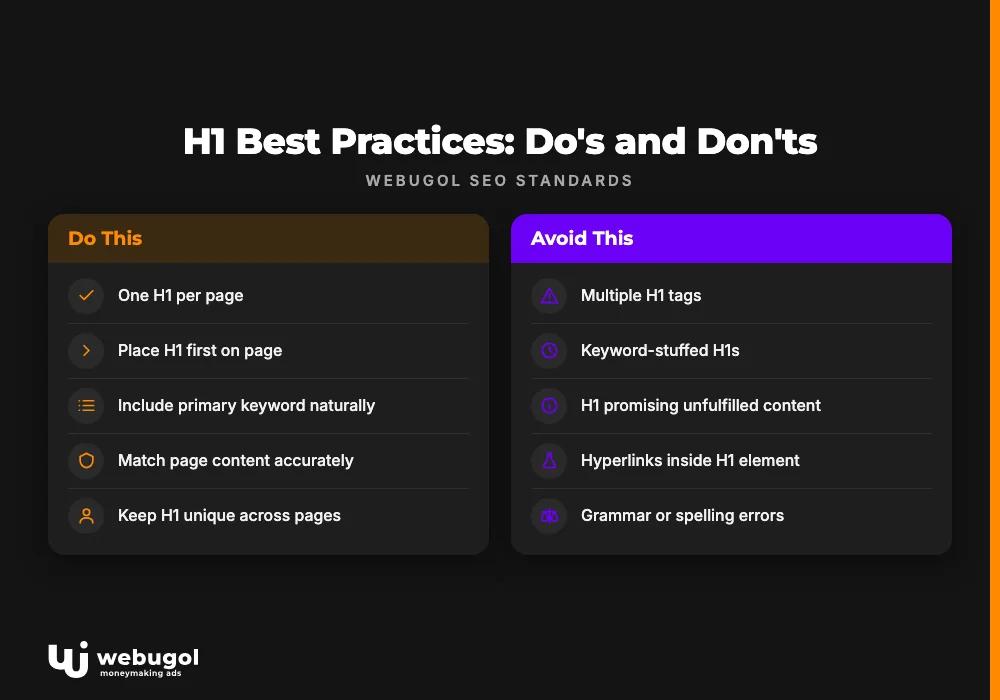
Write one h1 per page. The html heading structure depends on a single root heading. Multiple h1 tags fracture that structure and dilute the ranking signal for the target keyword.
Place it first. The h1 belongs above all other headings on the page. It sets the topic context that every h2 and h3 below it refines and expands.
Include the primary keyword naturally. Every h1 must contain the page's target keyword, phrased as a genuine headline. A keyword-stuffed h1 that reads like a list of phrases rather than a sentence invites Google penalties and signals low content quality to readers.
Match the page content. Write the h1 after you have a clear picture of what the page contains. An h1 that promises content the page does not deliver damages trust with visitors and sends a relevance mismatch signal to Google.
Use text only. The h1 should contain plain text with a clearly defined style. Placing hyperlinks inside an h1 element introduces unintended signals. Links belong in the body, not inside heading elements.
Keep it unique across all pages. Each page should have its own distinct h1. When multiple pages share the same h1, Google struggles to determine which URL should rank for the shared query, and both pages lose ground.
Proofread carefully. A grammatical or spelling error in the h1 is the first impression failure. It damages brand credibility from the opening word and sets a tone the rest of the page has to overcome.
Use h2 and h3 for supporting keywords. The html heading structure below h1 is where secondary and low-frequency keywords belong. H2 headings carry less individual weight than h1, but across several well-written subheadings they build collective semantic coverage. Keywords that do not fit the primary h1 naturally should appear in subheadings and body paragraphs.
Keyword distribution across heading levels
A consistent keyword strategy across the full heading hierarchy strengthens h1 tag SEO without overloading any single element. The approach Webugol uses: the highest-search-volume keyword goes in the title tag; the next strongest variation goes in the h1; from h2 downward, supporting keywords fill the remaining heading levels. Keywords that do not fit naturally in any heading belong in the page body.
This distribution gives Google multiple corroborating signals that the page covers its topic in depth. It avoids the error of concentrating every keyword into the h1, which produces a cluttered headline and a diluted body. It also prevents the opposite problem: keywords buried only in body text, with no heading-level confirmation for the crawler.
The semantic core of the site should be established before writing h1 tags. Each page's h1 should derive directly from the keyword that page is meant to rank for. Building the keyword map first, then drafting h1 tags from it, produces headings that are specific, differentiated, and aligned with actual search demand.
Understanding which keywords belong at which level of your on-page SEO strategy is a step that compounds in value: every page that gets the right h1 from the start is a page you do not have to fix later.
How to find h1 tag SEO problems on your site
The most reliable way to locate h1 issues across your domain is a technical crawl combined with manual review. A site-wide heading structure audit surfaces missing h1 tags, duplicate h1 content across multiple pages, headings longer than 65 characters, and h1 text that does not match the page's intended keyword target.
Beyond the technical output, look at page-level behavior data. A page that ranks for its target query but shows a high bounce rate may have an h1 that misleads visitors about what the page covers. The crawl tells you what is structurally broken; user behavior data tells you what is losing readers after the click.
Combining both data sources produces a prioritized correction list. Fix missing or duplicate h1 tags first, since these are structural failures with direct ranking impact. Then address h1 content that is misaligned with user intent, which affects engagement. These two passes cover the majority of h1 tag SEO problems found in typical site reviews.
Common h1 tag SEO mistakes
These are the errors Webugol identifies most often during site reviews:
- Missing h1 tag. Pages without an h1 lose a direct topical signal and leave Google to infer the page's subject from weaker sources like body text alone.
- H1 identical to the title tag. Copying the title into the h1 misses a second keyword opportunity and gives Google no signal differentiation between the two elements.
- Multiple h1 tags on one page. Multiple h1s weaken heading hierarchy and can reduce rankings for the page's primary query.
- H1 over 65 characters. Long headings risk display truncation and may trigger keyword-stuffing signals if the target phrase repeats within the heading.
- Keyword stuffing in the h1. Repeating the target keyword multiple times within a single h1 is a pattern Google discounts or penalizes.
- H1 content unrelated to the page. A heading that does not reflect what the page covers misleads users and signals a relevance mismatch to Google.
- Grammatical or spelling errors. These are credibility problems that the h1's prominent position makes impossible to hide.
- Missing supporting meta tags. When h1 issues appear alongside a missing title tag or meta description, the combined ranking effect is larger than any single element alone.
Catching and fixing these issues through regular audits keeps h1 tag SEO functioning as a consistent asset rather than an ongoing liability.
Let Webugol audit your h1 tags for free
If you are unsure whether your site's h1 tags are set up correctly, or if you want a thorough review of your heading structure and on-page signals, Webugol offers a free SEO audit that covers the entire site. The audit identifies h1 tag problems across every page and delivers specific recommendations for each issue found.
To get started, contact us or leave a request on our website. Our team will review your h1 tags and the full on-page SEO setup and follow up with detailed findings.
FAQ
What is the h1 tag definition in HTML?
The h1 tag is the top-level HTML heading element used to mark the primary visible title of a webpage. It is the most important heading in the html heading structure and carries more SEO weight than h2 through h6 elements. Search engines use it as a direct relevance signal when assessing what a page is about.
How many h1 tags can a page have?
One h1 per page is the correct standard. Using multiple h1 tags weakens the heading hierarchy and reduces Google's ability to identify the page's primary topic, which can lower rankings for the target keyword.
What is the difference between h1 and title tag?
The title tag appears in the browser tab and in search results; the h1 tag appears in the visible body of the page. The title drives click-through decisions from the SERP, and the h1 engages the reader after they have already arrived on the page.
Can Google rewrite your h1 tag?
Google can use your h1 tag in place of your title tag in search results when the title is missing or not relevant to the user's query. A keyword-aligned h1 reduces the risk that Google's substitution will hurt your click-through rate.
How long should an h1 tag be?
Keep the h1 under 65 characters. Longer headings risk keyword-stuffing signals and can be truncated or display awkwardly when Google promotes the h1 to the title position in search results.

