



Google Ads for dentists: how to run campaigns that actually fill your schedule
Google Ads for dentists is the fastest way to reach patients who are actively searching for dental care and ready to book. Unlike brand awareness formats, search ads appear at the exact moment someone types "emergency dentist near me" or "teeth whitening [city name]." The demand already exists. A well-structured dental Google Ads strategy captures it within days of launch, matching your practice to patients who are already ready to decide.
Is Google Ads worth it for dentists?
Yes. The reason is specific: search intent is already commercial. Someone typing "dental implant specialist [city]" has moved past the awareness stage and wants a provider today. Google Ads for dentists intercepts that moment before a competitor does.
The platform runs on a pay-per-click model, meaning you pay only when someone clicks your ad. Campaigns contain ad groups, which contain individual ads targeted to specific keywords. This hierarchy matters in dental PPC management because it lets you match the message and landing page to the exact search query, rather than routing every visitor through one generic ad that fits no one particularly well.
The cases where ppc for dental clinics underperforms are predictable. A practice without service-specific landing pages, a slow website, or no reliable call-handling process converts poorly regardless of campaign quality. Paid search amplifies what is already working in your intake process. A broken front desk produces low return from Google Ads just as it does from every other channel.
Two factors determine whether the economics work: average patient lifetime value and your close rate on new patient calls. A cosmetic-focused clinic with high-revenue procedures can absorb a higher cost-per-acquisition than a hygiene-heavy practice with modest average appointment revenue. Set your maximum acceptable cost-per-patient before setting any dental practice advertising budget. Everything downstream follows from that number.
Google Ads performs better as part of a broader channel mix than as an isolated investment. Paid ads deliver immediate visibility; organic search builds authority that compounds without ongoing spend. Consider how Google Ads fuels your broader practice growth as one component of a full-funnel acquisition model, not a standalone switch. What Google Ads will not do is fix a thin review profile, an unresponsive website, or a poor patient experience. It amplifies your current conversion environment.
How much does Google Ads cost for a dental practice?
Running Google Ads for dentists involves two distinct cost categories: ad spend, which goes directly to Google, and management overhead, which covers whoever runs the account. No universal figure applies because costs depend
on your market, service mix, and how tightly the campaigns are built.
Competitive urban markets with multiple established clinics require higher bids to hold top positions. Those positions capture the majority of clicks on any given query. Suburban and smaller markets cost less to compete in, which is why local ads for dentists in mid-size cities frequently produce better cost-per-lead ratios than equivalent campaigns in major metros.
Whether managing adwords for dentists in-house or through an agency, tracking both cost categories is essential for evaluating true return on investment. An unmanaged account can burn through budget on poorly matched keywords for months without producing enough data to diagnose the problem.
The minimum viable budget question comes down to data volume. A monthly spend generating fewer than 30-40 clicks gives you no meaningful signal. You need enough traffic to accumulate conversion events before any optimization is possible. Start at a level that produces measurable data, not the lowest technically possible spend.
Ad position is determined by Ad Rank, not bid alone. Ad Rank combines your bid with Quality Score, which Google calculates from expected click-through rate, ad relevance, and landing page experience. A tightly built dental ad campaign account with a moderate budget can outrank a loosely structured competitor spending twice as much. Campaign architecture and landing page quality matter independently of budget size.

What keywords should dentists target in Google Ads?
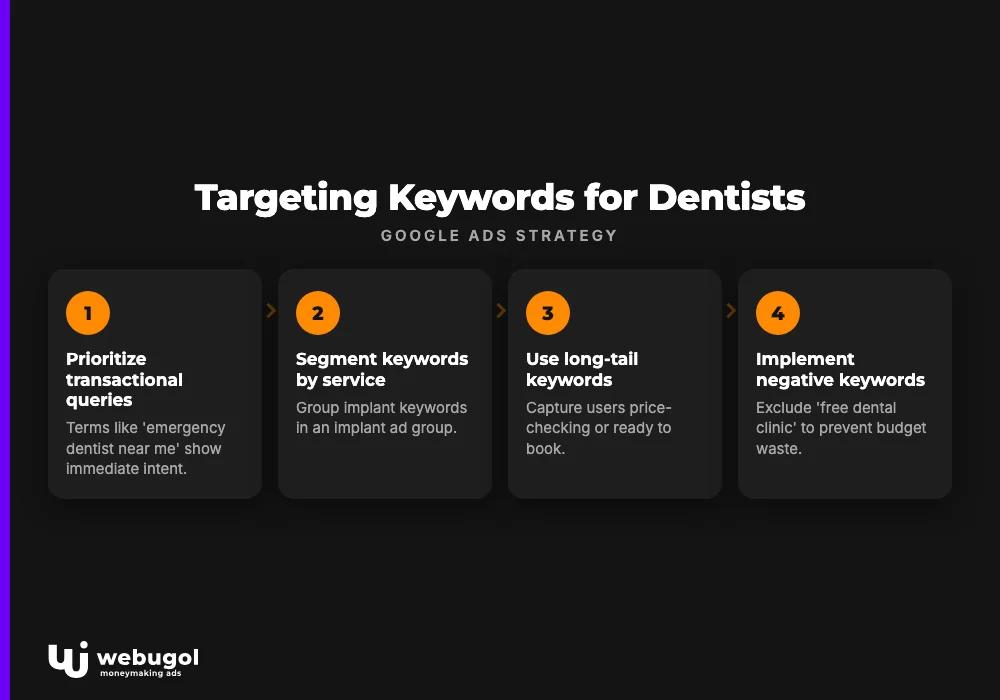
Prioritize transactional and service-specific queries. These are terms where a searcher is ready to act. "Emergency dentist near me," "same-day dental appointment," "dental implants [city]," and "Invisalign provider [city]" carry immediate intent and form the core of any effective Google Ads for dentists account.
Segment keywords by service rather than grouping all procedures into one campaign. Keeping implant keywords in an implant ad group, cosmetic keywords in a cosmetic ad group, and emergency terms in their own campaign lets you write ads that match exactly what the searcher wants and send them to a matching landing page. This alignment between keyword, ad, and destination page drives Quality Score and reduces cost-per-click over time.
| Intent tier | Example queries | Role in campaign |
|---|---|---|
| High-intent transactional | "emergency dentist open now," "dental implants near me" | Core conversion campaigns |
| Service-specific | "teeth whitening [city]," "Invisalign dentist near me" | Per-procedure ad groups |
| Exclusions (negative keywords) | "free dental clinic," "dental school," "dental jobs" | Negative keyword list |
Long-tail keywords deserve consistent attention in any adwords for dentists account. Someone searching "how much do dental implants cost in [city]" is price-checking before booking. Someone searching "dental implant surgeon [city]" is ready to book today. Both belong in the account, in separate ad groups with different messages.
Negative keywords prevent budget waste from day one. Common exclusions for dental ad campaigns include job searches, dental school appointments, DIY products, and free care program inquiries. Build the initial negative list before launch, then expand it weekly from the search terms report to catch unexpected queries that broad-match keywords are triggering.
Match types shape how broadly Google interprets your keywords. Phrase match targets queries containing your keyword phrase in sequence. Exact match restricts ads to searches closely matching your keyword. Most dental PPC management setups use a combination of phrase and exact match with aggressive negative keywords to control traffic quality, rather than relying on broad match alone.
For keyword research, Google Keyword Planner provides national volume estimates, but your Google Search Console data is often more accurate for your specific market. Queries your organic pages already rank for reflect real local patient behavior, which is more reliable than averaged national figures.
How do I set up geo-targeting for a dental clinic in Google Ads?
Start with radius targeting around your practice address. Dental patients rarely travel more than 5-10 miles for routine care. Set the radius to match your actual service area, not the full metropolitan region.
The most critical geo-targeting setting is the location options configuration. Under campaign settings, Google defaults to "Presence or interest," which includes users who have searched for your city but live elsewhere. Change this to "Presence: People in or regularly in your targeted locations." The default wastes budget on out-of-market clicks. Switching takes under a minute and immediately tightens targeting precision.
After establishing the radius, apply bid adjustments by zip code. Areas closer to your practice, or those with historically higher conversion rates, can be bid up to improve position for high-value searches. Zip codes with poor conversion history can be bid down or excluded. Review geographic performance data monthly and adjust based on actual results.
Location extensions display your practice address alongside the ad and connect to Google Maps navigation. For mobile searchers looking for urgent dental care, a visible nearby address shortens the decision to call or navigate considerably. Link your Google Business Profile to your Google Ads account to activate these extensions automatically.
Local ads for dentists compound in effectiveness when organic local search is also strong. Practices appearing in both paid top positions and the organic local pack for the same query occupy more of the results page, reducing the chance a patient scrolls past to a competitor. Building local search visibility for dental practices through a well-maintained Google Business Profile and consistent local citations reduces long-term ad dependency while reinforcing current campaign performance.
Building dental ad campaigns and landing pages that convert
A dental ad campaign routing all traffic to the practice homepage loses most of its conversion potential. Each service needs its own landing page where the headline, copy, and call to action match the keyword and ad that brought the patient there. This alignment is both a Quality Score factor and a patient trust factor.
Three elements consistently differentiate high-converting dental landing pages from weak ones:
- A single, specific call to action. One page, one goal: book a consultation, call the office, or claim a new-patient offer. Multiple competing CTAs split attention and reduce conversions.
- Trust signals above the fold. Years in practice, patient count, credentials, and a real photo of the dentist reduce hesitation before a visitor acts. Generic stock images and templated layouts produce the opposite effect.
- Mobile load speed. Most dental searches happen on phones. A page taking four or more seconds to load loses a measurable share of visitors before they reach the offer. Compress images, cut unnecessary plugins, and test on mobile network speeds.
For a structural breakdown of how landing pages differ from homepages and general service pages, the landing page structure guide covers the practical distinctions in useful detail.
Ad extensions expand your listing without adding cost per click and should be active on every dental Google Ads account. Location extensions display your address and integrate with Google Maps routing. Call extensions show your phone number and enable one-tap calling on mobile. Sitelink extensions create direct paths to specific service pages. All applicable extensions should be live from launch, as they consistently improve click-through rates by giving patients more ways to engage with your ad.
Responsive search ads are the standard format in Google Ads. Supply at least three distinct headlines and two description lines per ad, each addressing a different patient concern: urgency, credibility, and location. Writing headlines that are genuinely distinct from each other, rather than variations of the same phrase, gives the system more useful combinations to test.
How do I track patient conversions from Google Ads?
Set up two conversion actions before spending a dollar on Google Ads for dentists: phone call tracking and form submission tracking. Clicks measure traffic. Conversions measure patients.
For call tracking, enable Google Ads forwarding numbers or connect a third-party call tracking service. Either approach replaces your website phone number with a tracked number that attributes each call to a specific keyword, ad group, and campaign. Set a minimum call duration threshold, typically 60-90 seconds. Without it, wrong numbers and short automated calls inflate your conversion count and corrupt every optimization decision that follows.
For form submissions, use Google Tag Manager to fire a conversion event when a patient reaches the confirmation page after completing a booking or contact form. Each submission then links to the keyword and campaign that generated it, letting you see which ad groups and service pages produce actual inquiries rather than just visits.
The most overlooked tracking method in dental practice advertising is offline conversion import. When your front desk records a booked appointment, that data can be exported and imported back into Google Ads as an offline conversion event. This closes the loop between an ad click and an actual new patient, which is the only metric that ultimately matters for dental PPC management. Without offline imports, you may spend months optimizing toward keywords that generate form submissions but not bookings.
Once the account reaches 30-50 conversions per month, switch from manual or enhanced CPC to target CPA or maximize conversions bidding. Smart bidding requires sufficient conversion history to work correctly; below that threshold it optimizes for cheap clicks, not for patients. Begin on manual bidding, let data accumulate, then migrate to automation when the conversion volume supports it.
Report on cost-per-conversion in every campaign review. Clicks are the input. Booked patients are the output.

Dental PPC management: bidding, remarketing, and call-only campaigns
Ongoing dental PPC management evolves in three operational areas after a campaign launches. Bid strategy must transition from manual control to automated optimization as conversion data accumulates. Call-only campaigns and remarketing then add high-value traffic channels that most newly launched accounts do not start with.
Bid strategy by campaign stage
New adwords for dentists campaigns without conversion history should launch on manual CPC or enhanced CPC bidding. This maintains direct spend control while data accumulates. Automated strategies need a conversion history to produce reliable results; without it, the algorithm bids on no meaningful signal.
Once a campaign reaches 30-50 monthly conversions, migrate to target CPA or maximize conversions. The system then has enough data to identify which auction entries are likely to produce actual patient inquiries. Do not switch earlier. Each bidding change triggers a learning period of 1-2 weeks, and frequent resets prevent the algorithm from stabilizing.
For practices managing dental ad campaigns across multiple services, allocate budget by procedure revenue. Restorative and cosmetic procedures with high patient lifetime values justify higher cost-per-click bids than preventive care, provided conversion data confirms they are booking at a favorable cost-per-acquisition.
Call-only campaigns for urgent dental needs
Call-only ads appear exclusively on mobile and route searchers directly to your phone line, bypassing the landing page entirely. They are well-suited to emergency dental services, same-day appointment offers, and any scenario where a patient in pain wants immediate contact rather than a website experience.
Run call-only campaigns separately from website-traffic campaigns. Keeping them isolated separates budgets, distinguishes call leads from form leads in your reporting, and allows independent bid management for each traffic type.
Remarketing to re-engage past visitors
Most dental website visitors do not book on their first visit. Remarketing keeps your practice visible to those visitors through display ads shown as they browse other sites and YouTube.
Effective remarketing in ppc for dental clinics is audience-specific. A visitor who viewed your implants page should see implant-specific ads. A visitor who reached your booking form but did not submit it should see an ad that addresses hesitation directly, such as a financing offer or a clearly stated new-patient discount.
Set frequency caps to prevent overexposure. Three to five impressions per user per week is a practical starting range for most dental practice advertising campaigns. Above that level, display ads become intrusive rather than useful, and engagement rates drop.
What your dental Google Ads results actually depend on
Well-structured campaigns produce clicks. Clicks become patients only when several factors outside the Google Ads interface also work correctly. These are the elements most dental practice advertising guides do not address because they sit outside the campaign manager.
Your review profile. An ad driving traffic to a Google Business Profile with a handful of mixed reviews converts at a lower rate than the same ad reaching a profile with hundreds of consistent four-star reviews. Patients at the bottom of the search funnel check reviews before calling. A thin or neglected profile suppresses conversion rates regardless of targeting precision. Build your review acquisition process before scaling ad spend. Each dollar produces more return when the social proof already supports the decision to call.
Your front desk intake process. A paid inquiry going to voicemail during business hours, or reaching a team without a protocol for new-patient calls, wastes the conversion potential the campaign correctly generated. Google Ads produces phone calls and form submissions. Your intake team produces booked appointments. Both must function. Many practices find that improving their call-handling protocol raises return from dental ad campaigns without any change to the campaigns themselves.
Your landing page conversion rate. A page converting 5% of visitors can absorb more budget with predictable, scalable results. A page converting 0.5% produces diminishing returns as spend increases. Before scaling any Google Ads for dentists account, verify that the landing pages are already converting at a reasonable rate. More traffic through a non-converting page produces more waste at a faster rate.
Organic search as a long-term foundation. Paid visibility stops when spend stops. Organic rankings persist because they reflect content quality and website authority built over time. Practices investing in both paid and organic search occupy more positions on the results page and reduce long-term patient acquisition cost. The keyword conversion data from your Google Ads account, specifically which queries produce actual bookings, directly informs which content your SEO strategy should prioritize. The two channels share data and reinforce each other.
These factors separate a sustained Google Ads for dentists strategy from a short-term experiment. The campaigns are one component. The surrounding patient acquisition system determines the actual return.
Start building a dental Google Ads strategy that delivers real patients
Running effective Google Ads for dentists requires more than activating a campaign. Keyword architecture, bid sequencing, landing pages, call tracking, and ongoing optimization all determine whether your budget produces patients or only clicks. Webugol builds dental ad campaigns designed to fill schedules, with transparent reporting on exactly what each dollar produces from first click to booked appointment.
Contact Webugol to review your existing campaigns or to build a new dental Google Ads account with a complete patient acquisition strategy in place from day one.
FAQ
Is Google Ads worth it for a small dental practice?
Yes, provided the practice has a functional website, a reliable process for answering new patient calls, and a budget realistic enough to generate actionable data. Google Ads for dentists delivers immediate inquiries, but those inquiries convert only when the landing pages and intake process are prepared to receive them.
How much should a dental practice budget for Google Ads?
Budget depends on market competition and service mix. The practical minimum is a monthly spend that generates enough clicks to accumulate conversion data, typically 30-40 clicks or more. Below that threshold there is not enough signal to optimize the account and performance cannot improve.
What keywords should dentists use in Google Ads?
Prioritize high-intent queries like "emergency dentist [city]," "dental implants near me," and service-specific searches paired with a location modifier. Build a negative keyword list from the start, excluding terms like "free dental clinic," "dental school," and "dental jobs" to prevent budget waste on non-patient traffic.
How do I track calls and form submissions from Google Ads?
Enable Google Ads call tracking and set a minimum call duration of 60-90 seconds to filter out non-inquiries. Connect form submissions through Google Tag Manager, firing a conversion event on the booking confirmation page. Both tracking actions need to be in place before the campaign launches.
Can I run Google Ads for dentists without a dedicated landing page?
You can, but conversion rates will be substantially lower. Sending ad traffic to a homepage means visitors land on a page that does not match what they searched for. Each dental ad campaign performs significantly better with a matching service landing page and a single, focused call to action.

