



Digital marketing tools professionals actually use in 2026
Digital marketing tools are software platforms that help businesses plan, execute, measure, and refine their online campaigns across search, social, email, and paid advertising. The core categories are marketing analytics software, SEO tools for marketers, email marketing software, PPC management tools, social media management tools, keyword research tools, and content creation software. Which combination you need depends on your channels, team size, and budget. This guide covers each category, names the platforms professionals rely on, and explains how to build a stack that earns its cost.
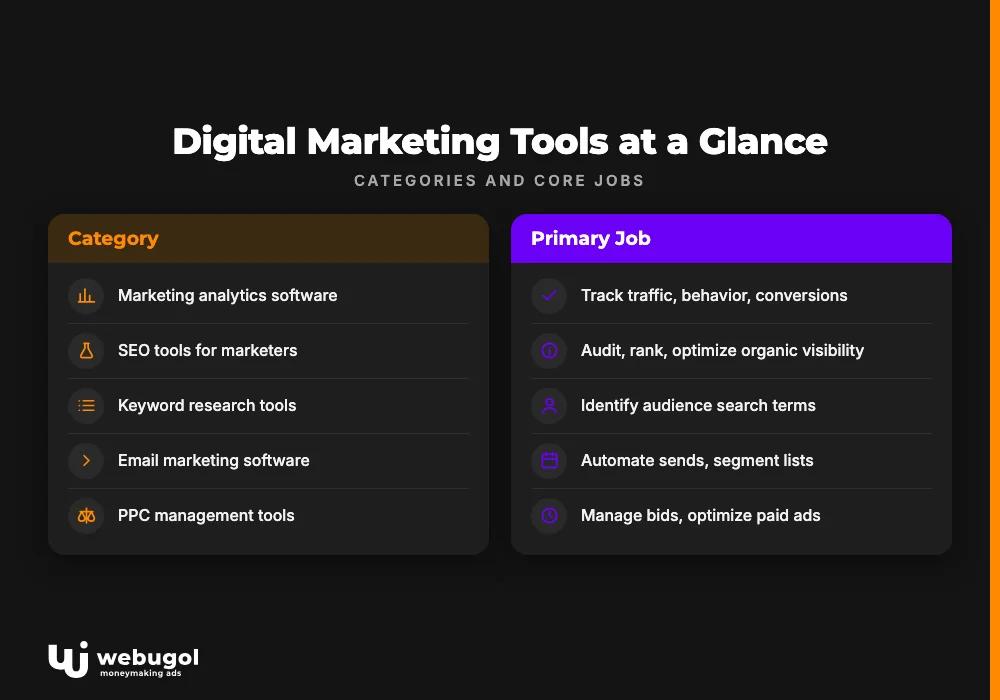
Digital marketing tools at a glance
The challenge is not finding tools. There are hundreds. The challenge is knowing which category solves which problem, so you stop paying for features that go unused.
This table maps each category to its core job and names the tools professionals actually use.
| Category | Primary job | Representative tools |
|---|---|---|
| Marketing analytics software | Track traffic, behavior, and conversions | Google Analytics |
| SEO tools for marketers | Audit, rank, and optimize organic visibility | Screaming Frog, Ahrefs, SEMrush |
| Keyword research tools | Identify terms your audience searches | Moz Keyword Explorer, SEMrush Keyword Magic Tool, Google Trends |
| Email marketing software | Automate sends, segment lists, and measure results | Mailchimp |
| PPC management tools | Manage bids and optimize paid ad spend | Google Ads |
| Social media management tools | Schedule, publish, and monitor social content | Facebook Ads Manager, platform-native tools |
| Content creation software | Produce copy, graphics, and campaign assets | ChatGPT, Jasper, Canva |
Most professional teams do not use all seven categories at once. A three-person startup typically starts with analytics, one SEO tool, and an email platform. Larger teams add PPC management and social scheduling as budgets and headcount grow. This table is a starting framework, not a shopping list.
The bigger point: digital marketing tools work as a system. An SEO tool tells you which pages to improve. Analytics software tells you whether the improvement moved conversion. Email software tells you which messages bring those visitors back. Each tool answers a different question. Choosing tools without thinking about how they connect produces a collection of data that points in different directions.
Which digital marketing tools do professionals actually use?
Professionals use a combination of analytics platforms, SEO software, email automation, PPC management tools, and content creation software. The exact mix varies by channel focus and business model, but Google Analytics, SEMrush or Ahrefs, Mailchimp, and Google Ads appear in nearly every professional toolkit.
The real question is not which tool wins a feature comparison. It is which tools solve your specific measurement and execution problems. Below is a category-by-category breakdown.
Marketing analytics software: the foundation everything else rests on
You cannot improve what you cannot measure. Marketing analytics software connects all other tools to a shared performance baseline.
Google Analytics tracks visitor IP addresses, browser types, visited pages, and average time on site. That data shows where traffic originates, which pages hold attention, and where sessions end. If a page draws strong traffic but low average time on page, that gap signals a content or layout problem before you spend more on driving visitors there.
The connection to campaign data matters equally. When marketing analytics software links traffic source to on-site behavior, you can see whether visitors from organic search behave differently from those arriving through paid ads. Organic visitors often spend more time on content pages. Paid visitors frequently arrive with higher purchase intent and shorter sessions before converting. Seeing that split clearly lets you design pages that match each audience's expectations.
This audience-level data also shapes content planning. Pages with the strongest organic engagement become templates for what to produce more of. Pages with high traffic and poor engagement become candidates for a rewrite or restructure. Marketing analytics software surfaces both signals at once.
Analytics data produces its highest value when reviewed on a fixed schedule. Monthly reviews catch trend shifts. Weekly checks catch campaign anomalies early enough to act before they drain budget.
SEO tools for marketers: ranking and visibility
SEO divides into three distinct jobs, and each requires a different type of tool.
On-page SEO tools examine keyword density, meta descriptions, page titles, and broken links. Screaming Frog SEO Spider, SEMrush, and Ahrefs Site Audit are the most widely used options in this category. Running a crawl surfaces problems across hundreds of pages at once. The output shows which pages lack meta descriptions, which carry duplicate titles, and which have broken internal links that hurt both user experience and crawl efficiency.
Off-page SEO tools focus on backlink profiles. Majestic SEO and Ahrefs Backlink Checker let you examine links pointing to your domain and to competitors' domains. Link quality matters more than volume. A handful of links from authoritative, relevant sources carries more ranking weight than hundreds from low-quality directories. These tools make that distinction visible, so link-building effort concentrates on what actually moves rankings.
Technical auditing tools catch infrastructure problems before they limit what all other SEO work can achieve. DeepCrawl, Serpstat, SEMrush Site Audit, and Google Search Console each report on page load time, crawlability, indexing errors, broken links, and sitemap status. Resolving these issues typically has more impact than any on-page adjustment, because a page that cannot be properly crawled will not rank regardless of its content quality.
Understanding how an SEO audit shapes your content strategy is the logical next step after choosing an audit tool. The audit output identifies where to focus content improvements, which keywords to prioritize, and which pages to consolidate or cut.
Keyword research tools: finding what your audience searches
Keyword research tools identify the terms your target audience types into search engines. That information drives both organic content planning and paid campaign targeting. The same keyword list that informs an editorial calendar also tells a PPC team which terms are worth bidding on and at what intent level.
Moz's Keyword Explorer, SEMrush's Keyword Magic Tool, and Google Trends are the standard options in this category. Each surfaces search volume, competitive difficulty, and related phrases that expand an initial seed list. Google Trends adds a time dimension, showing whether interest in a topic is growing or declining. That context prevents investing in content around a term that peaked several years ago and is no longer what your audience actively searches for.
The practical workflow: pick a seed topic, run it through one of these tools, filter results by realistic difficulty for your domain's current authority, and build content around the resulting list. Prioritize terms where a first-page result is plausible before targeting highly competitive keywords where established players dominate.
For paid search, choosing the right keywords for your Google Ads campaigns is a distinct skill. Search intent and bid economics behave differently from organic competition. A keyword that drives strong organic traffic may not be profitable at the cost per click the auction demands.
Email marketing software: automation that converts
Email marketing software remains one of the most cost-effective channels for both lead nurturing and repeat revenue. The key is segmentation. Sending the same message to your entire contact list wastes opens and accelerates unsubscribes. Segmenting by behavior, purchase history, or signup source produces better results with the same send volume.
Mailchimp handles email automation, list segmentation, and campaign analytics in one interface. Its editor lets marketers build and send campaigns without technical support. It integrates directly with Facebook Ads Manager and Google Analytics, connecting email performance data to the rest of your marketing stack. You can measure whether an email campaign drives on-site conversions, not just link clicks.
Automation within email marketing software produces measurable gains without constant manual input. Triggered messages based on user behavior, such as a follow-up after a form submission or a re-engagement sequence after a period of inactivity, consistently outperform broadcast sends in conversion rate. The platform handles timing and delivery. The team handles message strategy and segment logic.
PPC management tools: paid search and social ads
Pay-per-click advertising gives businesses direct control over who sees an ad and when. Google Ads is the dominant tool for search-based PPC. It allows keyword and audience targeting, bid optimization, conversion tracking, and performance reporting within one platform. Businesses can target different keyword groups, geographies, and device types within the same campaign structure, then refine based on continuous reporting data.
Social media PPC extends paid reach beyond search behavior. Facebook's ad platform targets users by age, gender, location, interests, and behavior, drawing on data that search platforms do not access. That demographic precision makes social PPC effective for brand awareness campaigns and retargeting. Twitter and other social networks include their own analytics to track ad performance across campaigns.
Understanding the strategic differences between SEO and paid advertising helps teams allocate budget between these channels with a clear rationale. SEO accumulates organic authority over time. PPC delivers placement immediately. Neither channel replaces the other; they operate at different points in the buyer journey and reinforce each other when planned in coordination.
Social media management tools: consistent presence across platforms
Facebook, Twitter, Instagram, and YouTube each reach audiences that search engines do not. Social media management tools let businesses publish across multiple platforms from one interface, monitor engagement metrics, and handle responses without switching between separate apps.
Scheduling features let small teams maintain a consistent posting presence. A week of content can be queued in a single session, freeing daily time for engagement and response rather than publication logistics.
The analytics layer in these tools shows which content formats and topics perform on which platforms. A post format that drives engagement on Facebook may not translate to LinkedIn. Social management tools surface those differences across channels simultaneously, so content decisions rest on platform-specific performance data rather than guesses about what different audiences prefer. At scale, this feedback loop is what prevents teams from producing content that performs on one channel while being ignored on every other.
Content creation software: building the assets your campaigns need
Content creation software covers the range from AI-generated copy to graphic design. Three tools appear consistently across professional marketing teams.
ChatGPT generates ideas and draft content quickly. It handles brainstorming article angles, producing subject line variations for A/B tests, and drafting first passes for team review. The output requires editing, but the speed advantage on cold-start writing tasks is real.
Jasper handles longer content workflows and includes campaign performance monitoring across email and social channels. It helps teams build content sequences based on customer interests and behavior patterns, with reporting on how content performs across different distribution touchpoints.
Canva is the standard graphic design platform for teams without dedicated designers. It covers social graphics, logos, flyers, website images, and blog post visuals. The template library lets teams maintain visual consistency across formats and campaigns. For a broader look at AI writing options in this space, our comparison of AI copywriting tools covers the major platforms side by side.
What are the best digital marketing tools for small businesses?
For small businesses, the best digital marketing tools are those that deliver the most utility for the lowest initial commitment. Google Analytics (free), Google Search Console (free), Mailchimp (free up to 500 contacts), Canva (free tier available), and Google Ads (pay per click only) together cover analytics, SEO monitoring, email automation, visual content creation, and paid search.
Three questions narrow the choice for any small team. Does the tool solve a problem you currently have? Can someone on the team get productive within a week of setup? Does it connect to the tools you already use? If the answer to any of these is no, the tool is probably not the right fit at this stage.
Start with analytics and one SEO monitoring tool. Google Analytics and Search Console are both free, and together they cover traffic data, keyword performance, crawl errors, and index coverage. That analytical foundation costs nothing and tells you more than most small businesses currently act on. Add email automation once you have a list large enough to segment meaningfully. Layer in paid advertising only after you have evidence of which organic content already converts visitors, because that knowledge makes paid targeting more precise and less wasteful.
How do digital marketing tools improve campaign performance?
Digital marketing tools improve campaign performance by replacing guesswork with measurement. When you can see which traffic source produces the highest conversion rate, you can concentrate budget where it compounds. When you can audit which pages rank poorly and understand why, you fix actual problems instead of building new content on top of broken infrastructure.
The improvement is not automatic. A tool surfaces data. The decision that data informs is what drives performance. Marketing analytics software flags a landing page with a high bounce rate. That flag tells you something needs attention. The team diagnoses and changes the page.
Automation within these tools produces direct gains without constant manual intervention. Email platforms that send triggered messages based on user behavior outperform broadcast emails in open rate and conversion. PPC platforms with automated bid strategies optimize spend against conversion targets that manual bidding cannot match at scale. Both follow the same pattern: the tool handles execution, the team sets strategy.
Data analysis at the audience level is the deeper lever. By tracking user behavior, market trends, and consumer demographics, businesses can identify which approaches to their target audience work and which do not. With that evidence, teams can update existing campaigns or build new ones grounded in what the data shows, rather than what seemed like a good idea in a planning meeting.

What is the difference between SEO and PPC tools?
SEO tools focus on organic visibility. They audit technical issues, research keywords, analyze backlinks, and track rankings over time. Results accumulate over weeks or months, with compounding returns as domain authority builds.
PPC management tools focus on paid visibility. They manage bids, target audiences, test ad variations, and track spend against conversions. Results appear within hours of a campaign launch and stop when the budget runs out.
The practical difference is timeline and cost structure. SEO tools help you earn traffic through relevance and authority. PPC tools help you buy placement immediately. Both track performance, but the metrics differ. SEO tools track rankings, organic sessions, and backlink authority. PPC tools track cost per click, conversion rate, return on ad spend, and quality scores.
Many teams run both simultaneously. SEO builds compounding organic traffic over time. PPC fills coverage gaps, supports launches, and targets competitive terms where organic ranking takes too long. The tools reflect that division of labor: they are built for different problems at different timescales.
What free digital marketing tools are worth using?
Free digital marketing tools worth taking seriously include Google Analytics, Google Search Console, Google Trends, the free tier of Canva, Mailchimp's free plan (up to 500 contacts), and the native reporting dashboards inside Facebook, Instagram, and Twitter's advertising platforms.
These deserve serious attention because they are professional-grade platforms, not trial versions of something better. Google Analytics and Search Console are what large organizations with substantial tool budgets use. The free access is not a compromise.
The limits of free tiers are usually volume or advanced features. Mailchimp's free plan adds its branding to outgoing emails and caps the contact list at 500. Canva restricts some premium assets on the free tier. These constraints rarely matter at the early stage. They start to bind as volume and team complexity grow. At that point, the performance data you have already gathered makes the upgrade decision clear.

How to choose the right digital marketing tools for your team
Picking digital marketing tools without a clear selection process leads to subscriptions for features that go unused. The following criteria apply regardless of team size or channel mix.
Identify your primary channel first. A business that depends on organic search needs SEO tools for marketers before social media management tools. A business driven by email needs email marketing software before a PPC management platform. Start with the channel that currently produces your best results and build measurement around it. Expanding from strength is faster than trying to fix everything simultaneously.
Count the people who will actually use the tool. Platforms built for solo operators often lack the collaboration features that teams require. Enterprise tools add administrative layers that slow down small teams. Seat-based pricing also changes the total cost significantly at different headcount levels. Factor your actual team size into the comparison before reviewing feature lists.
Check integration coverage before committing. A PPC management tool that does not connect to your analytics platform creates manual reporting work every time you need a unified view of results. A social scheduling tool that does not push data to your central dashboard produces isolated reports that do not combine into a coherent performance picture. Integration between tools is what allows the stack to produce answers rather than just data.
Budget for the learning curve. Tools with large feature sets require real onboarding time. If no one on the team has used a platform before, the true first-month cost is not only the subscription fee. It includes reduced output while the team learns the interface. A simpler tool used consistently produces better results than a sophisticated one that sits half-configured.
Audit what you already pay for. Marketing stacks accumulate tools gradually, often without periodic review. Before adding a new platform, confirm that an existing subscription does not already cover the same job. Overlapping capabilities are common and expensive once you total subscription costs across the year.
At Webugol, we have worked with businesses across industries and team sizes. The stacks that consistently perform best are not the most complex.
They are the ones where each tool is actively used, properly connected to the rest of the stack, and reviewed on a regular cycle for whether it still justifies its place. Adding more tools rarely fixes a performance problem. Clarifying which tools you actually use, and how, usually does.
Work with a team that builds stacks that deliver results
Understanding the categories of digital marketing tools is the starting point. Building a stack that fits your specific team, budget, and channels is the harder work.
Webugol provides SEO, PPC, email automation, social media management, and analytics services for businesses that want cohesive campaigns rather than disconnected point solutions. If you want a review of your current tool setup or help designing a channel strategy from scratch, reach out to our team.
FAQ
What are the main categories of digital marketing tools?
The main categories are marketing analytics software, SEO tools for marketers, keyword research tools, email marketing software, PPC management tools, social media management tools, and content creation software. Most businesses start with analytics and SEO, then add email automation and paid advertising as their channel mix develops.
How many digital marketing tools does a small business need?
A small business typically needs three to five tools: one for analytics, one for SEO monitoring, one for email automation, and optionally one for content creation or social scheduling. Starting with Google Analytics, Google Search Console, and Mailchimp covers the analytical and email foundations before any paid subscription is required.
Are free digital marketing tools good enough for professional work?
Yes, for most core functions. Google Analytics and Google Search Console are professional-grade tools used across organizations of all sizes. The free tiers of Canva and Mailchimp cover most early-stage needs until list size or design volume reaches the limits of the free plan.
What should I look for when choosing digital marketing tools?
Look for tools that match your primary marketing channel, integrate with your existing analytics setup, fit your team's collaboration model, and include documentation matched to your team's experience level. Avoid adding platforms that duplicate capabilities you already have in your current stack.
How do SEO tools differ from PPC management tools?
SEO tools help you earn organic traffic by resolving technical issues, tracking keyword rankings, and analyzing backlinks over time. PPC management tools help you buy immediate traffic through paid ads by managing bids, audience targeting, and conversion tracking. SEO produces compounding returns over months; PPC delivers results as long as campaigns remain funded.

