



Offline conversion tracking for healthcare marketers: close the gap between ad click and booked patient
Google Ads this loop is the mechanism that connects an ad click to a booked appointment, enrolled program, or completed consult. These are events that happen inside a CRM or on a phone call, not on a webpage. For clinics and telehealth providers running $10k to $100k per month in ad spend, the absence of this feedback loop means ad platforms optimize toward form fills while budget burns on patients who never show. This article covers how the mechanism works, which patient journey events to track, and how to configure the setup across Google Ads, Meta, and your CRM without exposing HIPAA-restricted data.
What is offline conversion tracking?
Offline conversion tracking is the process of importing real-world patient actions into Google Ads or Meta so algorithms optimize toward revenue-generating outcomes, not just website events. Those actions include booked appointments, answered calls, and program enrollments. It answers the question every healthcare marketer hits after the first month of ad spend: why does Google show 200 conversions when the CRM logs 40 bookings?
The mismatch happens because browser pixels only see what occurs on a webpage. Everything downstream is invisible to the platform. Intake calls, CRM stage changes, scheduling confirmations: none of these events register in the platform's data unless you build an offline import pipeline to carry them back.
Why standard pixel tracking fails clinics and telehealth providers
If you are still evaluating how paid channels fit into your patient acquisition strategy, the tracking infrastructure decision belongs in that conversation. But for practices already running paid campaigns, pixel-only attribution creates two structural failures that compound over time.
A browser pixel fires when a webpage event occurs and has no visibility into what your intake team, CRM, or scheduling software does next. That limitation is not a minor gap. It is the reason ad platforms routinely learn from the wrong signal.
The long sales cycle attribution problem
A patient who clicks a GLP-1 ad on Monday may book a consult three weeks later, after two follow-up calls and a telehealth intake form. None of that activity falls inside a standard 30-day attribution window. This compressed window causes ad platforms to undercount conversions from high-intent campaigns and shift budget toward faster-converting segments that produce lower-quality leads.
Telehealth programs with 45 to 90-day lead-to-booking cycles are the most exposed to this problem. The algorithm interprets a slow conversion as a failed one and reallocates spend accordingly. The result is a self-reinforcing bias toward the wrong patient profile.
HIPAA and platform data restrictions pixel tracking cannot handle
Browser-side pixels transmit URL paths, page titles, and referral strings. In a healthcare context, those strings can reveal a patient's health intent. Your compliance team cannot allow that data to flow to Google or Meta servers without a Business Associate Agreement and specific safeguards in place.
Offline import methods sidestep this by design. Instead of transmitting raw browsing behavior, you send a hashed click identifier tied to a CRM outcome. The ad platform learns which ad drove the appointment. It never sees why the patient came.
How offline conversion tracking works (for healthcare)
The mechanism is a two-step exchange. First, capture a click identifier when the patient clicks your ad. Second, upload that identifier back to the ad platform when a qualifying patient outcome occurs in your CRM. Three import methods are available to healthcare advertisers, each with a different compliance and technical profile.
The data flow: from ad click to CRM to ad platform
When a patient clicks a Google Ad, Google appends a GCLID (Google Click ID) to the landing page URL. Your form backend or CRM stores that GCLID as a hidden field on the lead record. When the lead reaches a qualifying CRM stage, an automated export sends the GCLID with a conversion timestamp back to Google Ads. Meta's equivalent uses hashed email or phone as the match key rather than a click ID, since Meta does not use GCLIDs across platforms.
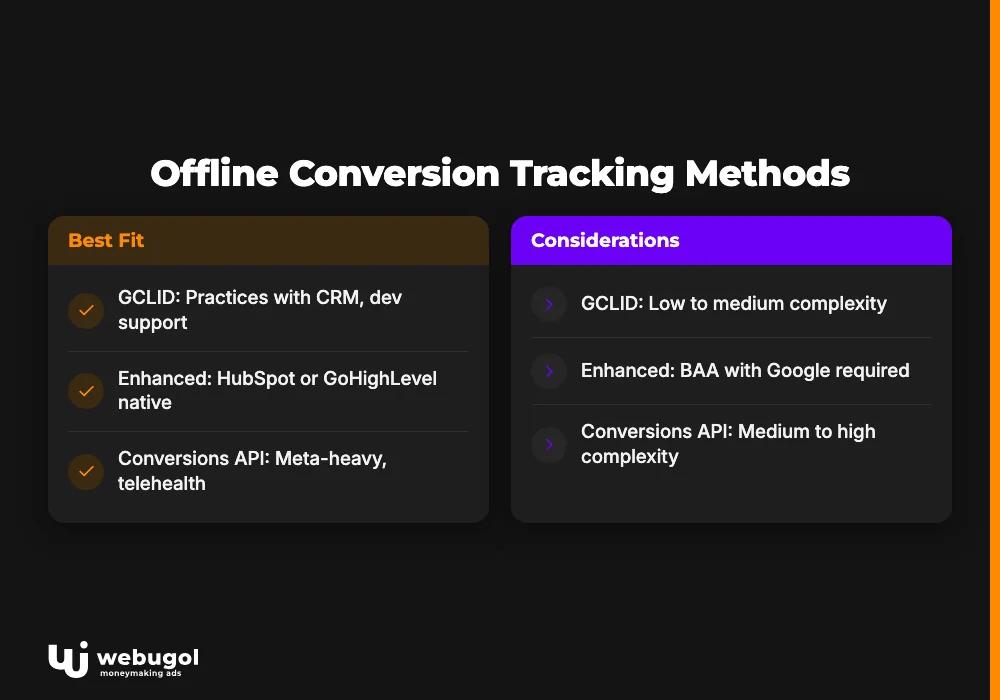
GCLID vs. enhanced conversions vs. Conversions API: which method fits your clinic?
Three import paths exist. The right choice depends on your CRM stack, technical resources, and compliance posture.
| Method | Data transmitted | Setup complexity | HIPAA notes | Best fit |
|---|---|---|---|---|
| GCLID upload (CSV or API) | Click ID only | Low to medium | No PHI transmitted | Practices with CRM and dev support |
| Enhanced conversions for leads | Hashed email or phone | Medium | BAA with Google required | HubSpot or GoHighLevel native integrations |
| Meta Conversions API | Hashed email or phone | Medium to high | Server-side, no pixel PHI exposure | Meta-heavy campaigns, telehealth |
The GCLID upload method transmits the least sensitive data and is the simplest starting point for practices evaluating an offline conversion tracking platform for the first time. Enhanced conversions for leads improve match rates but require a BAA with Google before configuration. The Meta Conversions API sends data server-to-server, which avoids the browser-pixel PHI exposure that compliance teams in healthcare most often flag.
Which conversion events should healthcare providers track offline?
Most ad accounts track form submission as their only conversion. That is the measurement equivalent of counting patients who walked through the front door rather than patients who showed up for their appointment. The events that carry real revenue signal sit further down the funnel.
For campaign structure built around these patient journey events, each event below maps to a distinct campaign optimization goal.
Events worth sending back to Google Ads or Meta:
- Consultation booked (CRM stage change, not form submit)
- Consultation attended (show confirmation from scheduling system)
- Inbound call: answered and qualified (call tracking disposition)
- Inbound call: booked from call (downstream CRM update)
- Program enrollment or first payment received
- Renewal or re-enrollment confirmed
Consultation bookings and appointment completions
Tracking form submission alone conflates leads with patients. The conversion upload should fire at appointment confirmation, or at appointment completion in the CRM. Assigning a conversion value that reflects expected program revenue rather than a binary signal gives smart bidding the margin data it needs to optimize toward profitable patient acquisition.
Inbound call outcomes: answered, qualified, and booked
Call tracking platforms record disposition data that most practices never push downstream. The key change is piping only booked-call outcomes back to ad platforms so the algorithm stops optimizing for call volume and starts optimizing for calls that become patients. A campaign generating 500 calls with a 5% booking rate produces 25 patients. One generating 200 calls with a 25% booking rate produces 50. Same budget, very different results.
Telehealth registrations and program enrollments
For subscription health programs, the meaningful conversion is first payment or program enrollment. These events happen inside a patient portal or CRM, not on a public webpage. Common CRM pipeline stages used by telehealth operators map to Google Ads conversion categories as: "Appointment Confirmed" maps to the Lead category; "Enrollment Confirmed" maps to the Purchase or Other category depending on the platform's available options.
No-show rate as a lead quality signal
A campaign generating high-volume consult bookings with a 60% no-show rate is producing bad leads, not successful conversions. Google offline conversion tracking lets you use low-value or negative conversion signals to teach ad platforms which audience segments generate patients who do not show. This reduces wasted spend without cutting total volume, because the algorithm learns to avoid low-quality segments rather than scaling back indiscriminately.
How do I set up offline conversion tracking in Google Ads for a healthcare practice?
A complete offline conversion tracking setup for a healthcare practice requires four components working in sequence: auto-tagging enabled at the account level, GCLID capture configured in your CRM, a conversion action created with the correct category, and an automated upload pipeline that fires on qualifying CRM stage changes. Each step must be complete, because a missing link at any point breaks the entire data flow.
Google Ads: auto-tagging, GCLID capture, and conversion import
Offline conversion tracking Google Ads accounts use auto-tagging to pass the GCLID parameter to landing page URLs. Enable it first, then confirm your CRM stores the GCLID as a field on every lead record created from paid traffic. Create a conversion action in the Lead or Appointment category, then configure an automated upload through the Conversions API or a scheduled CSV export. According to Google Ads Help documentation, Google processes uploads within 4 to 6 hours, and the import cutoff is 90 days from the click date. Practices with longer patient journeys need to extend the attribution window in account settings, or valid conversions will fall outside the reportable range entirely.
Meta offline Conversions API
What many marketers still call Facebook offline conversion tracking is now configured through Meta's Conversions API, which sends conversion data server-to-server using hashed email or phone as match keys. This approach avoids browser-pixel PHI exposure and improves match rates compared to cookie-dependent tracking. To configure: create a dataset in Events Manager, name your events for healthcare contexts (Appointment, CompleteRegistration, or Purchase for program enrollment), and use the test events tool to validate before going live. Meta does not use GCLIDs, so match quality depends entirely on the accuracy and consistency of hashed contact data between your CRM and Meta's records.
LinkedIn Conversions API for B2B telehealth and employer health
LinkedIn offline conversion tracking applies to a narrower use case: telehealth platforms selling to employer HR buyers or benefits administrators. For direct-to-patient campaigns, LinkedIn is rarely the right channel. For B2B healthcare contexts, the LinkedIn Insight Tag captures click-level data and the LinkedIn CAPI imports lead stage changes from your CRM into Campaign Manager. LinkedIn is one of the offline conversion tracking platforms worth configuring when employer-sponsored health programs represent a meaningful revenue line.
CRM integration: HubSpot, GoHighLevel, and ActiveCampaign
Your CRM is the data source for offline conversions. Without a reliable integration, the upload either never happens or sends raw lead counts instead of qualified patient outcomes. HubSpot, GoHighLevel, and ActiveCampaign all support offline conversion imports through native integrations or API connections, but each requires specific configuration to capture the GCLID correctly at the moment of form submission.
CRM offline conversion tracking integration checklist:
- Create a GCLID custom field on the Contact object in your CRM.
- Verify your form connector passes URL parameters to that field on submission.
- Map qualifying pipeline stages to conversion event names (for example, "Appointment Confirmed" maps to "booked_appointment").
- Set up an automated export trigger on stage change rather than a manual CSV pull.
- Confirm a test conversion appears in Google Ads within 6 hours of upload.
Manual CSV exports are a reasonable starting point but not a production solution. Stage-change triggers eliminate the lag between a patient booking and the ad platform learning from it, which matters for smart bidding algorithms that adjust bids in near real-time.
What does broken offline conversion tracking look like?
OCT failures are rarely obvious. The upload appears to work, conversions appear in the dashboard, and the account looks healthy while ad platforms learn from corrupted or incomplete data. The damage compounds over months of misallocated spend.
5 diagnostic signals your OCT setup is feeding wrong data
- Conversion count in Google Ads is 3x to 5x the booked appointments logged in your CRM.
- Imported conversions cluster on the upload date rather than distributed across the attribution window (a batch upload error).
- Google Ads reports "no matching GCLID" for more than 15% of uploaded events.
- Ad platform ROAS trends upward while CRM-tracked revenue stays flat or declines.
- Attribution window in Google Ads is set to 30 days but your average lead-to-booking cycle runs 45 to 90 days.
These are the diagnostic signals the Webugol team looks for before recommending any campaign changes. A team that owns only the tracking layer and skips this audit will move directly to bid adjustments and accelerate spend toward the wrong outcomes rather than correcting them.
If two or more of these signals match your account, your ad platform is training on the wrong patient data. A tracking audit identifies exactly where the break is and what it is costing you. See how our tracking-first approach starts with the attribution foundation before any campaign scaling begins.
Sending only qualified conversions back to ad platforms
Sending every lead event to ad platforms trains the algorithm on quantity, not quality. Filtered conversion strategy returns only qualified outcomes to Google and Meta, which reduces CPA by improving signal quality rather than by cutting spend.
The core principle: Google and Meta's smart bidding improves when the events it trains on correlate directly with patient revenue. A form submission does not correlate with revenue. An attended consultation does.
Send back to ad platforms:
- Booked appointment attended
- Qualified call resulting in a confirmed booking
- Program enrollment confirmed
- First payment received
- Renewal confirmed
Do not send back:
- Form submission only, with no downstream CRM qualification
- Unqualified call (hung up, wrong number, or out-of-area)
- No-show appointment
- Disqualified intake
Practices that implement this filter consistently see the algorithm shift budget toward the audience segments that convert. The shift takes two to four weeks of clean data to become visible in campaign performance.
Is offline conversion tracking HIPAA compliant?
Yes, when implemented using server-side methods and hashed identifiers. Compliance depends on what data fields you transmit and whether a Business Associate Agreement covers the relevant ad platform or middleware vendor. The method is not inherently risky; the risk lies in configuration choices that expose field values you should not be sending.
For a detailed look at what analytics tools are permissible under HIPAA, the 2026 HIPAA analysis of Google Analytics and compliant tracking tools covers the regulatory framework in full.
Consent Mode V2 and HIPAA-compatible data flows
Google's Consent Mode V2 addresses GDPR consent signal handling for EU users. US healthcare practices need a separate compliance layer built on HIPAA's minimum necessary standard and BAA coverage. Google and Meta both offer BAAs, but the BAA does not automatically cover all data flows. Verify that your specific upload method, whether GCLID import, enhanced conversions, or Conversions API, falls within the scope of the BAA your compliance team has signed. Server-side transmission avoids pixel-level PHI leakage by keeping raw browsing behavior out of the data flow entirely.
What you cannot send back to Google or Meta
These field types must stay inside your CRM and never appear in a conversion payload:
- Specific health conditions or diagnoses
- Diagnosis codes (ICD-10 or similar)
- Medication names or treatment protocols
- Appointment type labels that imply a diagnosis (for example, "GLP-1 consult" or "HIV screening")
- Any string that could re-identify the patient when combined with timestamp data
Compliance is not about avoiding this mechanism. It is about building the upload pipeline to exclude restricted fields by architecture. A correctly configured offline import sends a click ID and a conversion timestamp. Nothing in that payload identifies what the patient's appointment is for. If your CRM stores and handles patient data in a HIPAA-compliant structure, the export pipeline has a clean source to draw from.
Ready to track the appointments that actually justify your ad spend?
If your Google Ads account shows strong conversion volume but your intake team reports a different story, the gap is almost always the offline tracking setup. The Healthcare Growth System starts with the tracking foundation: GCLID capture, CRM pipeline mapping, and HIPAA-compatible import to Google and Meta, so every budget decision reflects real patient appointments, not form submissions. Book a Strategy Call to close the loop between ad spend and booked revenue.
FAQ
What is offline conversion tracking?
Offline conversion tracking Google Analytics cannot replicate: it imports real-world actions, booked appointments, completed calls, and program enrollments, from your CRM into ad platforms like Google Ads and Meta. It allows algorithms to optimize for outcomes that generate patient revenue rather than for website events that may never progress to a booked appointment. Without it, ad platforms learn from the wrong signal and shift budget toward the wrong audience segments.
Is offline conversion tracking HIPAA compliant?
Offline conversion tracking is HIPAA-compatible when implemented server-side using hashed identifiers and when you exclude health condition data, diagnosis codes, and appointment type labels that could reveal a patient's condition from the conversion payload. A Business Associate Agreement with your ad platform or middleware vendor is required before sending any patient-linked data. The compliance risk is not in the method itself but in misconfigured upload pipelines that transmit restricted field values.
Which CRM integrates with Google Ads offline conversions?
HubSpot, GoHighLevel, and ActiveCampaign all support offline conversion imports through native integrations or API connections. The key requirement is that your CRM stores the GCLID as a field on every lead record at the moment of form submission, before subsequent activity can overwrite the original ad source. Missing GCLID capture at submission time is the most common reason offline conversion imports show high "no matching GCLID" error rates.
How long does it take for offline conversions to appear in Google Ads?
Google processes imported conversion events within 4 to 6 hours of a valid upload, but the conversion date recorded reflects the original click date, not the upload date. Healthcare practices with 45 to 90-day lead-to-booking cycles must extend the attribution window in Google Ads account settings to match actual patient journey length, or valid conversions will be excluded from reporting.
What conversion events should a telehealth practice send back to Google and Meta?
The highest-signal events are attended consultations, program enrollments, and first payments, not form submissions or unqualified calls. Sending only attended, revenue-generating events trains ad platform algorithms on the patient profiles that convert, which improves audience targeting quality and lowers CPA over successive campaign cycles. No-show appointments and disqualified intakes should be excluded from the conversion payload entirely.

